13
Getting to Know the Camcorder
Introduction
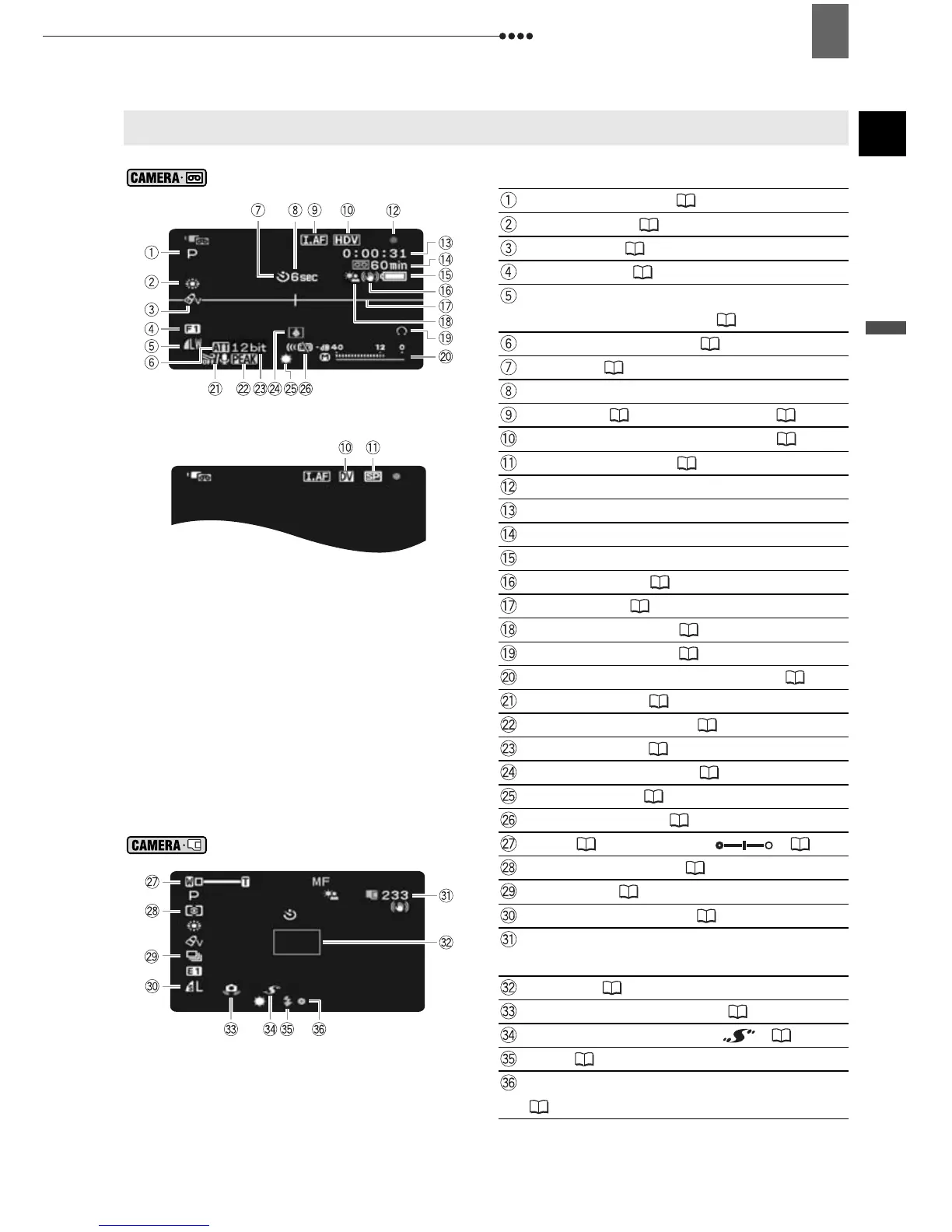
Screen Displays
Recording Movies
Recording program ( 43)
White balance ( 49)
Image effect ( 50)
Digital effects ( 61)
Still image quality/size
(simultaneous recording) ( 52)
Microphone attenuator ( 59)
Self timer ( 58)
Recording reminder
Instant AF ( 35)/Manual focus ( 47)
Recording standard (HDV or DV) ( 36)
DV recording mode ( 37)
Tape operation
Time code (hours : minutes : seconds)
Remaining tape
Remaining battery charge
Image stabilizer ( 36)
Level marker ( 41)
Backlight correction ( 47)
Headphones output ( 28)
Audio level indicator (microphone) ( 59)
Wind screen off ( 37)
Focus assist functions ( 48)
DV audio mode ( 37)
Condensation warning ( 93)
Mini video light ( 58)
Remote sensor off ( 42)
Recording Still Images
Zoom ( 26), Exposure ( 47)
Light metering mode ( 53)
Drive mode ( 54)
Still image quality/size ( 51)
Number of still images available on the
memory card
AF frame ( 53)
Camcorder shake warning ( 35)
Advanced accessory shoe ( 95)
Flash ( 57)
Autofocus (AF) and exposure (AE) locked
(25)


 To Next Page