Using the Recording Programs
44
Giving a Cinematic Look to your
Recordings
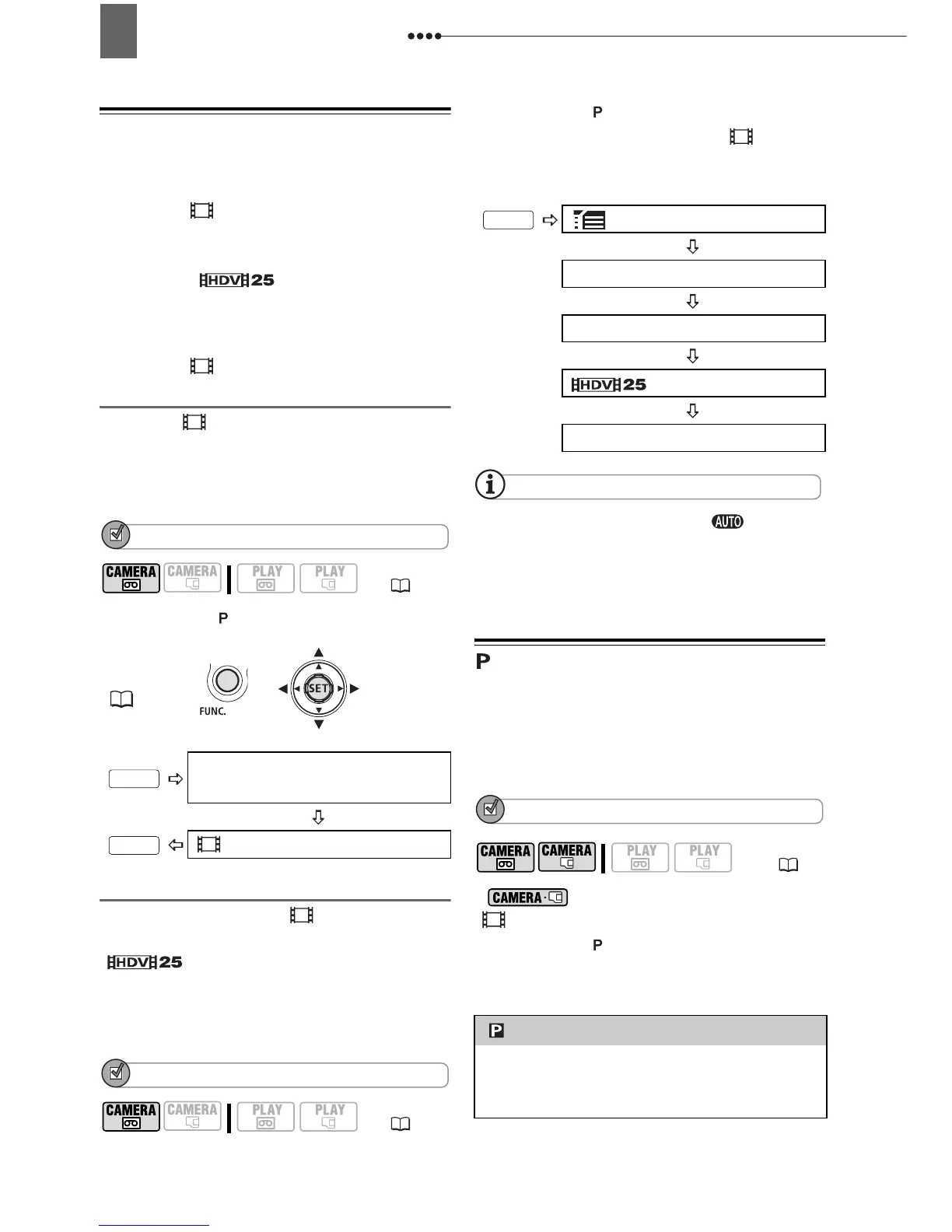
Give your recordings a cinematic look by
using the [ CINE MODE] recording
program. Combine this recording
program with the 25 fps progressive
frame rate [ HDV(PF25)] to get
the enhanced effect of the 25p Cinema
Mode.
Using the [ CINE MODE] Recording
Program
With the [ CINE MODE] recording
program, the camcorder adjusts various
image settings to give a cinematic look to
your recordings.
POINTS TO CHECK
Mode switch:
Setting the 25p Cinema Mode
You can combine the [ CINE MODE]
recording program and the
[ HDV(PF25)] frame rate to
achieve the 25p Cinema Mode, which will
enhance the cinematic look of your
recordings.
POINTS TO CHECK
Mode switch:
Set the recording program to [ CINE
MODE], as described in the previous
section.
NOTES
Do not move the mode switch to during the
actual recording of a scene; the brightness of
the picture may change abruptly.
Flexible Recording: Changing the
Aperture and Shutter Speed
Use the automatic exposure (AE)
program or give priority to the exposure
value or the shutter speed.
POINTS TO CHECK
* : Only settings other than
[CINE MODE].
Mode switch:
Options
Default value
(8)
FUNC.
(21)
Icon of the currently selected
Recording Program
CINE MODE
(8)
FUNC.
FUNC.
MENU
REC/IN SETUP
HD STANDARD
HDV(PF25)
YES
(8)
[ PROGRAM AE]
The camcorder automatically adjusts the
aperture and shutter speed to obtain the
optimal exposure for the subject.
FUNC.
*


 To Next Page