Connecting to a Computer
74
Connecting to a Computer
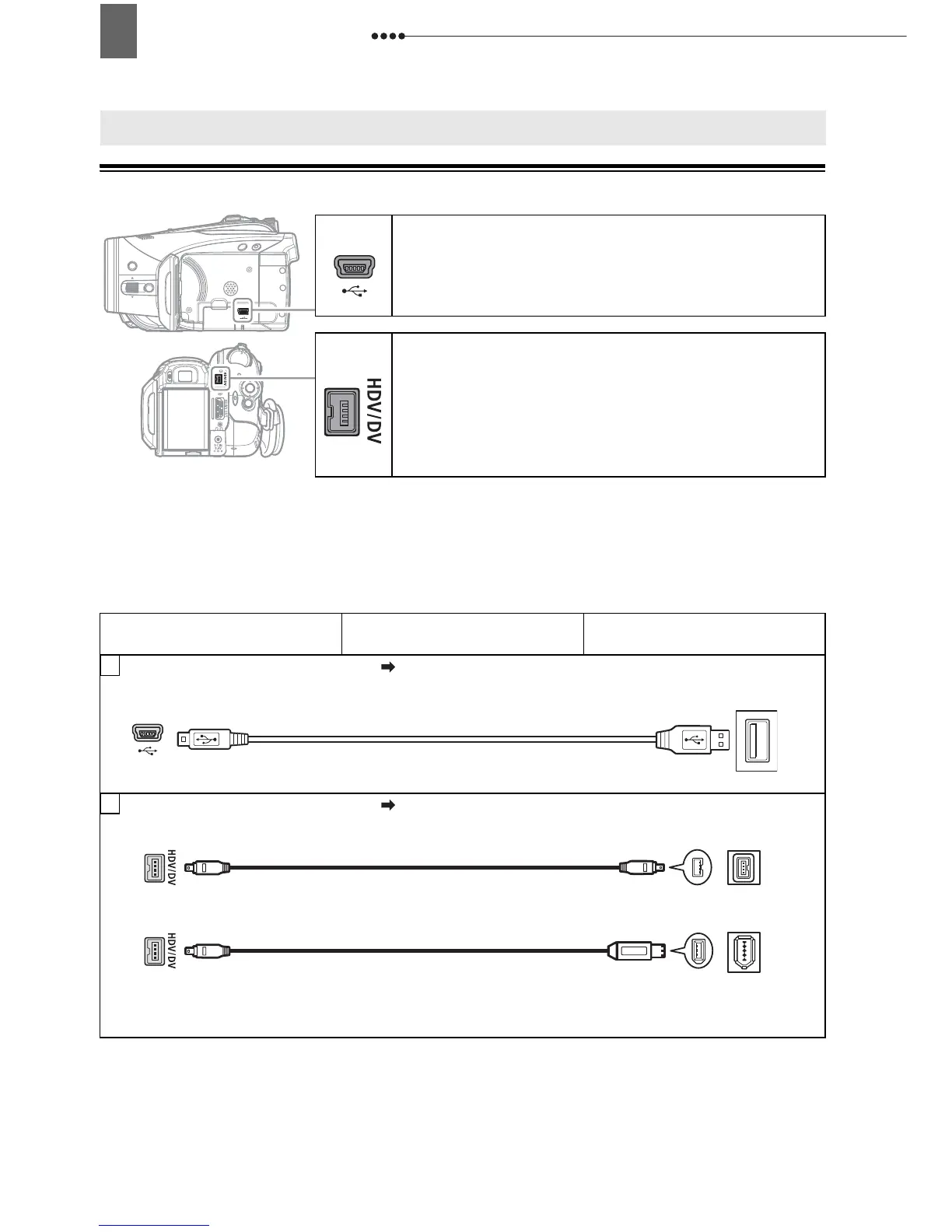
PC Connection Diagrams
Connecting to a Computer
USB Terminal
Open the LCD panel cover to access.
HDV/DV Terminal
• Check the type and orientation of the terminal
and make sure you connect the DV cable
properly.
• Use the optional CV-150F (4 pin-4 pin) or
CV-250F (4 pin-6 pin) DV cable.
Terminal on the Camcorder Connecting Cable
Terminal on the Connected
Device
1
Output connection (Signal Flow ) to a PC or PictBridge compatible printer with a
USB port.
USB Cable
(Supplied)
2
Output connection (Signal Flow ) to a computer with a DV (IEEE1394) terminal or a
DV capture board.
CV-150F/CV-250F
DV Cable (Optional)
4-pin
6-pin*
* Be careful to correctly insert the 6-pin plug into the DV terminal. Inserting it in the wrong direction
can result in damage to the camcorder.


 To Next Page