1-4
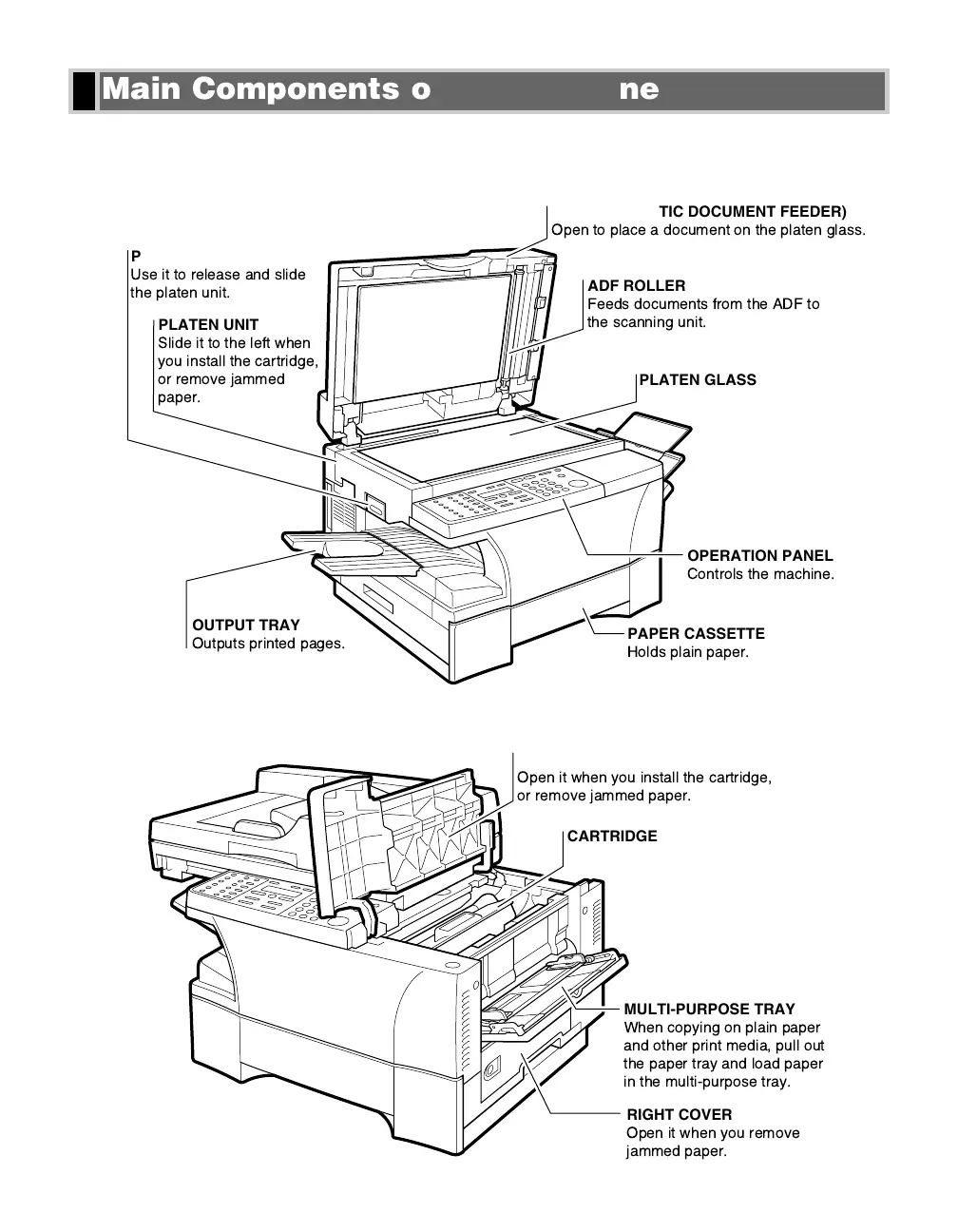
This section describes the main components of the machine.
Front View
Inside View
CARTRIDGE COVER
Open it when you install the cartridge,
or remove jammed paper.
CARTRIDGE
MULTI-PURPOSE TRAY
When copying on plain paper
and other print media, pull out
the paper tray and load paper
in the multi-purpose tray.
RIGHT COVER
Open it when you remove
jammed paper.
PAPER CASSETTE
Holds plain paper.
PLATEN UNIT LEVER
Use it to release and slide
the platen unit.
ADF (AUTOMATIC DOCUMENT FEEDER)
Open to place a document on the platen glass.
ADF ROLLER
Feeds documents from the ADF to
the scanning unit.
PLATEN GLASS
PLATEN UNIT
Slide it to the left when
you install the cartridge,
or remove jammed
paper.
OUTPUT TRAY
Outputs printed pages.
OPERATION PANEL
Controls the machine.
Main Components of the Machine
01 RG_Chap1.qxd 03.7.10 3:32 PM Page 1-4














 To Next Page