6
6-1
This section describes how to remove jammed paper from the main unit, paper cassette, ADF, and multi-purpose
tray.
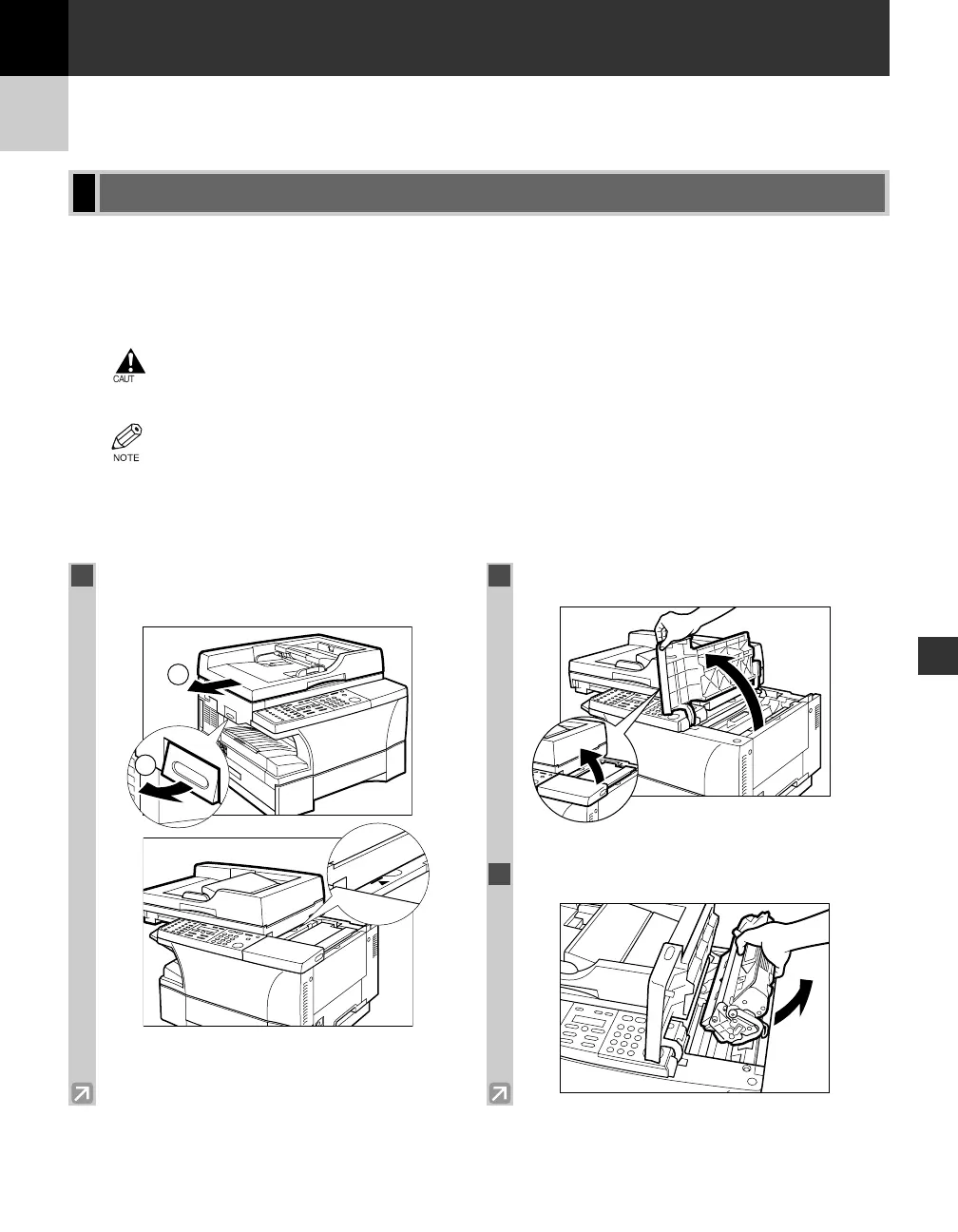
Removing Jammed Paper from Inside the Main Unit
When print media jams inside the main unit, the LCD displays REC. PAPER JAM and SLIDE PLATEN LEFT.
• There are some areas inside the machine and cartridge which are subject to high voltages and
high temperatures. Take adequate precaution when performing internal inspections, to avoid
burns or electrical shock.
• When removing copy paper which has become jammed from inside the machine, take care not to allow
the toner on the jammed copy paper to come into contact with your hands or clothing, as this will dirty
your hands or clothing. If they become dirty, wash them immediately with cold water. Washing with
warm water will set the toner and make it impossible to remove the toner stains.
Clearing Jams
Troubleshooting
Troubleshooting
Chapter 6
1
Lift the platen unit lever q and slide the
platen unit w until the
3
4 mark appears.
2
Open the cartridge cover.
3
Remove the cartridge from the machine.
2
06 RG_Chap6.qxd 03.7.10 3:26 PM Page 6-1














 To Next Page