5-7
Maintenance
5
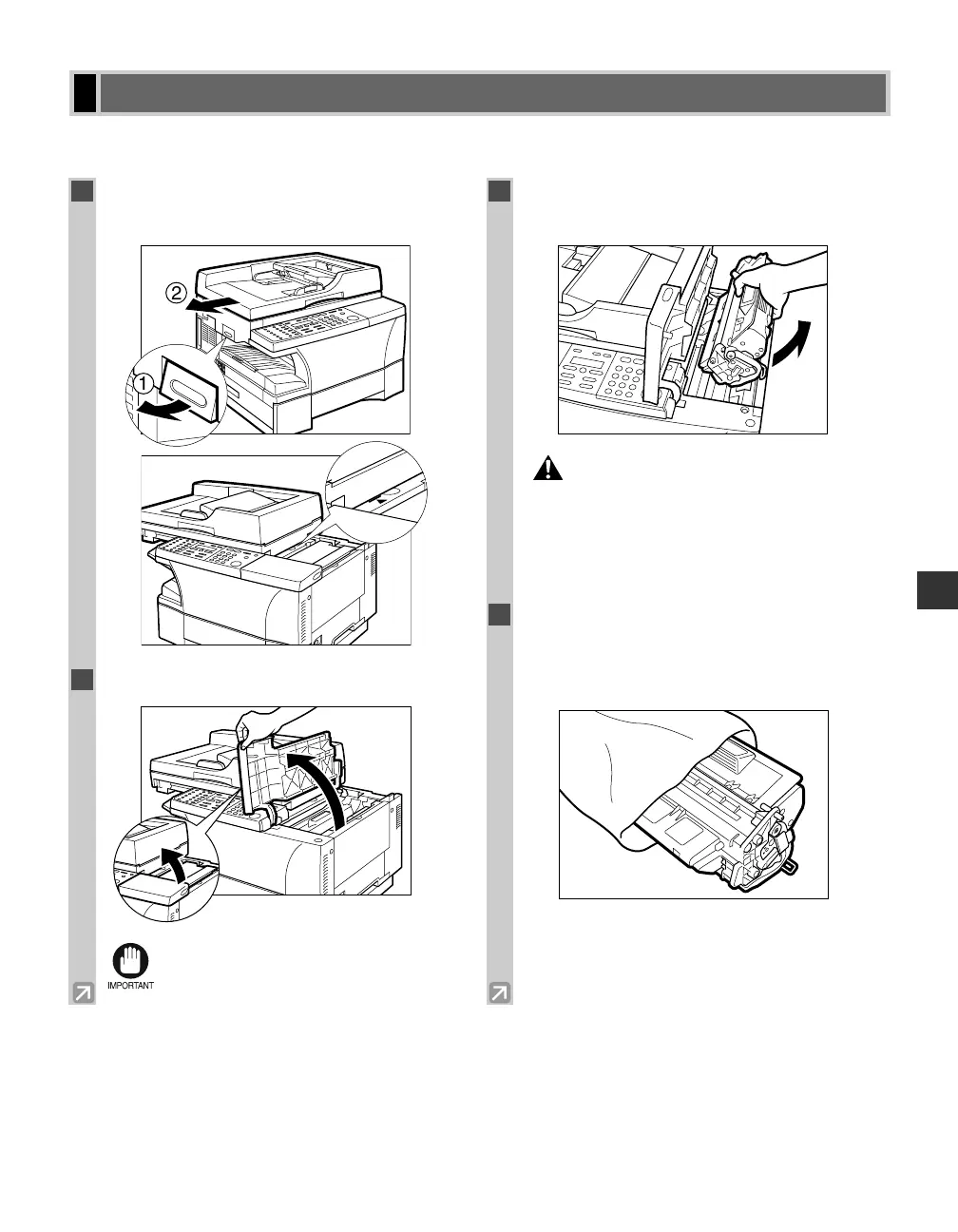
This section describes how to remove the used cartridge and replace it with a new one. Before replacing the
cartridge, be sure to read the section When to Replace the Cartridge. (→ p. 5-4)
Replacing the Cartridge
1
Lift the platen unit lever q and slide the
platen unit w until the
3
4 mark appears.
2
Open the cartridge cover.
• You cannot replace the cartridge when the
cartridge cover is partially open.
3
Grip the end of the cartridge, and remove it
from the machine.
• There are some areas inside the machine
and cartridge which are subject to high
voltages and high temperatures. Take
adequate precaution when performing
internal inspections, to avoid burns or
electrical shock.
4
Remove the new cartridge from its
protective bag. Save the protective bag.
You may need it later when you remove the
cartridge from the machine.
2
05 RG_Chap5.qxd 03.7.10 3:29 PM Page 5-7














 To Next Page