4-14
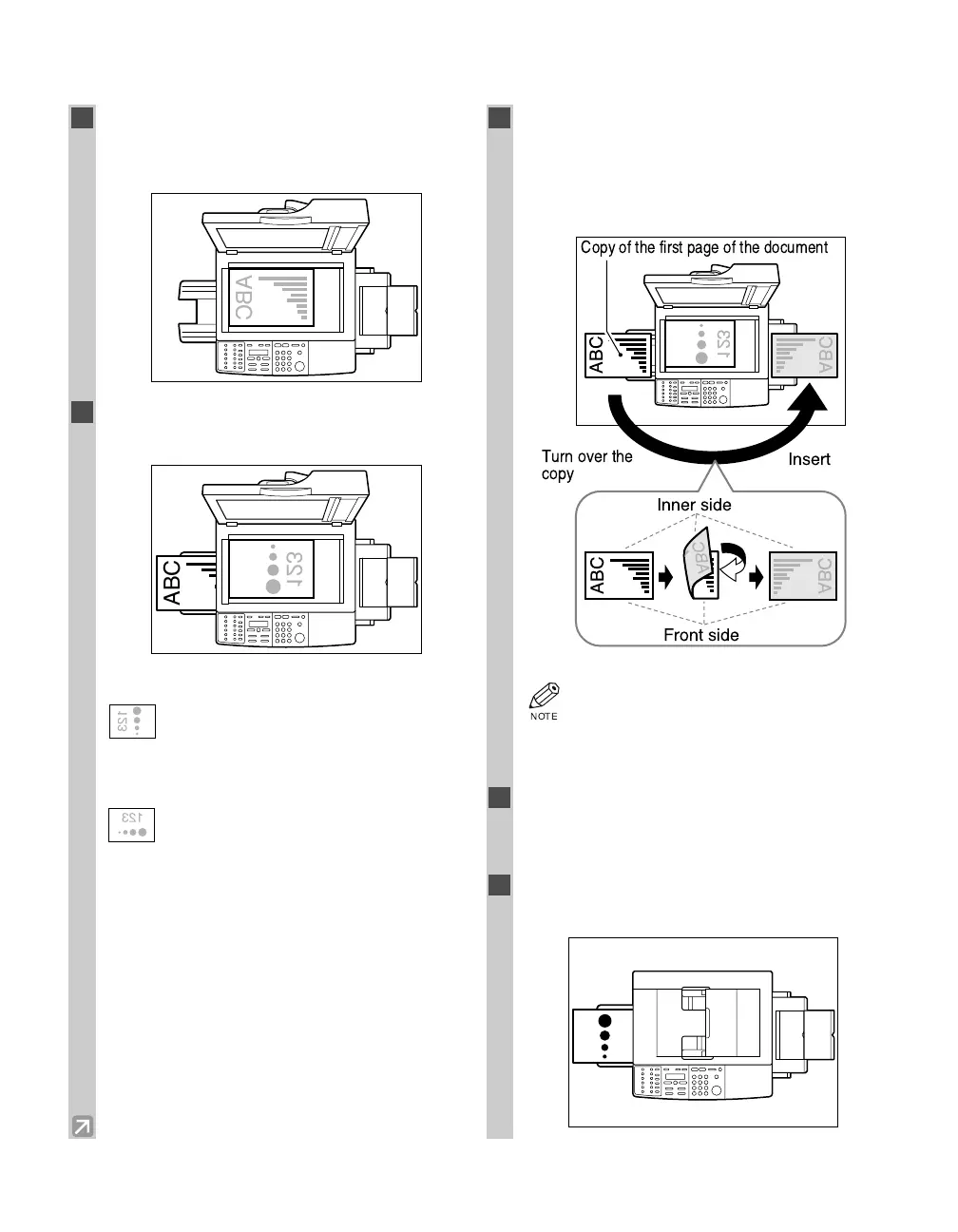
■ When Placing a Document on the Platen Glass
1
Place the first page of the document face
down on the platen glass, then press Start
to begin copying.
2
Place the next page of the document on the
platen glass.
Portrait orientation documents:
Place the page so that the top edge is
opposite to the top edge of the previous
page.
Landscape orientation documents:
Place the page so that the orientation is the
same as the previous page.
3
Turn over the copy you made in step 1 to
make sure that the inner and front side of it
will remain in the same position as shown
below, then insert it into the multi-purpose
tray.
• If the copied sheet is curled, uncurl it
before inserting it into the multi-purpose
tray. Failure to do so will cause paper
creases and paper jams.
4
Press Paper Select to select the multi-
purpose tray.
• For details, refer to p. 4-3.
5
Press Start to copy the next page to finish
making your two-sided copy.
ABC
ABC
123
Copy of the first page of the document
Insert
ABC
ABC
ABC
Inner side
Front side
Turn over the
copy
04 RG_Chap4.qxd 03.7.10 3:34 PM Page 4-14














 To Next Page