MP250 User Guide
14
Using Projector
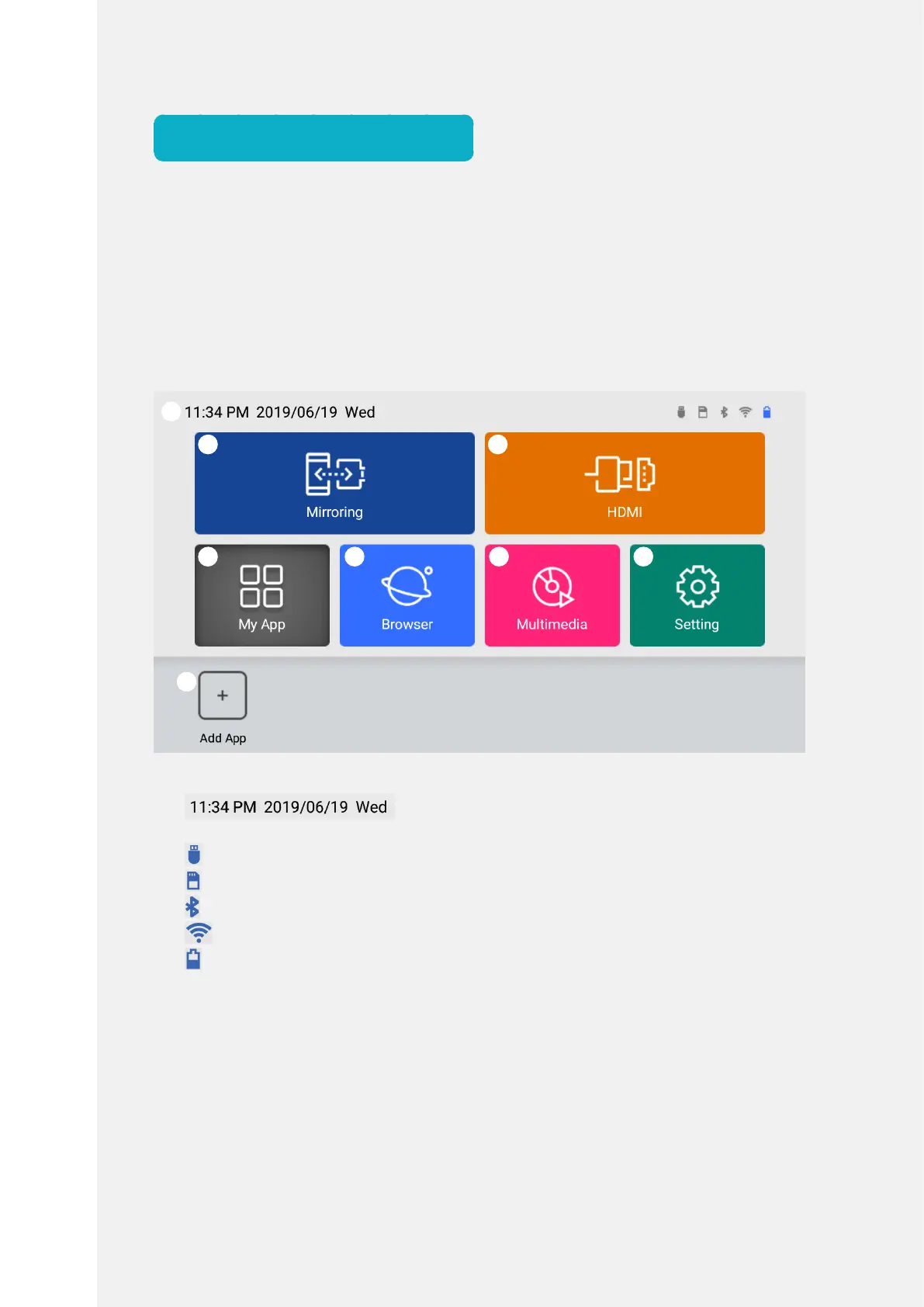
Home Screen
Homescreenisastartingscreentorunthekeyapplicationsandfeaturesofthe
product.
Tapahomescreenicontomovetothedesirepageorfeaturepane.
❶StatusBar:Displaysstatusicon,dateortimeofthedevice.
:Displayscurrenttime,year/month/day,andday
ofweek
:DisplaystheconnectionstatusofUSBstoragedevice.
:DisplaystheMicroSDcardmountingstatus.
:DisplaystheconnectionstatusofBluetooth.
:DisplaystheconnectionstatusofWi-Fi.
:Displaysthebatterypowerlevel.
❷Mirroring:Youcansharethemobiledevicescreenwirelessly.
❸HDMI:StartstheHDMIconnection.
❹MyApp:Youcanviewalistofvarioustypesofinstalledapplications.
❺Browser:Startsthebrowserforinternetconnection.
❻Multimedia:Startsvideo,musicoralbumapplications.
❼Settings:Youcancheckandchangethedevicesettings.
❽Add:Press[Add]toaddshortcutsoftheapplicationsinMyApp.(Upto6)
❶
❷
❹ ❺ ❻ ❼
❽
❸



 To Next Page