MP250 User Guide
9
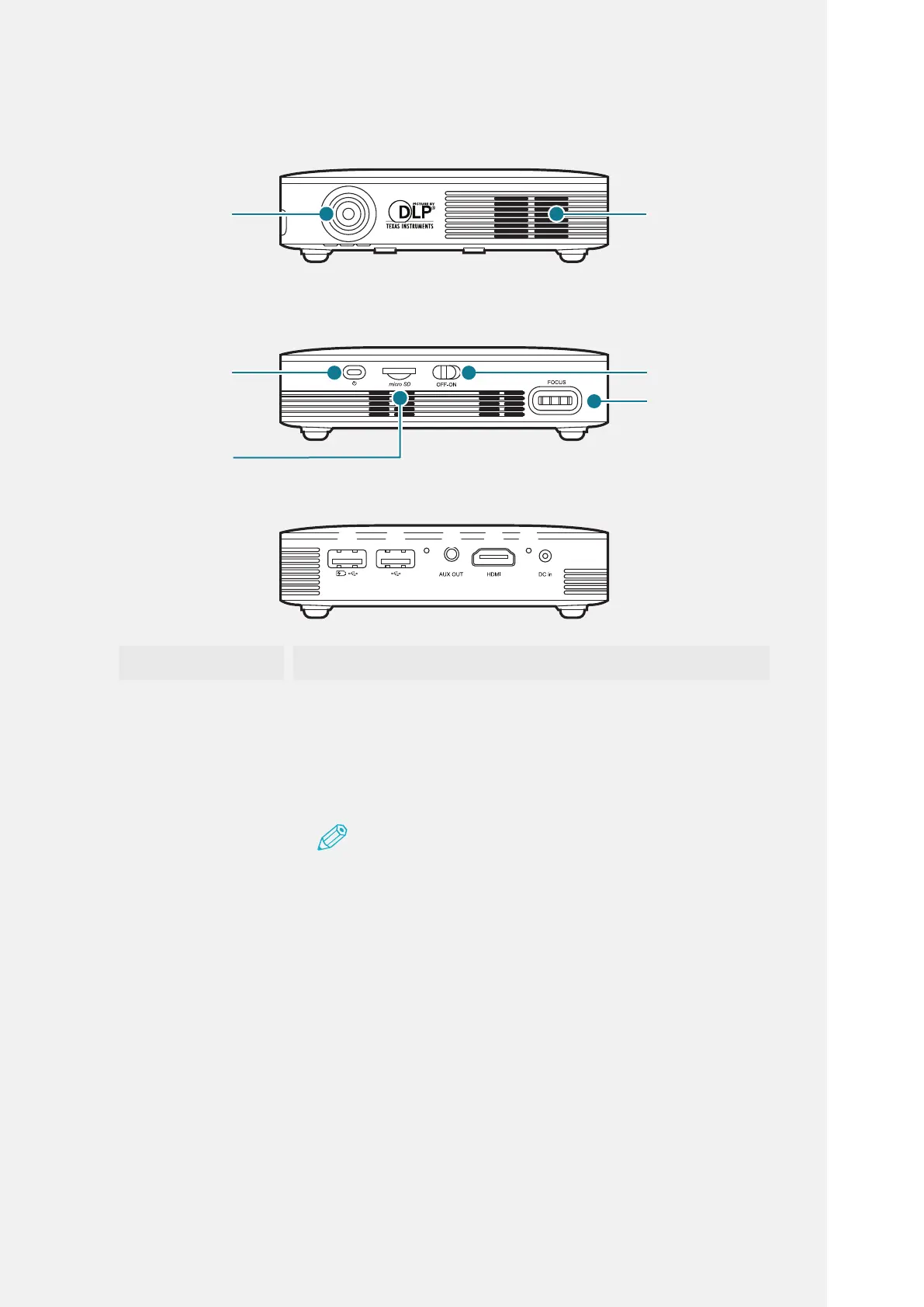
Name Description of Functions
❶
USBPort FunctionsasexternalUSBchargerorUSB2.0.
❷
USBPort FunctionsasUSB2.0.
❸
ServiceKey*1 ThekeytoinstructsoftwareupdatedirectlyfromthePC
duringtheserviceoperation.
Note
*1: Do not press the service key directly using a sharp object
such as needle. This may cause failure.
❹
AudioPort Outputaudiotoanexternalspeaker,etc.
❺
HDMIPort Screenofthesmartdeviceisprojectedfromtheprojector
viaHDMIcable.
❻
ChargeLamp Checkthechargingstatuswiththecoloroflamp.
(Red:charging,Green:chargingiscomplete)
❼
PowerInput
Terminal
TheterminaltoinputDC12V3ApowersupplyusingDC
jack.
❶ ❷
❸
❹
❺
❻
❼
Projection
Lens
Ventilator
ProjectorPower
Button
FocusAdjustment
Ring
BatterySwitch
MicroSD
Socket



 To Next Page