Paper Is Jammed inside the Machine
If the jammed paper tears and you cannot remove the paper either from the paper output slot or the
jammed paper remains inside the machine, remove the paper following the procedure below.
Important
The power cannot be turned off while the machine is sending or receiving a fax, or when the received
fax or the unsent fax are stored in the machine's memory.
Make sure if the machine completed sending or receiving all the faxes before disconnecting the power
cord.
If you unplug the power cord, all the faxes stored in the machine's memory are deleted.
Note
If you need to turn off the machine to remove jammed paper during printing, press the Stop button to
cancel print jobs before turning off the machine.
1.
Turn off the machine, and unplug the power cord of the machine from the power
supply.
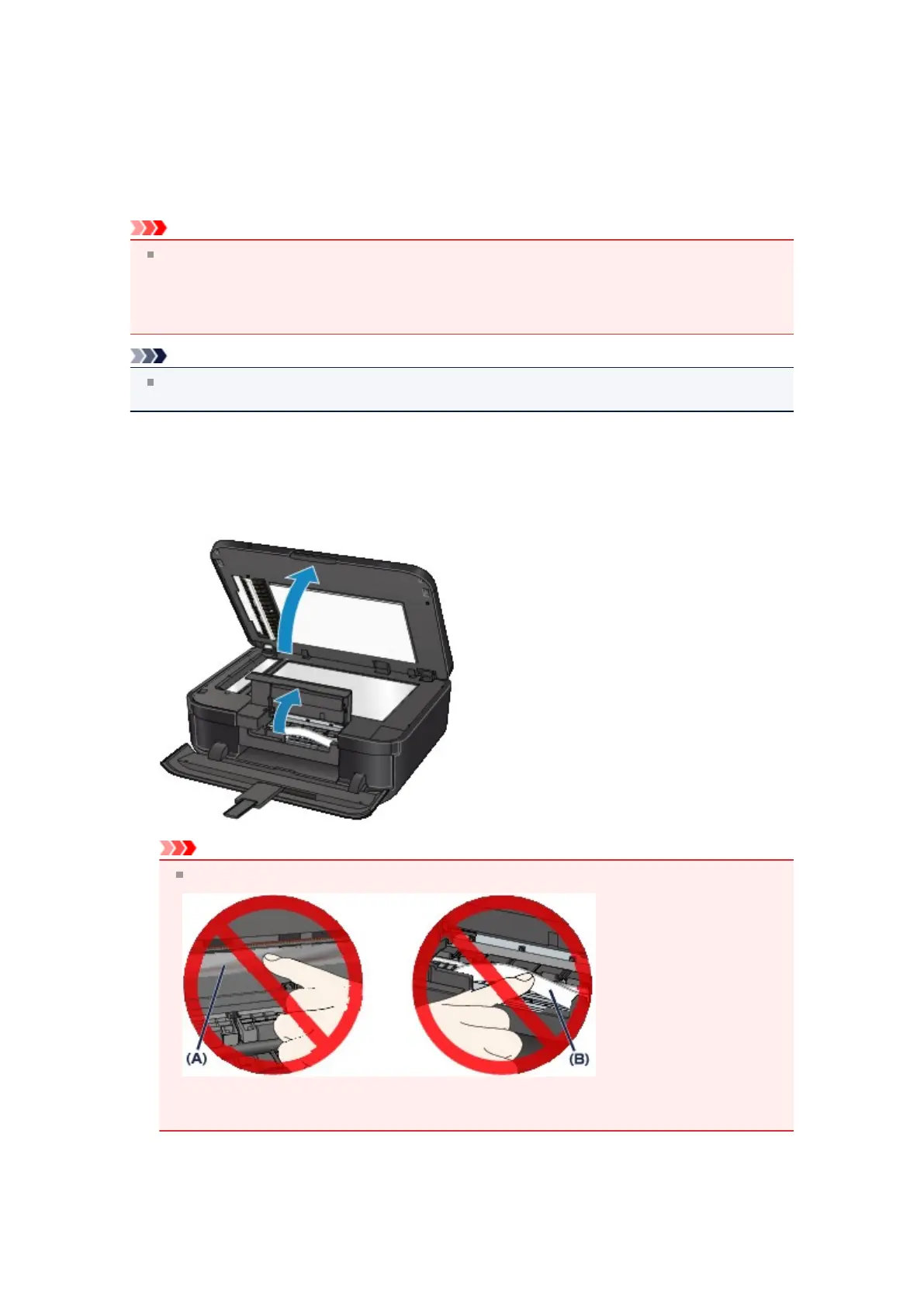
2. Open the document cover and the ink cover.
Important
Do not touch the clear film (A) or the white belt (B).
If the paper or your hands touch these parts and blot or scratch them, the machine can be
damaged.
3.
Make sure that the jammed paper is not under the print head holder.
If the jammed paper is under the print head holder, move the print head holder to the right edge or the
left edge whichever is easier to remove the paper.













 To Next Page