8
1
2
3
ABC D
Action
Reference Information
Repeat
and
to enter more characters.
Enter characters using the Numeric buttons.
Press the
button of the Numeric buttons to switch to the character entry mode you
want to use.
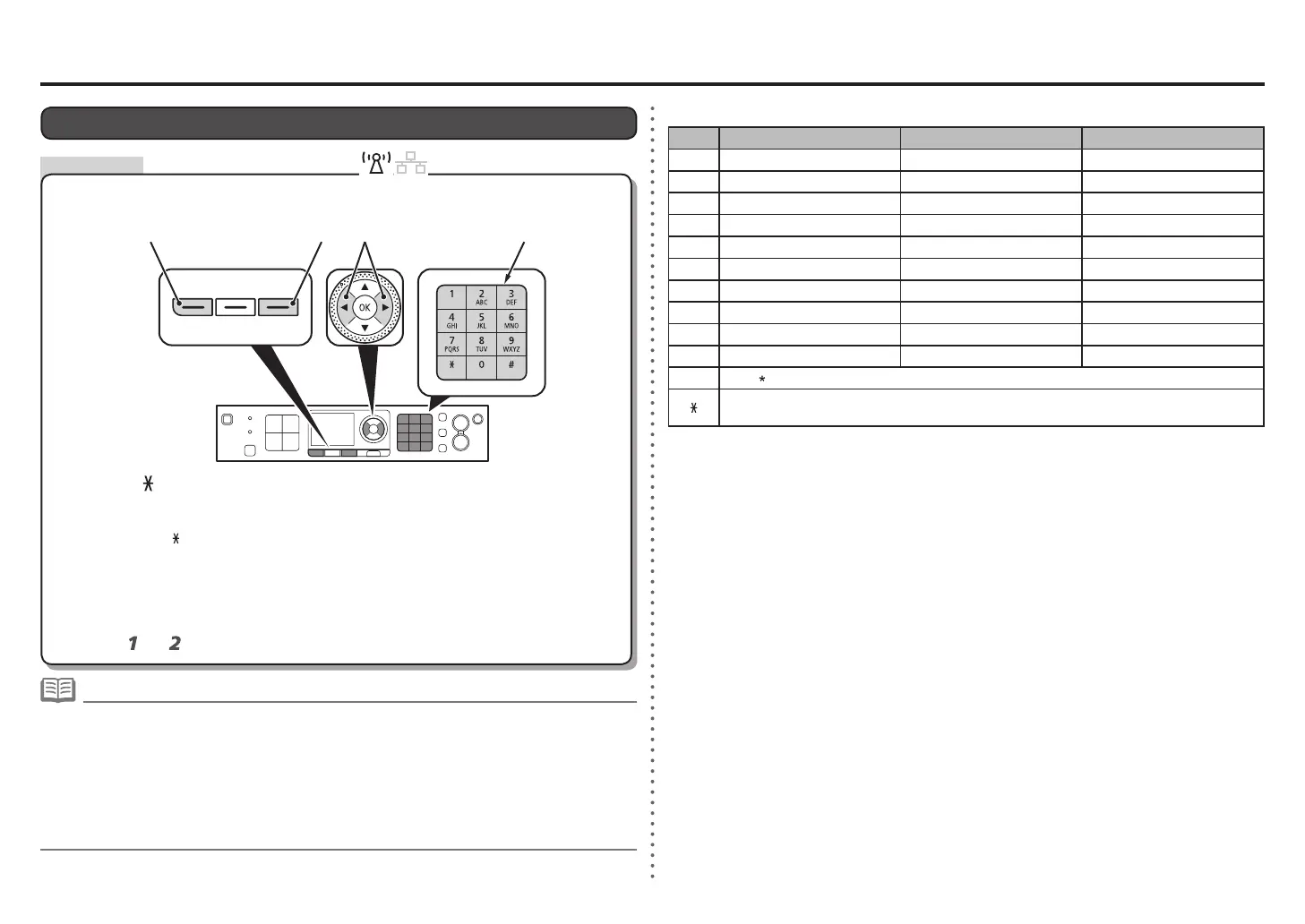
This machine allows you to enter characters using the Numeric buttons (A).
Follow the procedure below.
Character Entry
Three character entry modes (numeric, upper case and lower case) are available. Each time
you press the
button, the entry mode displayed on the upper right of the screen changes
between numeric 123, upper case ABC and lower case abc.
•
Multiple characters are assigned to each key. Press a key to toggle character options for that
key. For details on assigned characters, refer to "Key Assignments" on the right.
•
<Key Assignments>
Button Numeric mode 123 Upper case mode ABC Lower case mode abc
1 1
2 2 ABC abc
3 3 DEF def
4 4 GHI ghi
5 5 JKL jkl
6 6 MNO mno
7 7 PQRS pqrs
8 8 TUV tuv
9 9 WXYZ wxyz
0 0
# - . SP
# ! ″ , ; : ^ ` _ = / | ´ ? $ @ % & + ( ) [ ] { } < > \
~
Each time you press this button, the entry mode changes between numeric mode 123, upper
case mode ABC and lower case mode abc.
To delete a character, move the cursor to the target character using the [ or ] button, then press the
right FUNCTION button (D).
•
To insert a space, move the cursor to the target position using the [ or ] button (B), then press the left
FUNCTION button (C).
•
To insert characters, move the cursor to the character on the right of the target position using the [ or ]
button, then enter characters.
•
To enter characters assigned to the same key successively (e.g., enter "N" then "O"), press the ] button
(B) to move the cursor by one character to the right rst.
•
SP: Indicates a single space.









 To Next Page