5
AA
Check
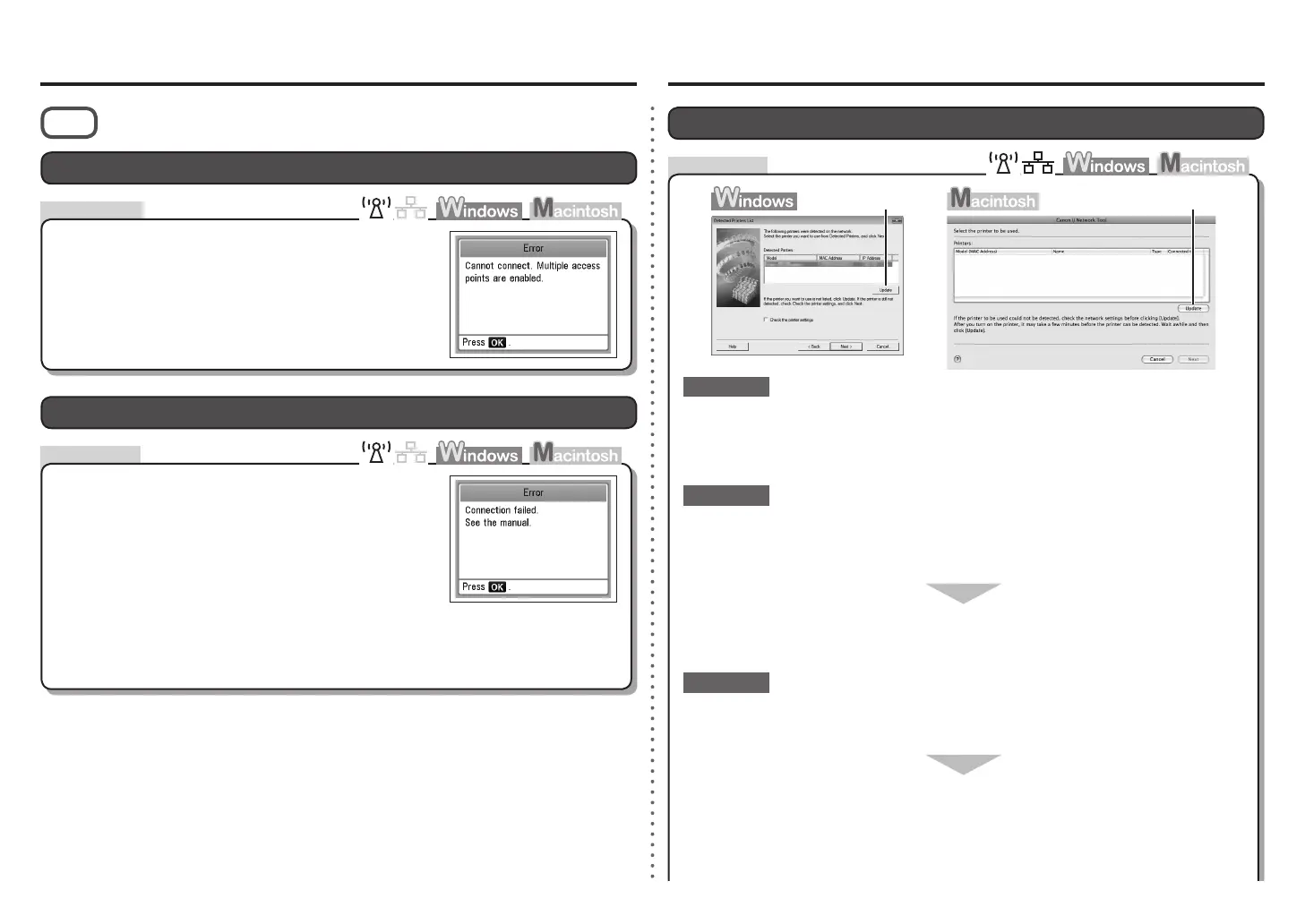
The Machine is Not Displayed (Detected)
Is the machine connected to a network?
To conrm the connection status, press the Setup button, then using the { } [ ] and OK
buttons, select Device settings > LAN settings > Conrm LAN settings > WLAN setting list or
LAN setting list. Make sure that Connection is set to Active.
•
For a wireless connection, make sure that you follow Check 1, 2, 3, 4, 5 and 6 of
"Connection Checklist" on page 12, then click Update (A).
Check 2
Check 1
If the machine is not connected to a network, perform setup again by following the
procedures in "Wireless Setup" and onward or "Wired Setup" and onward in the printed
manual: Getting Started.
Check 3
Problems during Software Installation
Is the IP ltering feature enabled on the network device (router, access point, etc.)?
Set the network device to accept the IP address of the machine.
For details on how to check settings of the network device, refer to the manual supplied with the
network device or contact its manufacturer.
•
For details on how to change settings of the network device, refer to the manual supplied with the
network device or contact its manufacturer.
•
To check the IP address of the machine, press the Setup button, then using the { } [ ] and
OK buttons, select Device settings > LAN settings > Conrm LAN settings > WLAN setting
list or LAN setting list, then check IP address.
•
For a wired connection, make sure that you follow Check 1, 2, 3, 7 and 8 of "Connection
Checklist" on page 12, then click Update (A).
WPS
Action
Check
Cannot connect. Multiple access points are enabled. is Displayed
The message appears when multiple access points are
detected.
Check the access point settings, then congure WPS
settings again.
For details on how to check the settings of the access point,
refer to the manual supplied with the access point or contact its
manufacturer.
•
The message appears when an error occurs.
Connection failed. is Displayed
Wait for a while, then congure the settings again.
For the procedure to congure WPS settings of the machine,
refer to "Wireless Setup Using WPS (Wi-Fi Protected Setup)" in
the printed manual: Getting Started.
•
When using an access point that does not support WPS, congure settings manually. For the
procedure to congure settings of the machine manually, refer to "Wireless Setup" in the printed
manual: Getting Started.
•









 To Next Page