2-1
2
Registering Information
Chapter 2
Registering Information
Methods of Registering Information in the Machine
To customise the machine to your particular needs, you can adjust the general operation, sending, receiving, printing, system
settings, and speed dialling settings.
You can adjust settings directly via the operation panel of the machine. Detailed instructions are described in this guide.
Guidelines for Entering Numbers, Letters, and Symbols
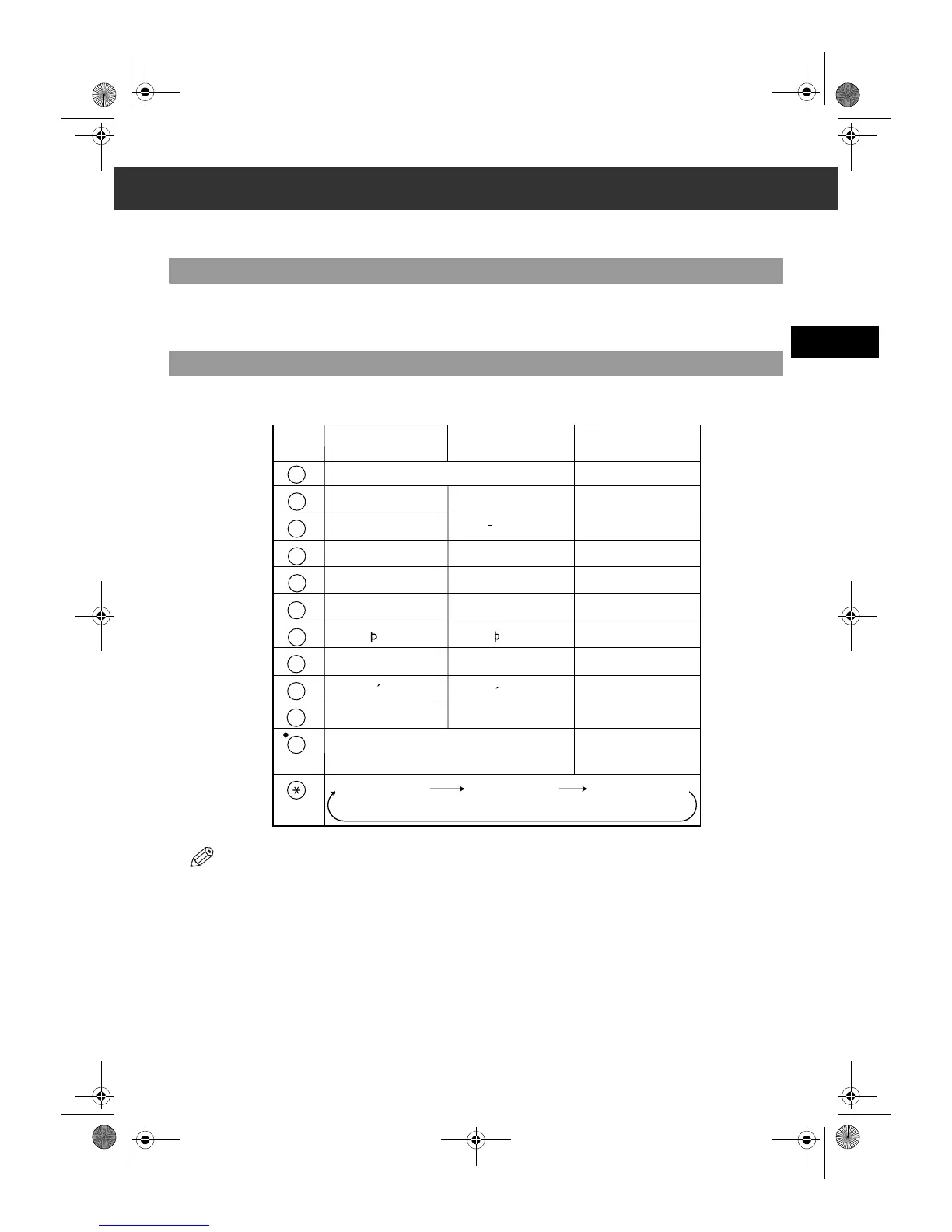
When you come to a step that requires you to enter a name or number, refer to the table below to determine which numeric key
to press for the character you want:
• If you do not press any key for more than 2 minutes, when you enter data, the machine will automatically return to standby mode with
the auto clear function.
• AUTO CLEAR can be set within a range of 1 to 9 minutes at one minute intervals. You can also disable the auto clear function, →
Reference Guide.
0
ABCÅÄÁÀÃÂÆÇ abcåäáàãâæç 2
WXYZY wxyzy 9
TUVÜÚÙÛ tuvüúùû 8
PQRS pqrs 7
MNOÑØÖÓÒÕÔ mnoñøöóòõô 6
JKL jkl 5
GHIÏÍÌÎ ghiïíìî 4
DEF-DËÉÈÊ defdëéèê 3
1
1
PQRS
7
TUV
8
WXYZ
9
GHI
4
JKL
5
MNO
6
ABC
2
DEF
3
0
–.A#!",;:^`_=⁄|’?$@%&+
()[]{}<>
#
Key Uppercase Letter
Mode (:A)
Lowercase Letter
Mode (:a)
Number Mode
(:1)
Uppercase Letter
Mode (:A)
Lowercase Letter
Mode (:a)
Number Mode (:1)
SB_PC1270D_FG_EN.book Page 1 Monday, February 18, 2002 12:20 PM



 To Next Page