EasyManua.ls Logo

Canon VM-E70 - ADVANCED OPERATIONS; Special Techniques: Focusing; Manual Focusing Procedure

Canon VM-E70
52 pages
Print Icon
To Next Page IconTo Next Page
To Previous Page IconTo Previous Page
Loading...
ADVANCED
OPERATIONS
SPECIAL
TECHNIQUES
VM-E70
is
specially
designed
for
ease
of
use
and
operation.
The
program
mode
lets
you
shoot
in
most
recording
situations
by
simply
pressing
the
start
button.
There
are.
however,
certain
occasions
when
you
II
want
to
make
use
of
special
features
and
operations
of
the
VM-E70
to
add
more
control
and
creativity
to
recording
scenes.
FOCUSING
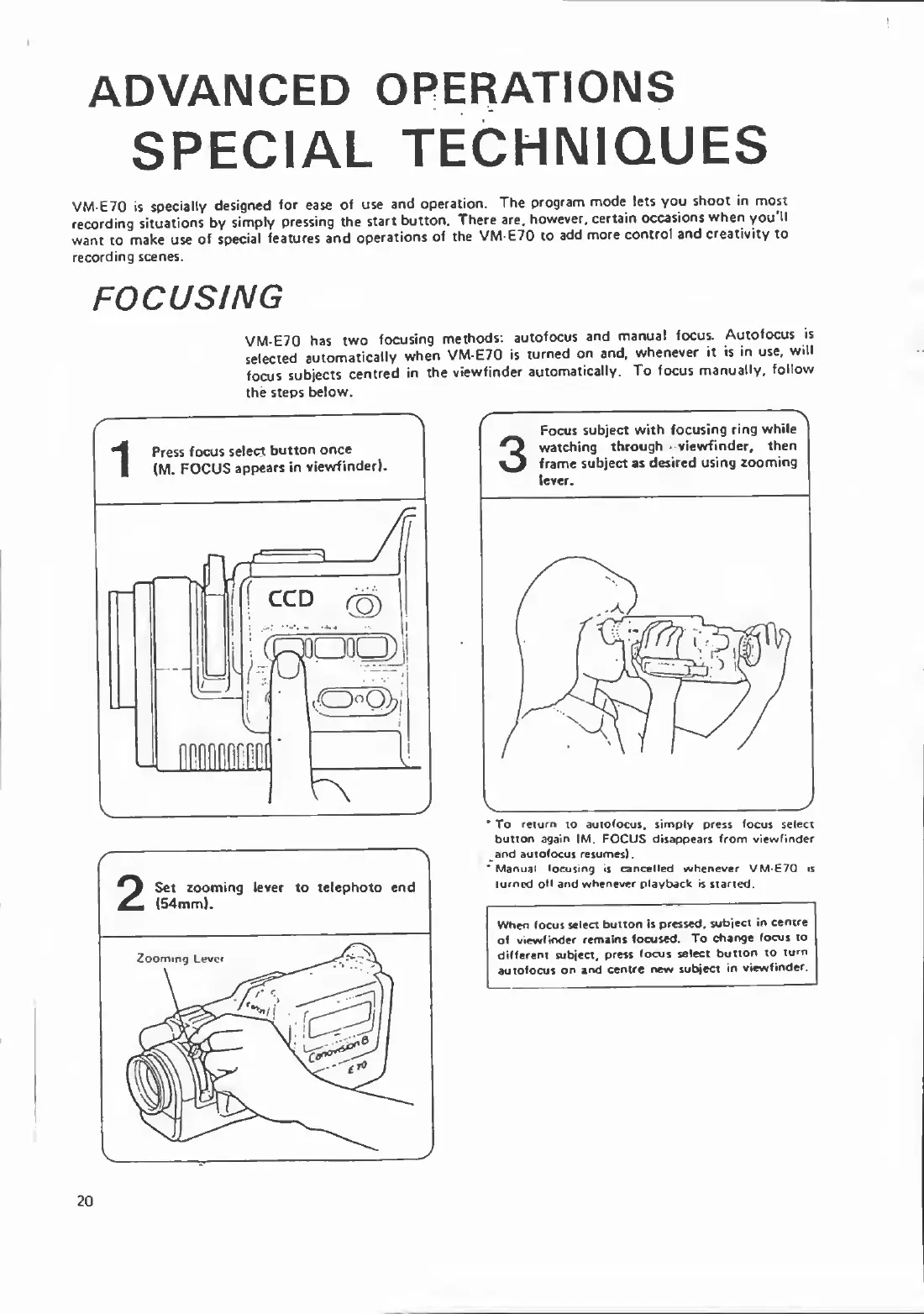
VM-E70
has
two
focusing
methods:
autofocus
and
manual
focus.
Autofocus
is
selected
automatically
when
VM-E70
is
turned
on
and.
whenever
it
is
in
use,
will
focus
subjects
centred
in
the
viewfinder
automatically.
To
focus
manually,
follow
the
steps
below.
To
return
xo
autofocus,
simply
press
focus
select
button
again
(M.
FOCUS
disappears
from
viewfinder
and
autofocus
resumes).
Manual
focusing
is
cancelled
whenever
V/M-E70
is
turned
o*f
and
whenever
playback
is
started.
When
focus
select
button
is
pressed,
subject
in
centre
of
viewfinder
remains
focused.
To
change
focus
to
different
subject,
press
focus
select
button
to
turn
autofocus
on
and
centre
new
subject
in
viewfinder.
20

Related product manuals