EasyManua.ls Logo

Canon VM-E70 - SELECTING THE VIDEO CHANNEL; TV Connection with Audio;Video Inputs

Canon VM-E70
52 pages
Print Icon
To Next Page IconTo Next Page
To Previous Page IconTo Previous Page
Loading...
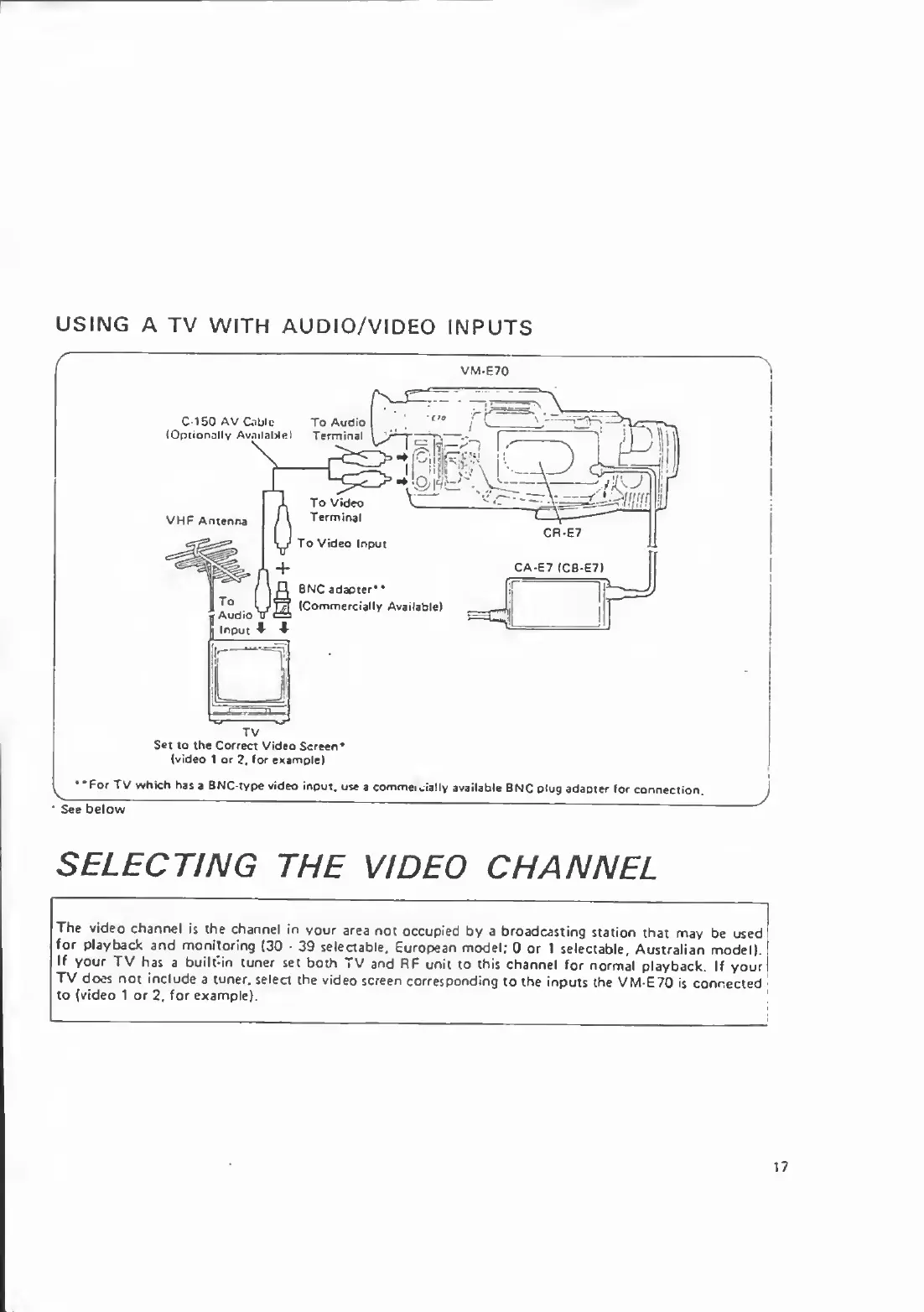
USING
A
TV
WITH
AUDIO/VIDEO
INPUTS
VM-E70
Set
to
the
Correct
Video
Screen*
(video
1
or
2,
for
example}
••For
TV
which
has
a
BNC-type
video
input,
use
a
comme.
Jally
available
BNC
plug
adapter
for
connection.
See
below
J
SELECTING
THE
VIDEO
CHANNEL
The
video
channel
is
the
channel
in
your
area
not
occupied
by
a
broadcasting
station
that
may
be
used
for
playback
and
monitoring
(30
39
selectable.
European
model;
0
or
1
selectable,
Australian
model).
If
your
TV
has
a
built-in
tuner
set
both
TV
and
RF
unit
to
this
channel
for
normal
playback.
If
your
TV
does
not
include
a
tuner,
select
the
video
screen
corresponding
to
the
inputs
the
VM-E70
is
connected
to
(video
1
or
2,
for
example).
\
17

Related product manuals