EasyManua.ls Logo

Canon VM-E70 - PLAYBACK; Connection Procedure (No A;V Inputs); Antenna Selector Setting

Canon VM-E70
52 pages
Print Icon
To Next Page IconTo Next Page
To Previous Page IconTo Previous Page
Loading...
PLAYBACK
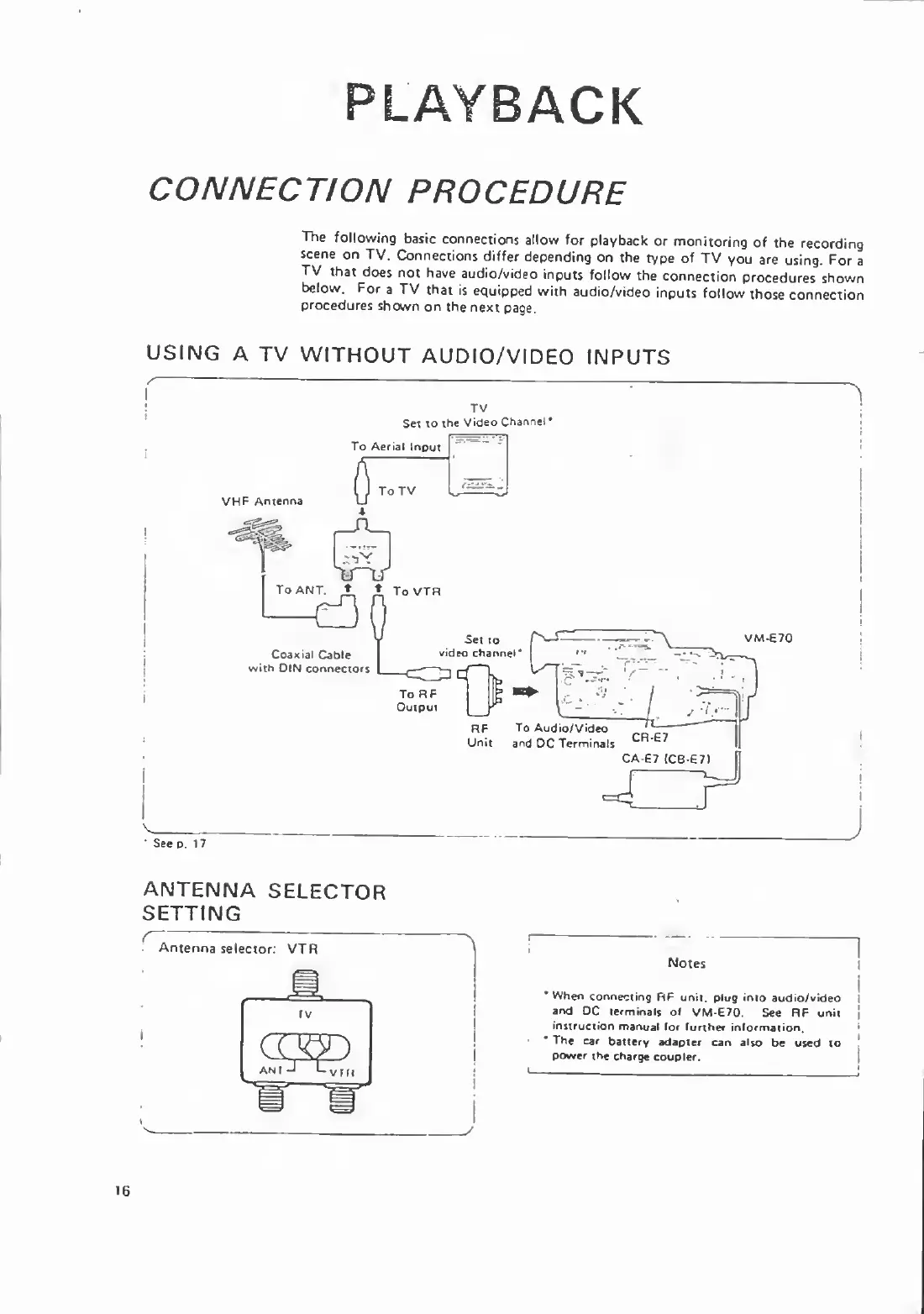
CONNECTION
PROCEDURE
The
following
basic
connections
allow
for
playback
or
monitoring
of
the
recording
scene
on
TV.
Connections
differ
depending
on
the
type
of
TV
you
are
using.
For
a
TV
that
does
not
have
audio/video
inputs
follow
the
connection
procedures
shown
below.
For
a
TV
that
is
equipped
with
audio/video
inputs
follow
those
connection
procedures
shown
on
the
next
page.
USING
A
TV
WITHOUT
AUDIO/VIDEO
INPUTS
TV
Set
to
the
Video
Channel*
A
ANTENNA
SELECTOR
SETTING
Notes
*
When
connecting
ft
F
unit,
plug
into
audio/video
and
DC
terminals
of
VM-E70.
See
RF
unit
instruction
manual
lor
further
information.
The
car
battery
adapter
can
also
be
used
to
power
the
charge
coupler

Related product manuals