11
Space Thermistor – Wall Mount (optional)
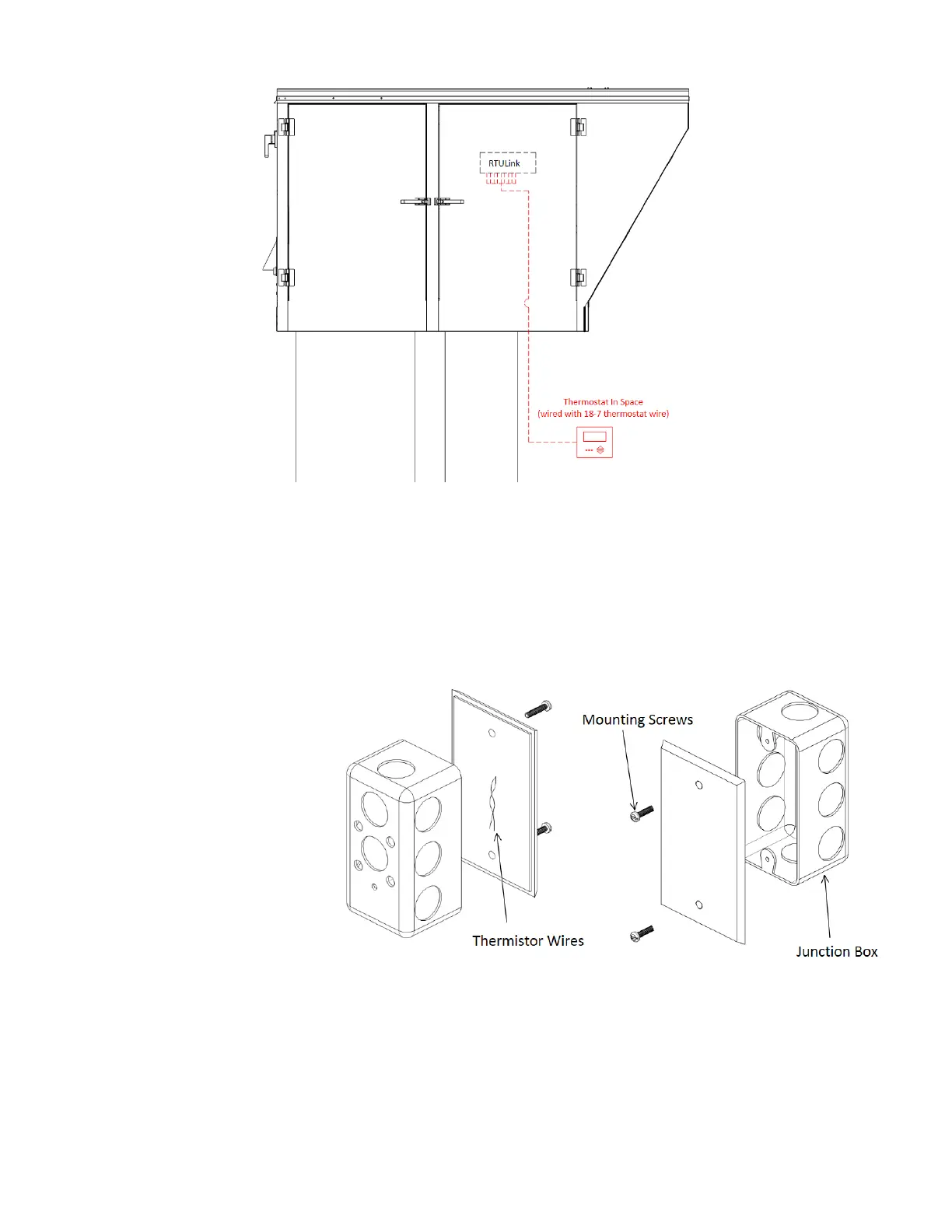
If a space temperature sensor/thermistor is called for in the specifications, follow the instructions in this section.
Note: This is not to be confused with the traditional space stat that is used for commercial kitchen ventilation
electrical packages.
A space thermistor will need to be
installed in the zone being supplied
by the RTU. Install a junction box in
an area that will provide accurate
temperature readings. Avoid areas
near windows that are exposed to
sunlight, areas near diffusers, areas
near appliances, areas more than 6
ft. above the floor, etc. Route the
thermistor wire to the RTULink and
connect it to the + and C terminals
(thermistor input is not polarity
sensitive) on the “RTU” side of the
RTULink labeled “SPACE TEMP
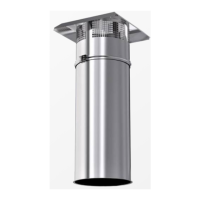
10kΩ”. Use the mounting screws
provided with the sensor to secure
the sensor to the junction box.
Figure 8 shows an installation detail
for a stainless steel space thermistor
(PN: A/CP-SP). Figure 9 shows an
installation detail for a space
thermistor with a plastic housing (PN:
A/CP-R2). Figure 10 shows the space sensor terminals and wiring detail.


 To Next Page