14
Optional Sensors
Temperature and Humidity Sensor – Wall Mount
If a humidity or temperature/humidity sensor is called for in the specifications, follow the instructions in this
section.
A temperature and humidity sensor will need to
be installed in the desired location. It is important
to install the space humidity sensor in a single
gang junction box in an area that will provide
accurate temperature and humidity readings.
Avoid areas near windows that are exposed to
sunlight, areas near diffusers, areas near
appliances, areas more than 6 ft. above the floor,
etc. Any holes in the junction box should be
completely sealed with caulk to prevent humid air
from coming in contact with the sensors circuit
board.
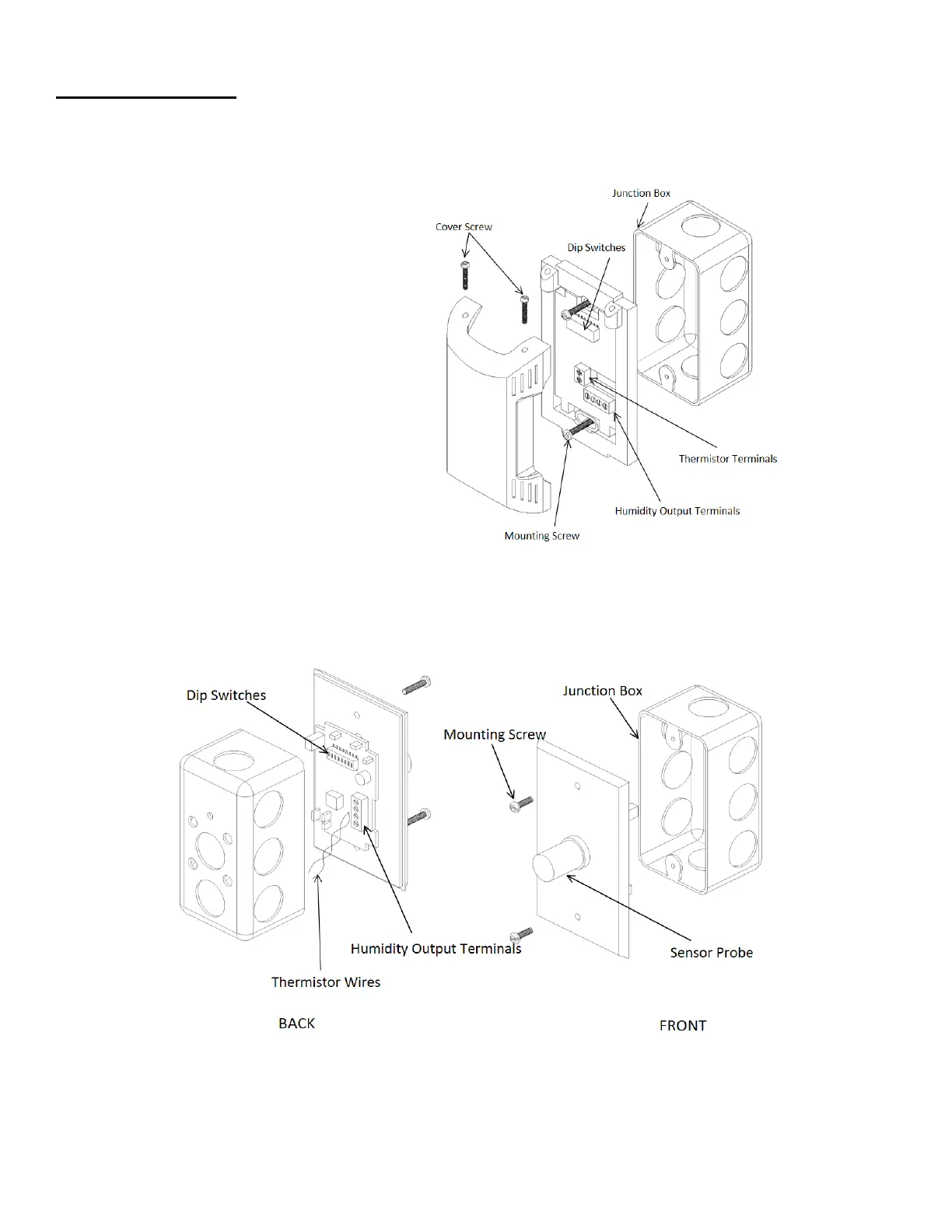
Figure 12 shows an install detail for a wall-
mounted temperature and humidity sensor with a
plastic housing (PN: A/RH3-CP-R2). Figure 13
shows an install detail for a wall-mounted
temperature and humidity sensor with stainless
steel housing (PN: A/RH3-CP-SP). Figure 14
shows a wiring schematic of a space temperature
and humidity sensor that is installed in the space
and connected to the “RTU” Input 1 on the
RTULink. Standard 18-5 thermostat wire should
be used for sensor wiring.


 To Next Page