8 EN
3. Operations
3-1 Turning the device on/o
The device will automatically turn on when you start your car’s engine, and
automatically turn o when you shut o your car.
To manually turn your Dash Cam on/o, press and hold the Power button for 2
seconds.
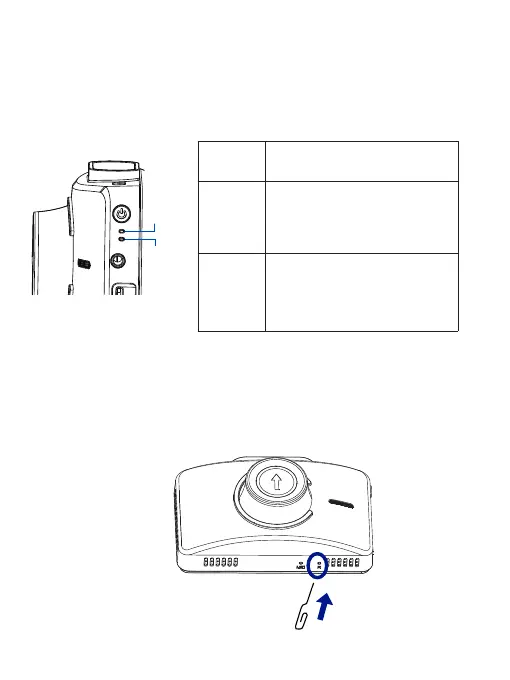
LED
Indicator
LED Indicator on the device
Description
Restarting the Dash Cam
Occasionally, you may need to perform a hardware reset if the Dash Cam stops
responding or if it appears to be “frozen” or unresponsive. To restart the Dash
Cam, press and hold the Power button until the system powers o. Press the Power
button again to turn the Dash Cam on.
If the system does not shut down from holding the Power button, you can do a
forced reboot by inserting a paper clip into the “RESET” button hole on the device.
REC
indicator
Charging
indicator
REC
indicator
Charging
indicator
When the device is charging, the
charging indicator glows blue.
When fully charged, the charging
indicator will turn o.
When you turn on the device, the
REC indicator glows blue. While
recording, the REC indicator will
glow blue to indicate that record-
ing is in progress.



 To Next Page