12
4. OPERATION OF CONTROL PANEL
25
35
45
55
15
21
27
34
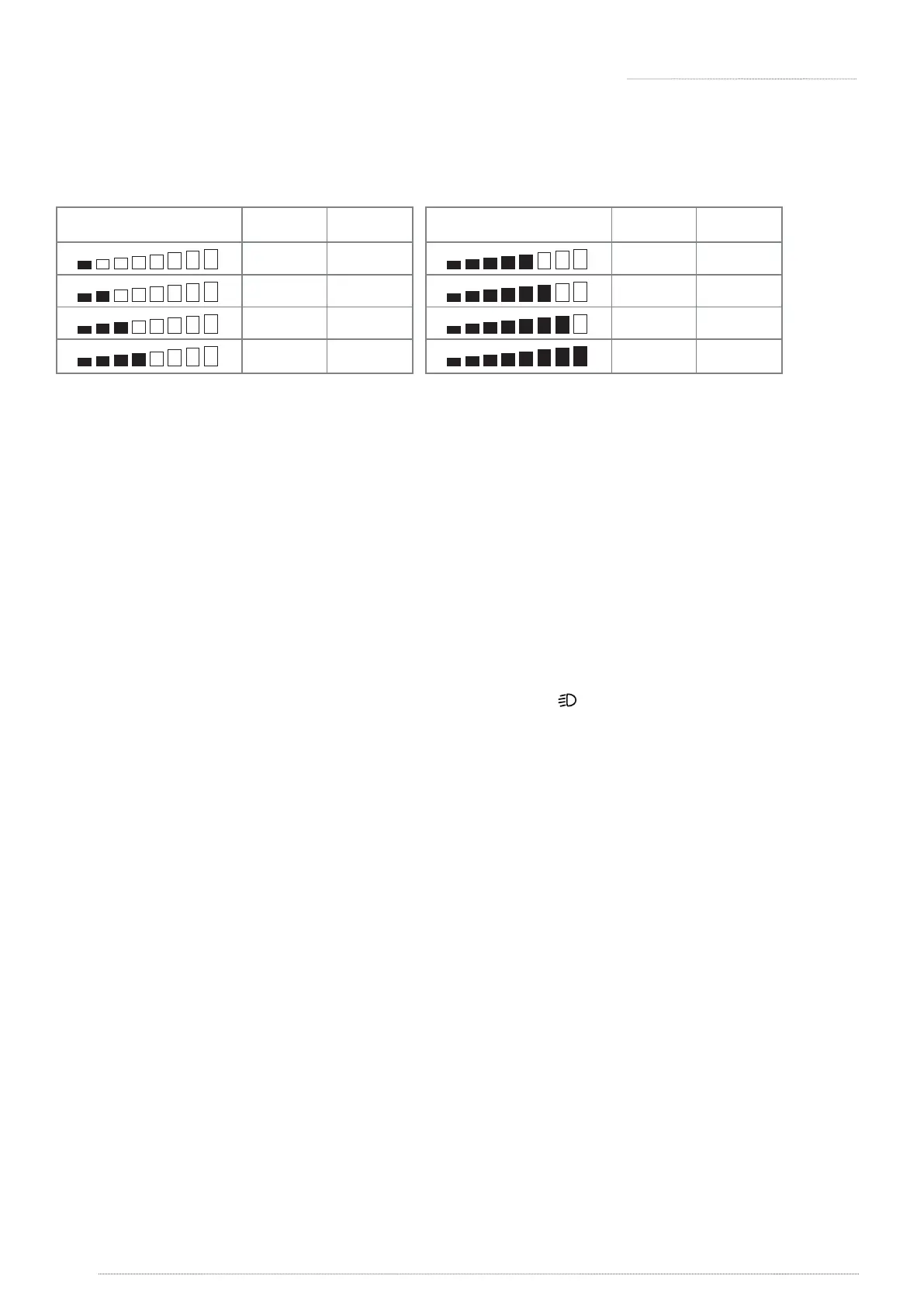
Speed Display
H
Max %
L
Max %
65
75
88
100
42
50
55
65
Speed Display
H
Max %
L
Max %
H / L Switch:
» The max speed can be 100% (Max) if [H/L] is set to “H”
» The Low Speed LED indicator will be on if [H/L] is set to “L”, the max speed in low speed mode
can be up to 60% of max speed of scooter.
» Press [H] / [L] to reduce /increase max speed.
Head light / Tail light/ Decorative light:
» There are 4 modes for lights: On (Default) / O / Head Light / 3-Stage. When the lights is set
in On (Default) mode:
» The decorative light will be on automatically when the scooter turns on.
» To turn on the head light in ON Mode, please press the button on the panel, this will
simultaneously turn o the decorative light. The decorative light will be on again if user turns
o the headlight.
Please refer to section 4.4 for other three modes.
Turning light and Parking Light:
» To activate the hazard lights (left and right turning lights blink simultaneously), press the
Hazard light key. Pressing this key again will turn o the light.
» To activate the left turn light, press the Left Turn key. Pressing this key again will turn o
the light.
» To activate the right turn light, press the Right Turn key. Pressing this key again will turn o
the light.
» When any of the buttons are pressed, a synchronized beep with the ashing lights will be
produced. (Please refer to section 4-4 if adjustment of buzzer volume is needed).
» If any of turning lights is faulty, the ashing frequency of remaining lights will increase.
» Normal frequency is 1sec/ash, and faulty frequency is 0.5/ash.
The turning light switches itself automatically after 30 secs (except for parking light)
※
【 】
【
】
【
】





 To Next Page