16
5. OPERATING YOUR SCOOTER
5.1 GENERAL OPERATION
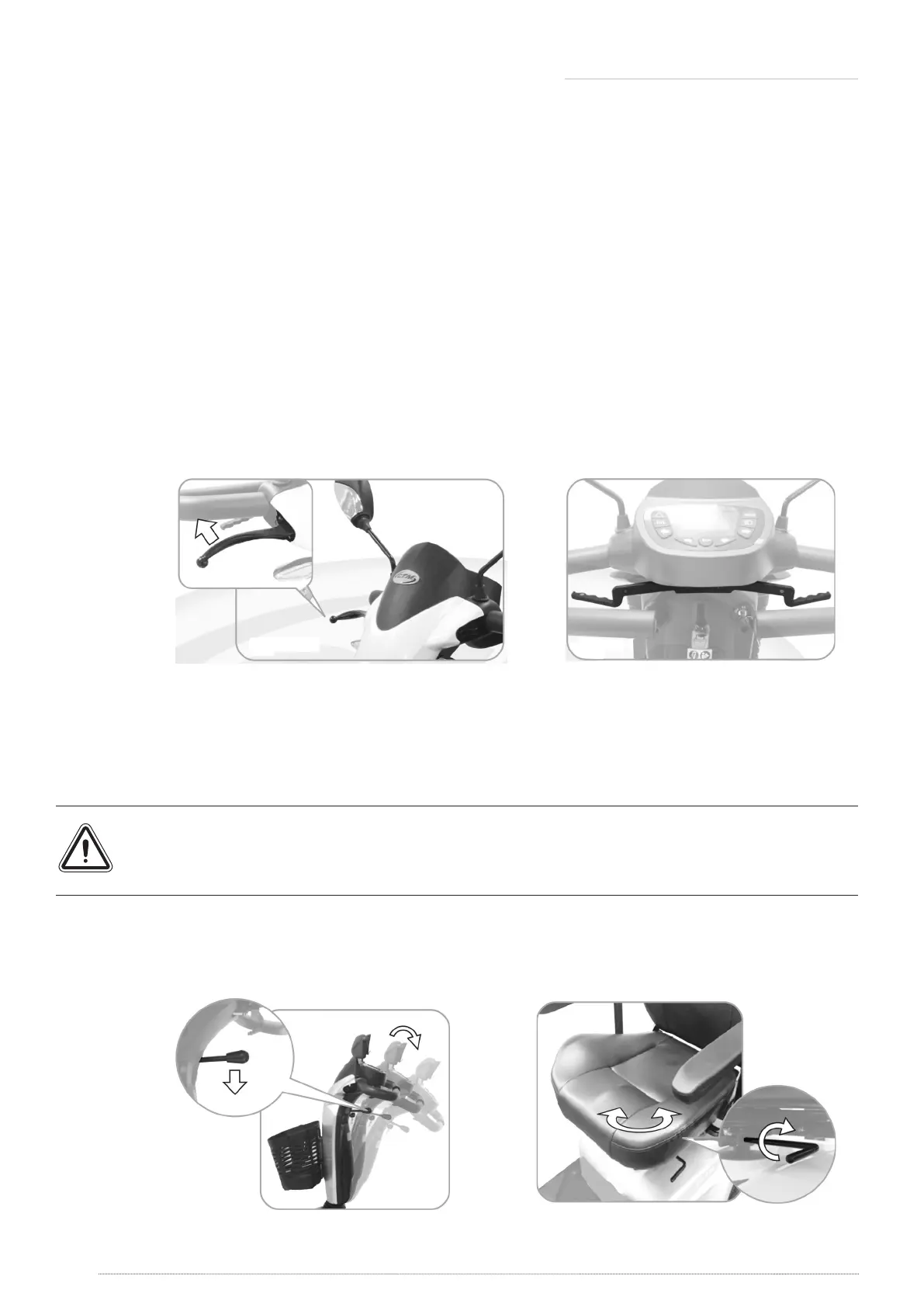
Brake
» Release throttle, scooter will stop automatically.
» If necessary, please use handbrake to stop scooter. (Figure 20)
Throttle
» Pull the right throttle to move scooter forward. Pull the left throttle to move scooter
backward. This can be reserved if required by local dealer. (Figure 21)
» These are also your accelerator. The further you depress them, the faster you go. (Subject to
the position of speed control)
» Releasing both left/right throttles automatically operates the brakes to slow down and stop.
Figure 20 Figure 21
Tiller angle adjustment
» Pull the tiller adjustment downwards to adjust tiller’s angle and release to lock at a desired
comfortable position. (Figure 22)
» Do not pull both right and left throttle at the same time; you might not able to control the
scooter. Always ensure the scooter is switched o before getting on or o the scooter.
Seat Swivel Adjustment
» Pull the swivel lever upwards to rotate seat left and right. (Figure 23)
Figure 22 Figure 23





 To Next Page