20 EN
*The pre-brewing moistens the grounded beans in the brewer with
a small amount of water. It expands the coffee grounds to build up
a greater pressure in the brewer helping to extract oils and flavors
from the grounded beans.
1. When the appliance is in the standby mode, press and holds
for 5 seconds.
2. The buttons will have the following indications in different
settings:
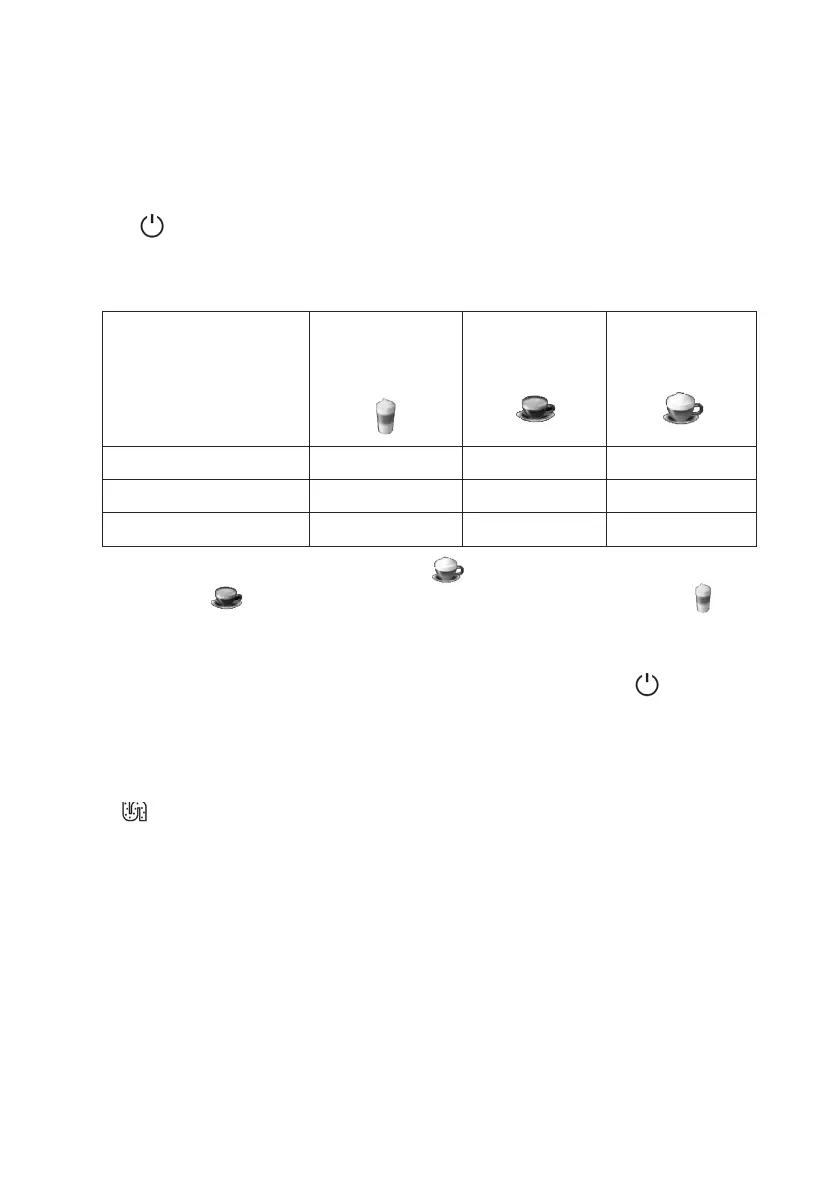
Latte
Macchiato
button
Espresso
button
Cappuccino
button
In ECO Mode Lights ON Flashing Flashing
In Speed Mode Flashing Lights ON Flashing
In Default Setting Flashing Flashing Lights ON
3. Press the Cappuccino button for default settings, Espresso
button for speed mode and Latte Macchiato button for
ECO mode. Two beeps will sound meaning that the new mode
is applied.
4. If you want to keep the settings unchanged, press again or
wait for 5 seconds for the appliance to return to the standby
mode.
DESCALING
If lights up stably, it means that the appliance requires
descaling. The appliance will remain in the best condition if
descaling is performed at least once a month or more often
depending on the hardness of the water used.
1. Fully fill the water tank.
2. Add one pack of cleaning agent included in the box to the
water tank.
3. Plug in the appliance. Place a large container under the coffee
spout. Remove the milk tube connector from the dispensing
spout milk frother inlet if necessary.


 To Next Page