26 EN
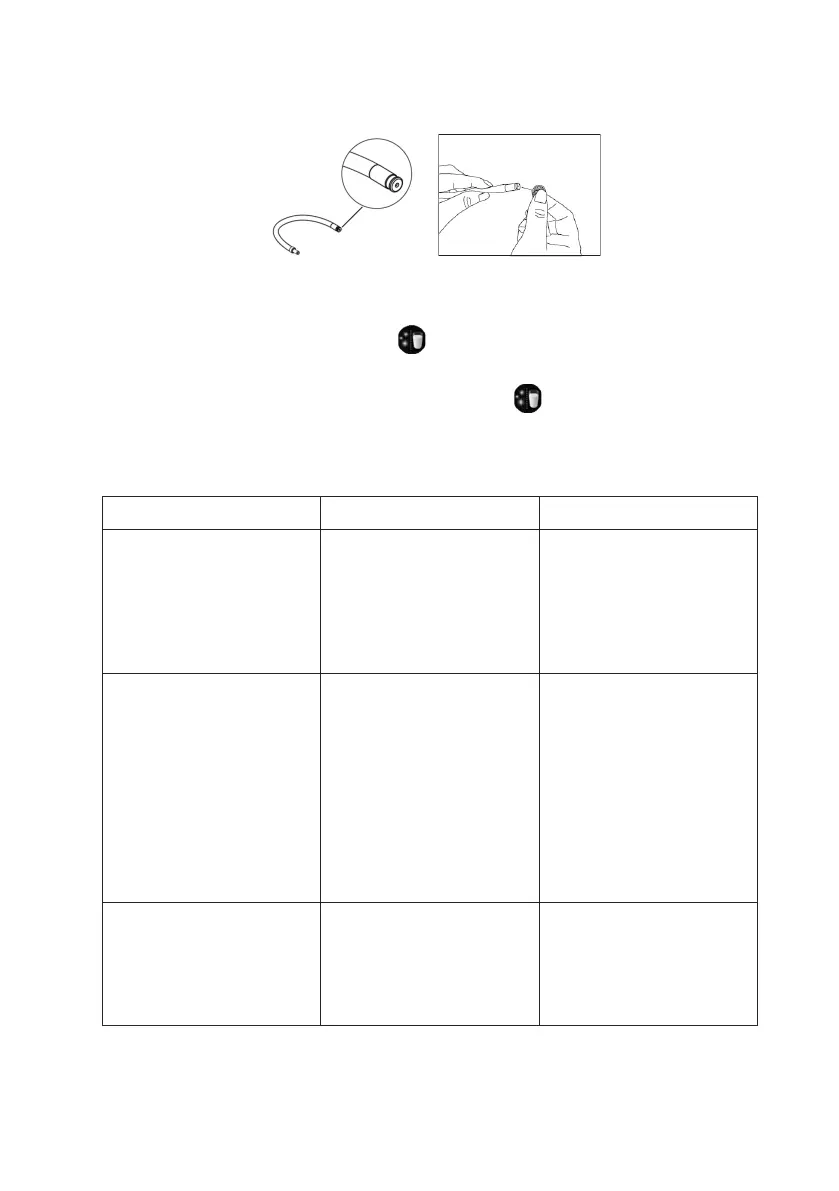
clean. You can use the needle (20) or the brush to clean the
holes.
3. Fill the milk container with potable water and connect to the
appliance through the container milk tube.
4. Press the Cleaning button twice, the water in the milk
container will clean the insides of the connection tube. You can
stop the cleaning process by pressing again.
10. TROUBLESHOOTING
PROBLEM CAUSE SOLUTION
The appliance does
not work.
The appliance is not
connected to the
mains.
Plug in and press
the Power ON/OFF
button.
Check the cable and
the plug.
No or delayed
response when
pressing function
keys on the panel.
Appliance is under
electromagnetic
interference.
Dirt over the panel.
Not pressing the
touch button right.
Unplug the
appliance. Restart
after few minutes.
Clean the panel with
a cloth.
Press the lower part
of the icon of the
touch button.
The coffee is not hot
enough.
The cups have not
been preheated.
The brewing unit is
too cold.
Rinse the appliance
at least 3 times
before making
coffee.


 To Next Page