9
8
GENERAL SPECIFICATION
Power AC 220V, 50/60 Hz
Size 110(W) x 130(D) x 66(H)
Temperature -10
℃
~+40
℃
Weight Approx 750g
Power Consumption Approx 10W
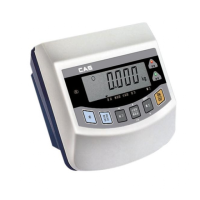
MEASURE OF APPEARANCE
FRONT PANEL
1. Weight display Lamp
n
ST Lamp : turn on when the weight is stable.
n
TARE Lamp : turn on when tare weight is stored.
n
NET Lamp : turn on when the current weight is Net weight.
n
HOLD Lamp: turn on when the weight is held while weighing moving or alive things.
n
ZERO Lamp : turn on when the current weight is 0 kg.
2. Keyboard
Used to return the display to the 0.
User set the zero range within 4% or 10% of the maximum capacity(F09).
Used to enter the TEST mode.
Used to weigh item by using the container.
When this key is pressed, the scale stores current weight as the tareweight.
If you press TARE key in unload condition, tare setting is released.
Used to enter the SET mode.
Used to current value X 10 in CAL, SET mode.
Use this key to switch from GROSS to NET weight.
The annunciators and display will alternate between GROSS and NET aswell.
In case tare weight is REGISTERED, tare plus item's weight is GROSS weight
and only item's weight is NET weight.
When the Lamp turning on, it means NET weight.
Used to set current value+1 in CAL, SET mode.
When you press this key, the current designated printing form is printed.
Use this key when weighing data is printed.
Used to set the when weighing data is printed.
Used to set the current value - 1 in SET mode.
Used to store current condition and exit in CALIBRATION, TEST, SET mode.
Used to enter the CAL mode.
ZERO
TARE
3
NET
GROSS
5
3
PRINT
SET



 To Next Page