Indoor GPS antenna
Network Extender 3
User Guide
2-18
Indoor GPS antenna
The Network Extender receives timing information from the GPS. The Network
Extender is required to be placed such that the GPS receiver has an unobstructed line
of sight with at least 4 strong satellites in order for it to get a position fix during the
booting process. Thereafter, the Network Extender is required to maintain sync with at
least one satellite to be able to continue to monitor the position fix.
Without adequate GPS signal, the Network Extender cannot function properly. When
positioning the Indoor GPS antenna, ensure that it is:
• Installed in a horizontal position.
• Adjacent to a window and in an open area. This ensures clear reception of the
GPS signal.
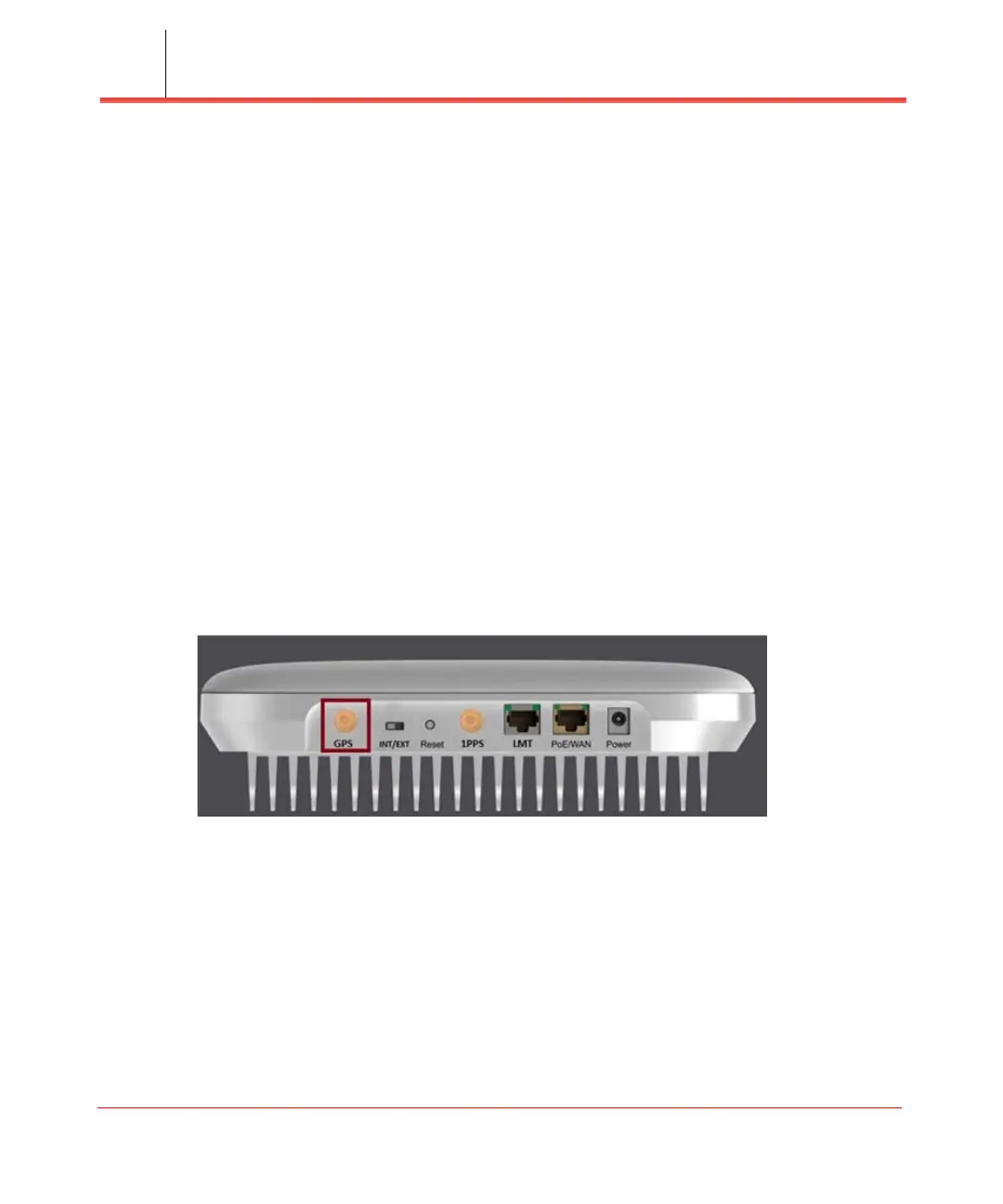
This section outlines the installation and relocation of the Indoor GPS Line (see
Figure 2-20).
Figure 2-20. GPS port
1. Turn off the Network Extender.
2. Connect the provided Indoor GPS antenna cable to the GPS port on the Network
Extender.
3. Place the antenna near a window where the GPS signal is stronger. To help
evaluate GPS signal quality in each location, a free smart phone application called
“GPS Test” can be used.
4. Turn on the Network Extender to allow the detection of an available GPS signal.


 To Next Page