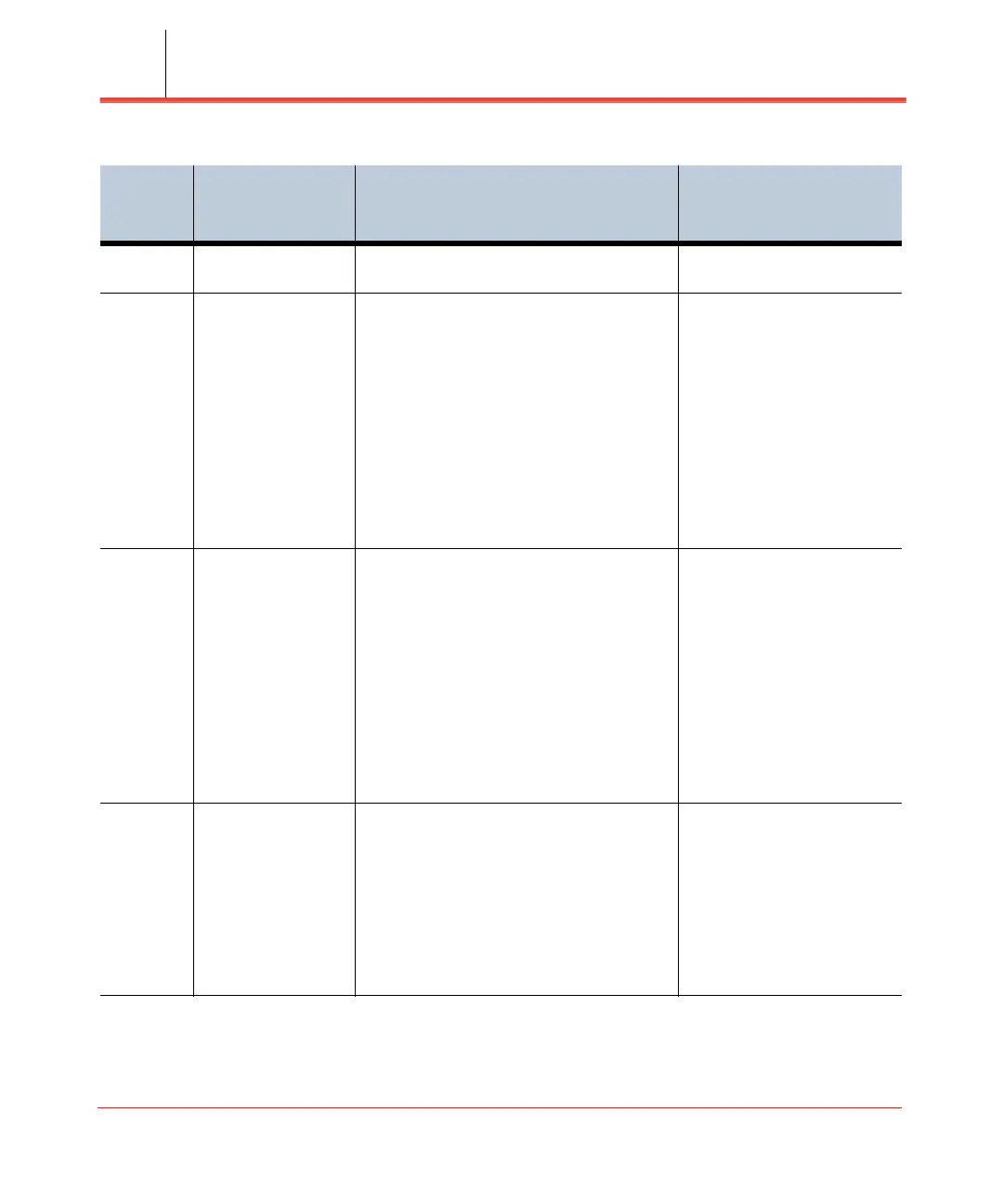
Alarm troubleshooting
Network Extender 3
User Guide
5-10
20047 Critical
configuration failure
Parameters not set properly. Verify that all parameters are
set per guideline.
20049 CMS server
connection failure
The device cannot communicate with
Verizon's Network.
Please check the LAN/
Firewall settings,
connectivity status and
available bandwidth. The
device will reboot
automatically and try
establishing the connection
again.
If the problem persists,
please contact Verizon
Wireless Customer Service.
20050 AeMS connection
no response
The device cannot communicate with
Verizon's Network.
Please check the LAN/
Firewall settings,
connectivity status and
available bandwidth. The
device will reboot
automatically and try
establishing the connection
again.
If the problem persists,
please contact Verizon
Wireless Customer Service.
20051 Low DC Power PoE source is delivering up to class 4. Verify PoE device supports
class 5 and has sufficient
power to feed the LTE
Network extender device.
Verify Ethernet cabling.
If possible, change to a
different switch port and wall
patch panel socket.
Table 5-2. Alarm troubleshooting (continued)
Unique
Alarm ID
(Code)
Alarm Description Recommendation



 To Next Page