198305557-R2
ADVANCED WEIGHING OPERATIONS
FK0563.eps
Totaling (Accumulation)
This mode adds and totals a group of weights.
Verify that the "F 30" parameter setting is "1". Refer to the
Appendix section, "Advanced Weighing Options".
2
4
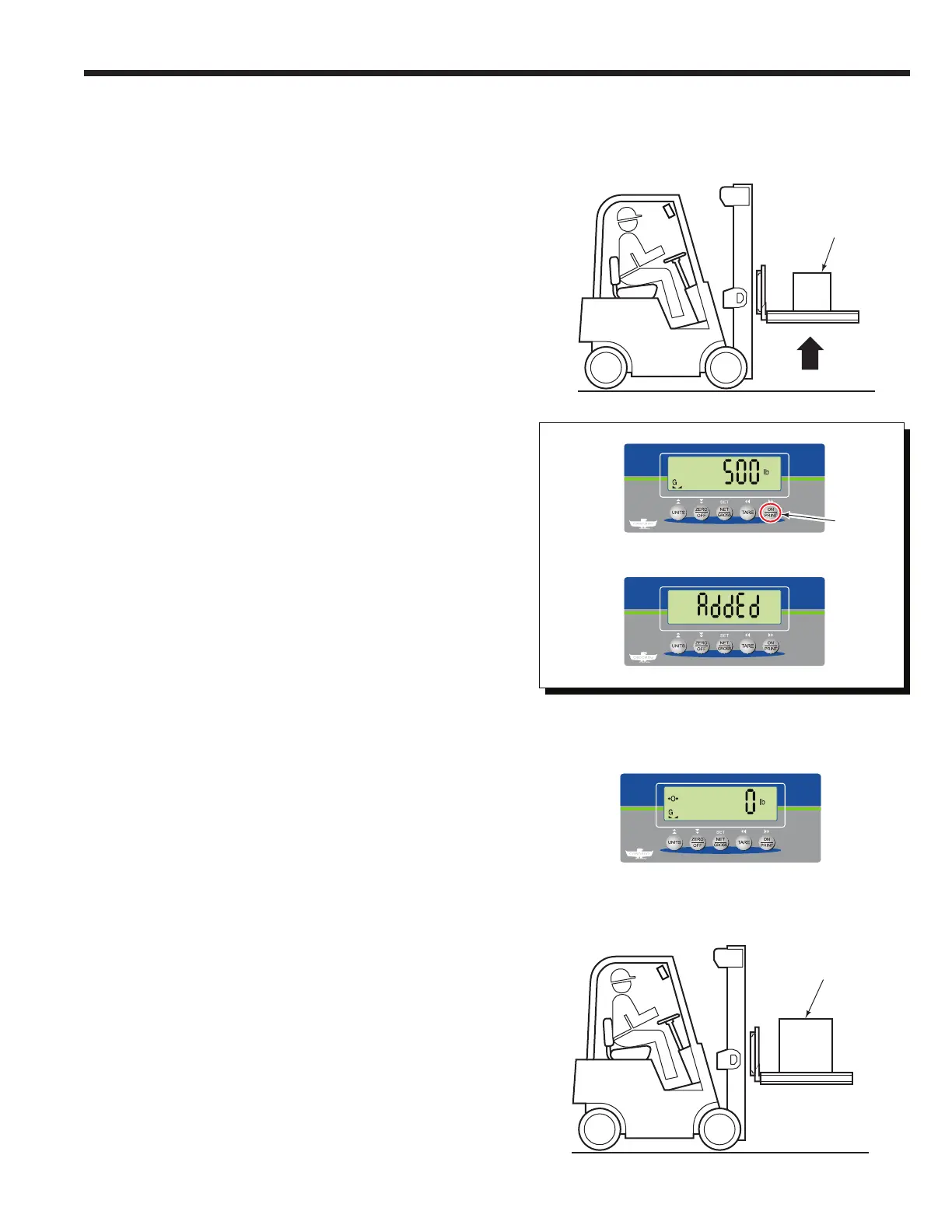
2 If required, position a pallet (or bin) on forks. Raise
forks (and pallet or bin).
1 If required, change parameter setting "F 30" to "1".
Refer to the Appendix section.
3 Press the "TARE" button (tares a pallet or bin; the
value will show up on print out) or "ZERO/OFF"
button (zeros the pallet or bin).
4 Place a load on the pallet. Wait for the indicator to
read the load weight.
6 The indicator will show "AddEd".
NOTE: If a printer is installed, the print out will show the
Gross, Net and Tare weights.
7 Remove the load. Wait for the indicator to return to
normal weighing mode and zero.
8 Place a new load on the pallet. Wait for the indicator to
read the load's weight.
5 Press the "ON/PRINT" button. This begins the adding
sequence of totaling.
Load
5
6
7
8
Load
Procedure continued on next page



 To Next Page