18 8305557-R2
USING THE WEIGH SYSTEM
AUTO SHUT-OFF & BACKLIGHT
FK0647.eps
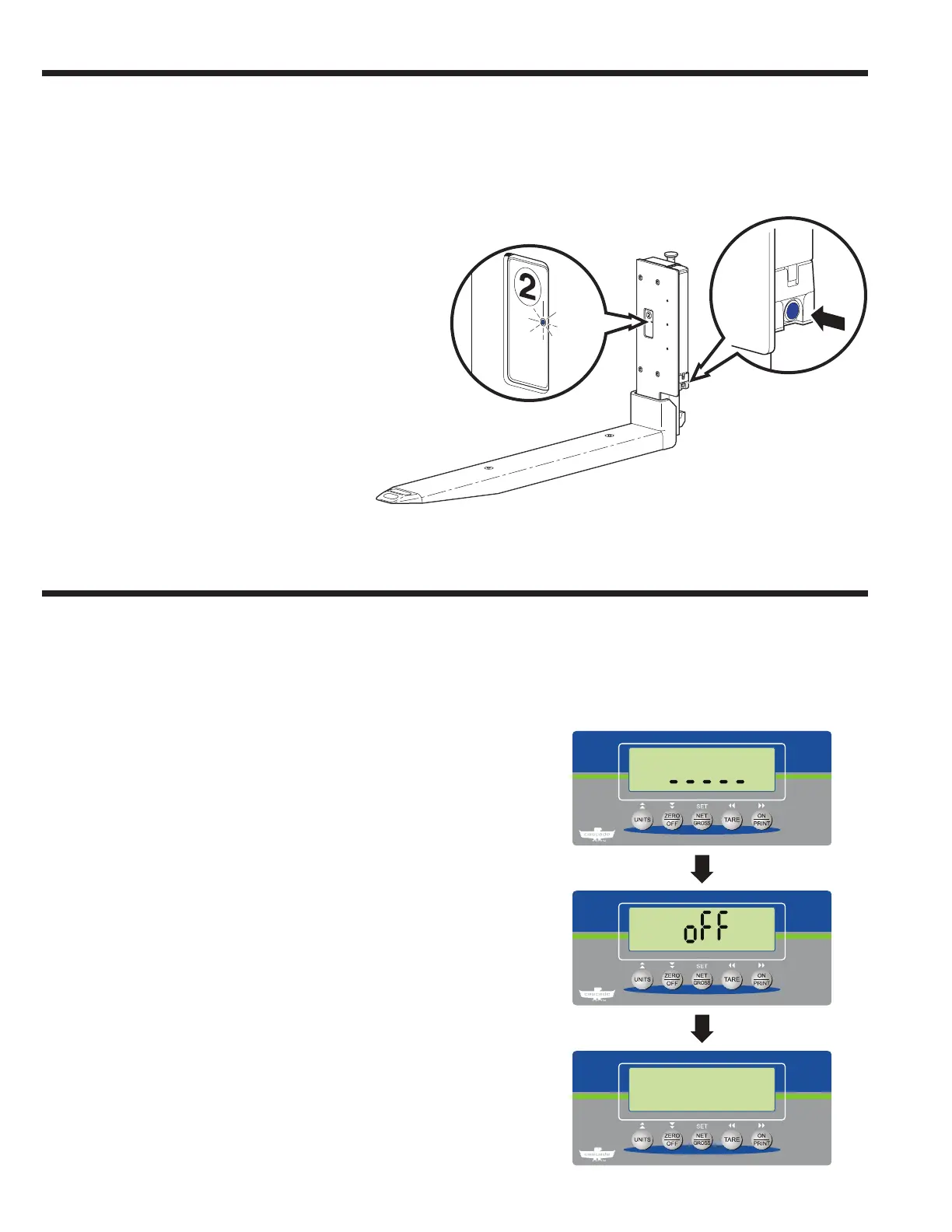
Powering Off Forks
Press and hold the blue button on each battery holder for
ten seconds or until the blinking blue light turns solid (front
face of forks). Release hold on blue button.
1
2
After 5 minutes (default) of no action:
1 On the indicator, a countdown screen shows. Press
any button to cancel auto shut-off and return to normal
weighing mode.
2 After 20 seconds of no further action, "off" will appear on
the screen. The indicator will turn off.
NOTE: After 2 hours (default) of no weighing, the forks
will turn off. To change the default time, refer to Service
Manual, part no. 6910417 Parameter "B 8".
NOTE: To change the default time, refer to Service Manual,
part no. 6910417, Parameter "A 10".
NOTE: To change the time for the backlight to remain
on (default 1 minute), refer to Service Manual, part no.
6910417, Parameter "A 14".



 To Next Page