318305557-R2
APPENDIX
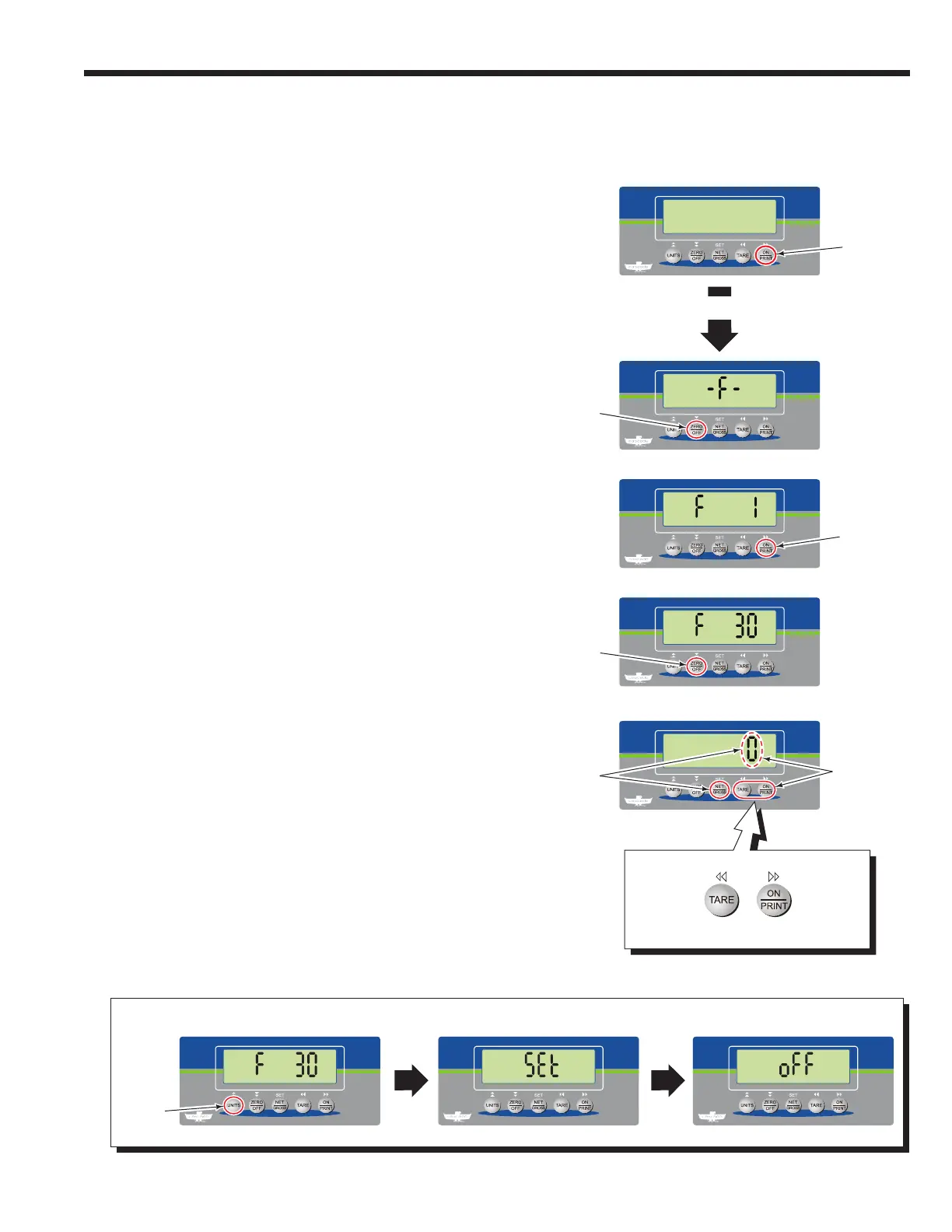
3 The indicator will show "F 1". Repeatedly press the "ON/
PRINT" button until "F 30" shows.
2 The indicator will show "-F-". Press the "ZERO/OFF"
button.
4 Press the "ZERO/OFF" button.
5 Press the "ON/PRINT" button to view each available
parameter setting. The "TARE" button will show the
previous parameter setting. The following options are
available:
0 – None (Default)
1 – Totalling (Accumulation)
3 – Sampling Weight (Piece Count)
5 – Hold
6 – Set Point
6 To select displayed parameter setting, press the "NET/
GROSS" button.
7 The indicator will show "F 30". Press the "UNITS" button
twice.
8 The indicator will show "Set", "off" and then power off.
The indicator is now ready to perform in normal mode or
advanced weighing mode.
IMPORTANT: If the indicator does not show "Set", the
changed parameter setting was not saved. Repeat this
procedure.
1 With the indicator powered off, press and hold the "ON/
PRINT" button for approximately 20 seconds.
Advanced Weighing Options
Advanced weighing options are special application features.
To view, enable, change or disable an advanced weighing
options (Parameter "F 30") perform the following procedure:
1
2
3
4
5
6
8
7
Show the
Next
Parameter
Setting
Show the
Previous
Parameter
Setting
Each
Parameter
Setting will
show on the
indicator.
Press the "NET/
GROSS" button to
select displayed
parameter setting.
Press
twice
(2x)
20 Seconds



 To Next Page