32 8305557-R2
APPENDIX
Programming Preset Tare Values
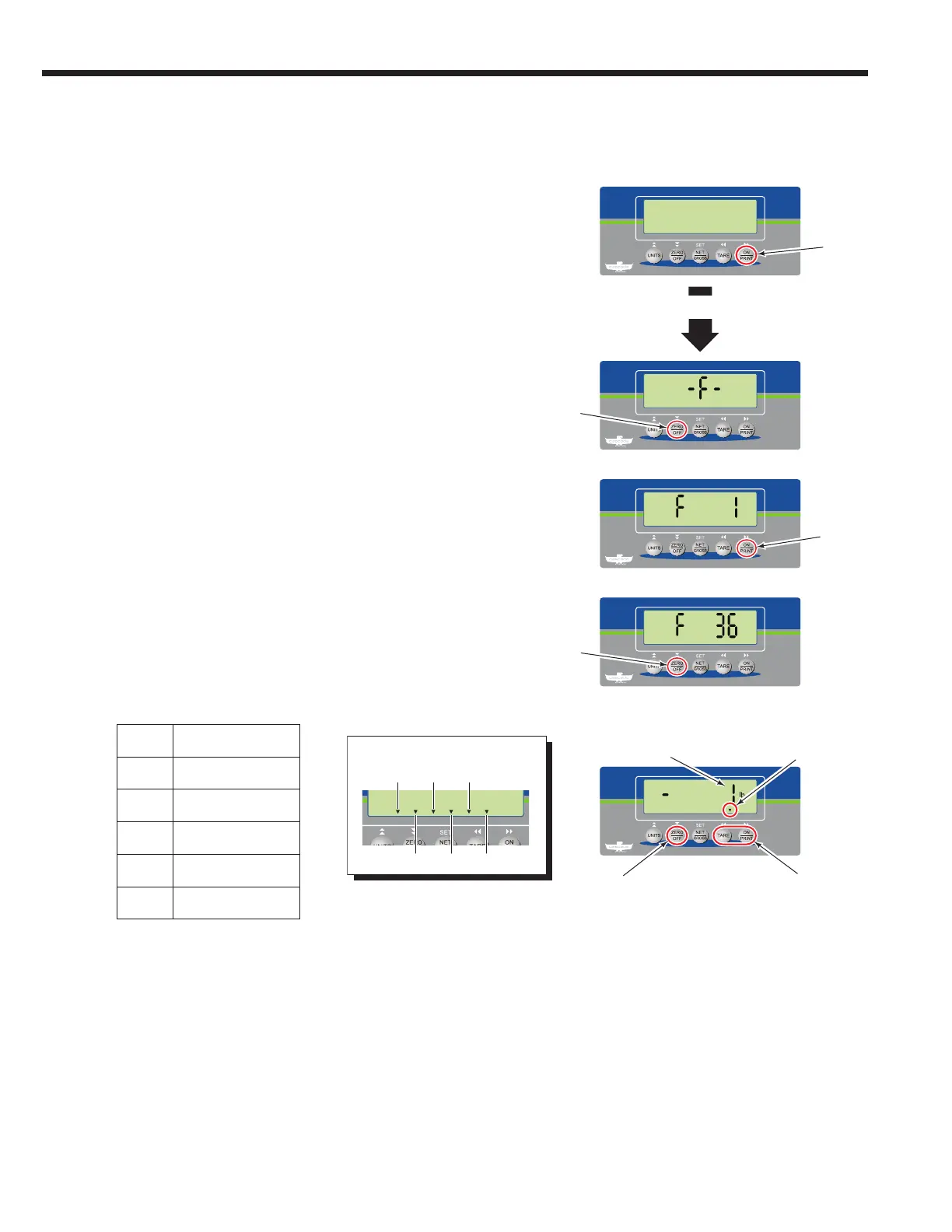
To add (or update or view) preset tares (Parameter "F 36"),
perform the following procedure:
3 The indicator will show "F 1". Repeatedly press the "ON/
PRINT" button until "F 36" shows.
2 The indicator will show "-F-". Press the "ZERO/OFF"
button.
4 To enter parameter "F 36", press the "ZERO/OFF" button.
5 Use the "ON/PRINT" (next) and "TARE" (previous)
buttons to view each preset tare (default values are
"-1" lb). An arrow at the bottom of the screen and its
position, shows which preset tare value is shown. Press
the "ZERO/OFF" button to add (or update) a preset tare
value. If only viewing tare values, continue to Step 9.
1 With the indicator powered off, press and hold the "ON/
PRINT" button for approximately 20 seconds.
FK077
PT6
Current Preset Value
Press to add
(or update) value
Preset Tare
Designation
(PT1 shown)
PT5
PT4
PT3
PT2
PT1
Preset Tare Designation
1
2
3
4
5
20 Seconds
Record PT values:
PT1
PT2
PT3
PT4
PT5
PT6
Toggle using buttons
"ON/PRINT" (next) or
"TARE" (previous)
NOTE: This table is also available on
page 16 and in the Service Manual,
part no. 6910417.



 To Next Page