E-44
USB Cradle (HA-S60IO)
The USB cradle can be used to connect the DT-X400 to devices such as a computer or USB
device. It can also be used to supply power to the DT-X400 and to charge the battery pack.
Part Names and Operation
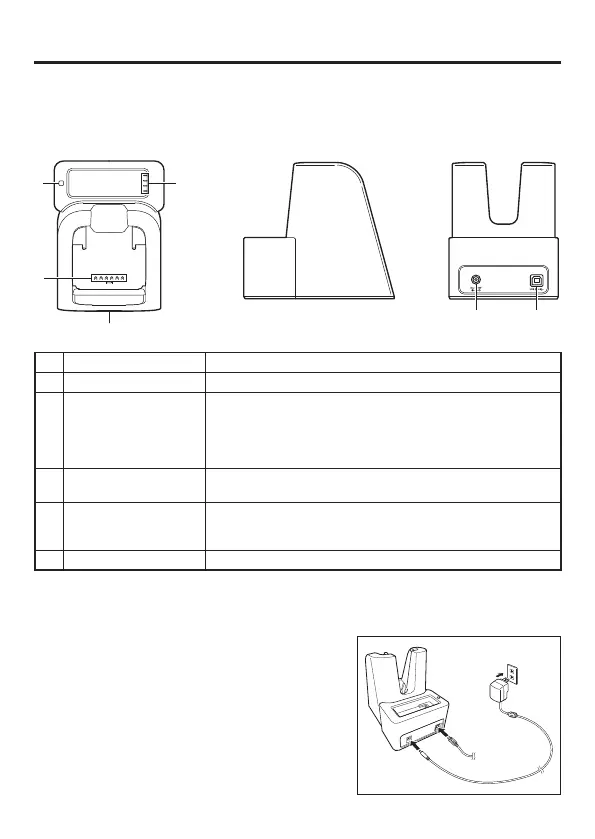
<Top> <Left> <Back>
63
4
5
12
1 AC Adaptor Jack Used to connect an AC adapter as a power supply.
2 USB Client Port Used to connect to a computer.
3
Charging Status LED
(Battery Pack)
Shows the charging status.
Red: Charging
Green: Charging complete
Flashing alternately red/green: Battery pack fault or outside charging
temperature range
4
Power Supply/Data
Communication Terminal
Used to supply power to the DT-X400 or for data communication.
5 Power Supply LED
Indicates the power status and the mounting status of the DT-X400.
Red: Power on, DT-X400 is not installed.
Green: Power on, DT-X400 mounted correctly.
6 Battery Pack Contacts Used to charge the battery pack.
Installing and Connecting the Power Supply
Use the optional AC adaptor(AD-S50400A) to supply power to the charger.
1. Plug the AC adapter into the AC adapter jack on
the back of the USB cradle.
2. Plug the AC adapter into a mains power outlet.
3. When connecting to a computer, plug the USB
cable into the USB client port.
Computer



 To Next Page
 Loading...