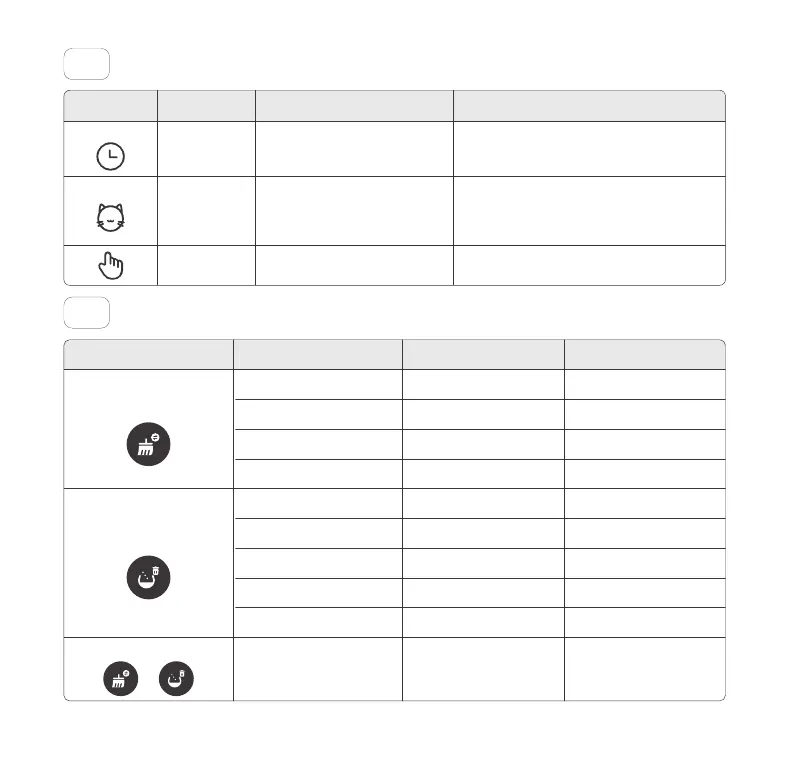
Button Functions05
Clean Modes04
8
Toll free: +1 833 440 2772 Email: support@catlink.cn
Explanation NoteIndicator Mode
Timer
Auto
Manual
You can schedule regular cleanings
in the app. Only clean litter according
to the schedule you have set.
The litter box will automatically
clean itself when your cat exits the
Globe.
You can manually start and pause
the cleaning process.
You can modify the Wait Time in the app, which
determines when the litter box will automatically
clean up after the cat leaves the Globe. By default,
it is set to 5 minutes.
It can only be set via app when the WIFI is
connected.
For kittens under 6 months old or weighing less than
3.3 lbs, it is recommended to use Manual mode.
Press
Press during cleaning process
Long press for 3 seconds
Long press for 10 seconds
Press
Press after adding litter
Long press for 3 seconds
Long press for 10 seconds
Long press the two buttons
for 3 seconds
Long press for 3 seconds
during emptying litter
One beep
One beep
Two beeps
Two beeps, and two beeps
One beep
One beep
Two beeps
Two beeps, and two beeps
Two beeps
Two beeps
Start cleaning
Pause cleaning
Switch clean modes
Enter Wi-Fi connecting mode
Add litter
Level litter
Start emptying
Calibrate weight
Open/close Panel Lock
Cancel emptying
Clean
Add / Empty
Combination Buttons
+
Button Operation Explanation Sound



 To Next Page