Setting Up Your SCOOPER SE03
Once you have assembled the item and confirmed that the package is complete, get
started by following the steps below.
Placement:Place the Unit as required.
3
Check the items:Confirm that the item and accessories are present.
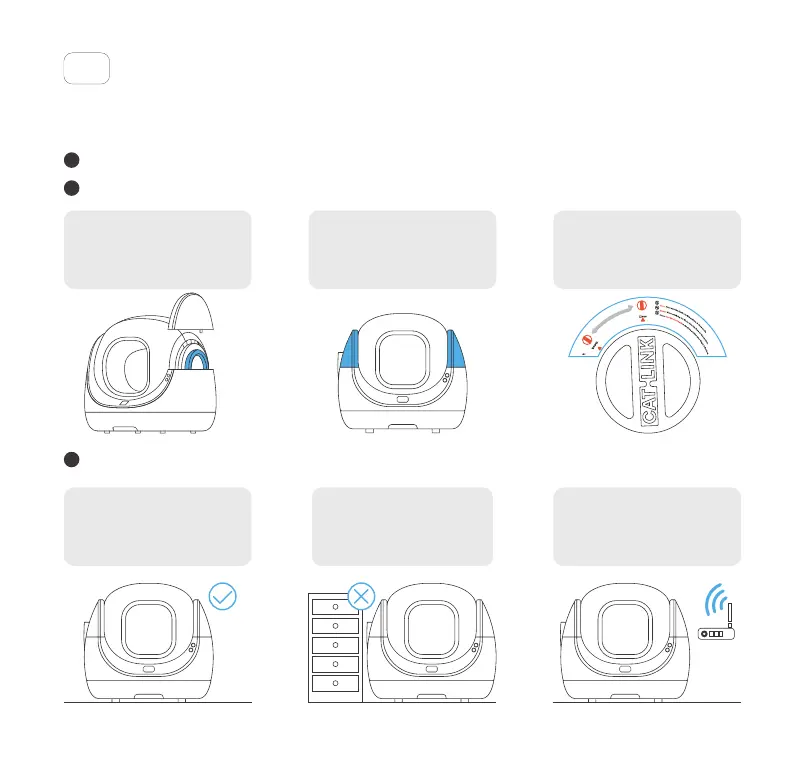
Check the installation:Ensure that all items are installed correctly to avoid any issues.
1
2
(1) Make sure that the Trigger
under the Right Cover is firmly
locked in place.
(3) Make sure that the Knob is set to
the Clean position and that the
Screen is not covered by the Empty
Pad used for emptying litter.
(2) Confirm that both Covers are
properly installed and free from
warping.
(1) Make sure that the Unit is placed
on a level and sturdy surface with no
objects beneath it. Soft, uneven, or
unstable flooring should be avoided.
(3) Place the Unit close to a stable
WiFi signal and far from devices
that may cause WiFi interference.
(2) Locate the Unit near a power outlet,
with no walls or corners touching it,
and nothing on top of it.
3
Toll free: +1 833 440 2772 Email: support@catlink.cn



 To Next Page