Empty means removing all the litter from the Globe.
How to Empty07
To prevent the Waste Bin from overflowing during the emptying process, replace the Trash
Liner with a new one.
*Do not attempt to empty the Waste Bin when it is full.
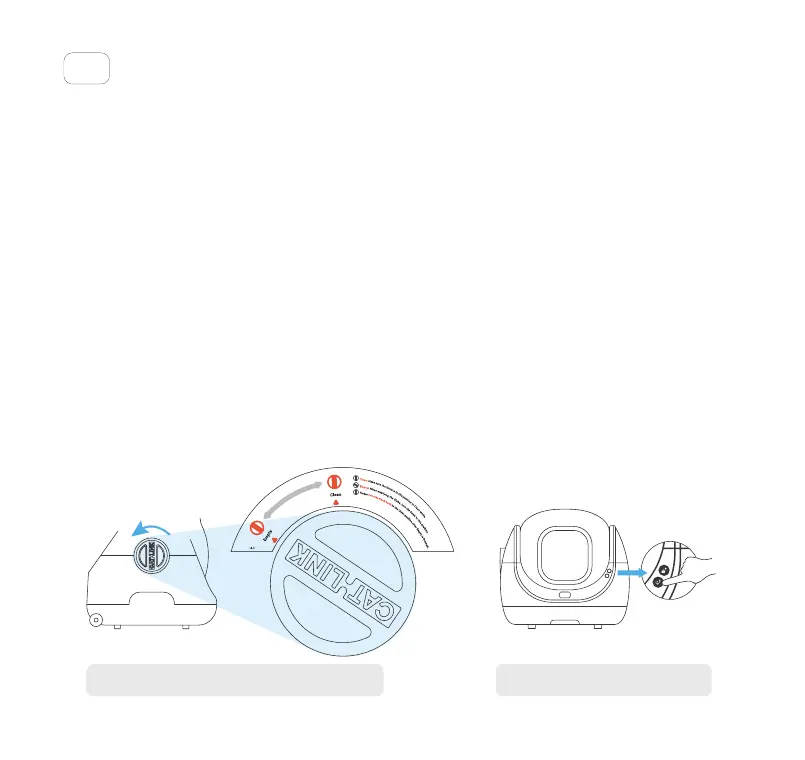
Rotate the Knob to the Empty position, and the Empty Pad will cover the Screen.
*Do not rotate the Knob while the Unit is in motion.
To start the emptying process, either long press the Add/Empty Button for 3 seconds or
select Empty in the app.
*Empty cannot be performed when the Knob is not in the Empty position.
Once emptying is complete, rotate the Knob to the Clean position and the Empty Pad will
return to its home position.
*Cleaning cannot be performed when the Knob is not in the Clean position.
After the Knob returns to the Clean position, open the Waste Bin cover and replace the Trash
Liner.
①
②
③
④
⑤
Rotate the Knob to the Empty position.
Press and hold the Add/Empty
Button for 3 seconds.
10
Toll free: +1 833 440 2772 Email: support@catlink.cn



 To Next Page