10
Remote Control
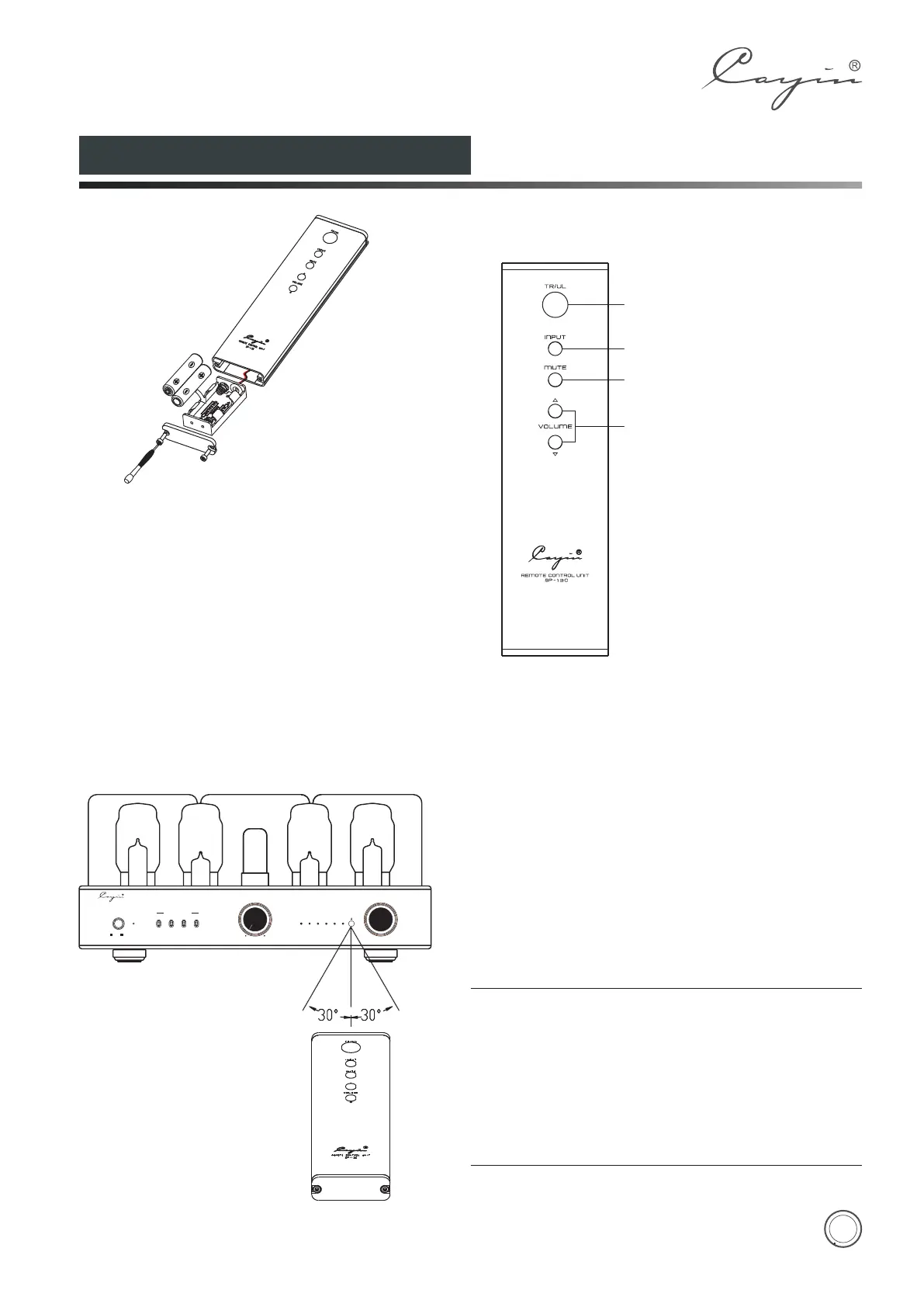
Installation
1. Place the remote control upside up. Screw the rear
cover open with the screwdriver.
2. Pull out the battery case carefully (do not break the
wires connected).
3. Put in the batteries with correct polarity.
4. Push in the battery case and screw the rear cover
close.
1. Triode/Ultralinear Selector
2. Audio Source Input Selector
3. Mute Button
4. Volume Control Selector
1
2
3
4
Effective Distance:about 6m
◆ Don't drop the remote control. Keep the remote
control dry.
◆
◆
◆
◆
Replace the batteries timely.
Don't mix new and old batteries together and use
the batteries with the same specification.
Take out the batteries if you don't use the remote
control for an extended period of time.
Batteries with high quality are recommended.
NOTE:
A1
POWE R
ON OF F
A2 A4
A3
B1
B2 B4
B3
VOLUME
MI N
MA X
SELE CTOR
VACUUM TUB E INTEG RATE D AMPLI FIER CS -100A
BIAS S ELECT OR
TR
UL
LINE1
PRE -IN
LINE2
LINE3


 To Next Page