User Manual
15
5.2.5 Multi player
1、Copy backup file to your PC.
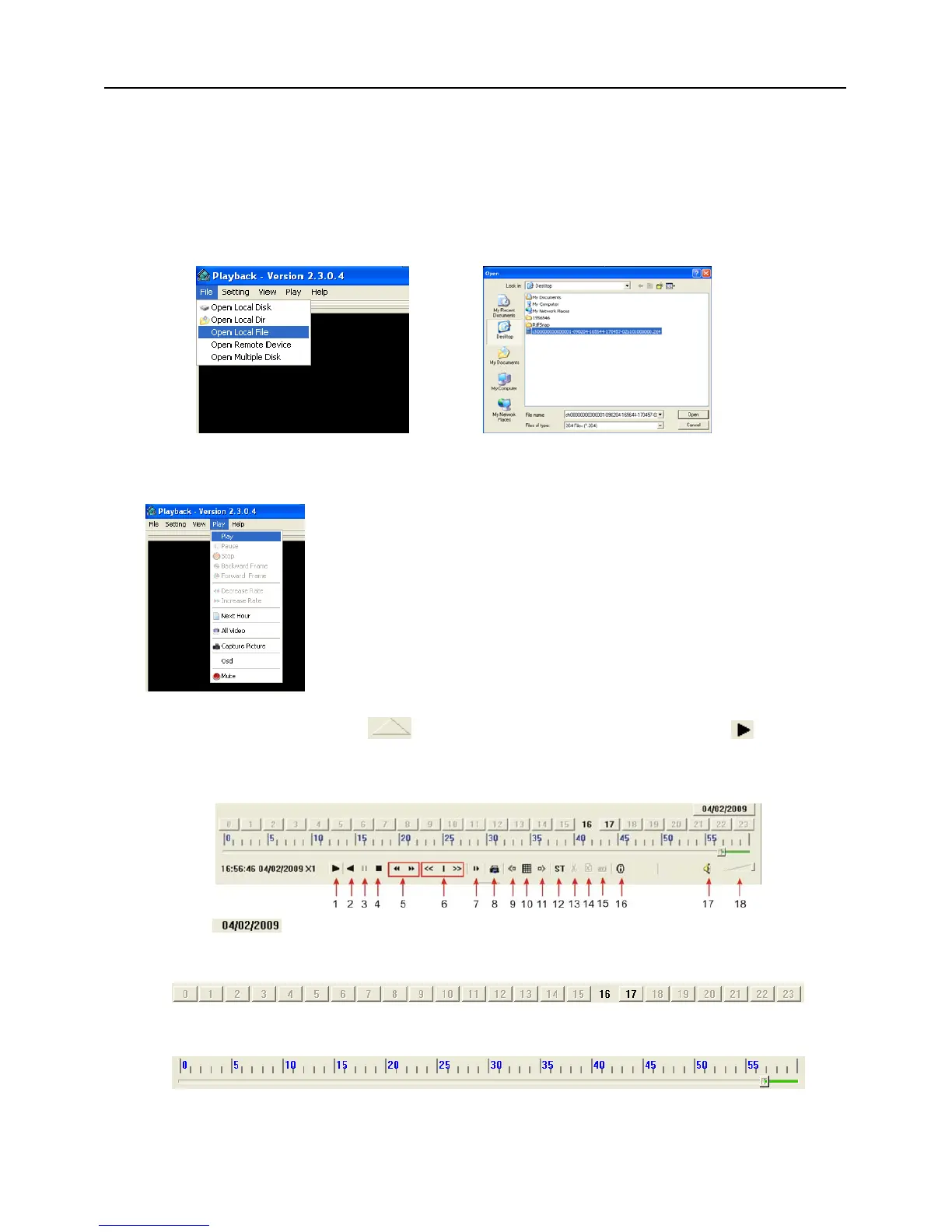
2、Open multimedia player and click [File Local (F)] to find/select the backup file, and then click [open]
button
Note: the file type you have selected should be *.264 format.
3、Open backup file:
(2)、Click pop-up menu button
on the bottom of multimedia player and [Play- ] button, then
the backup file will be played on the according channel.
(3)、The Menu brief on the bottom of multimedia player:
Date:
recording date for the current backup file shown as right corner;
24H recording time: lie under [Date] menu. Black number button stands for current recording
playback is normal recording for the time line.
0~60 Minute recording time quantum: Green part on play processing bar stand for recording length
for one hour recording.
(1)、Click [Play] menu (P) on the top of multimedia player
interface to select playing the backup file;
Picture 5-24
Picture 5-25
Picture 5-26


 To Next Page