User Manual
3
Chapter 2:Layoutt
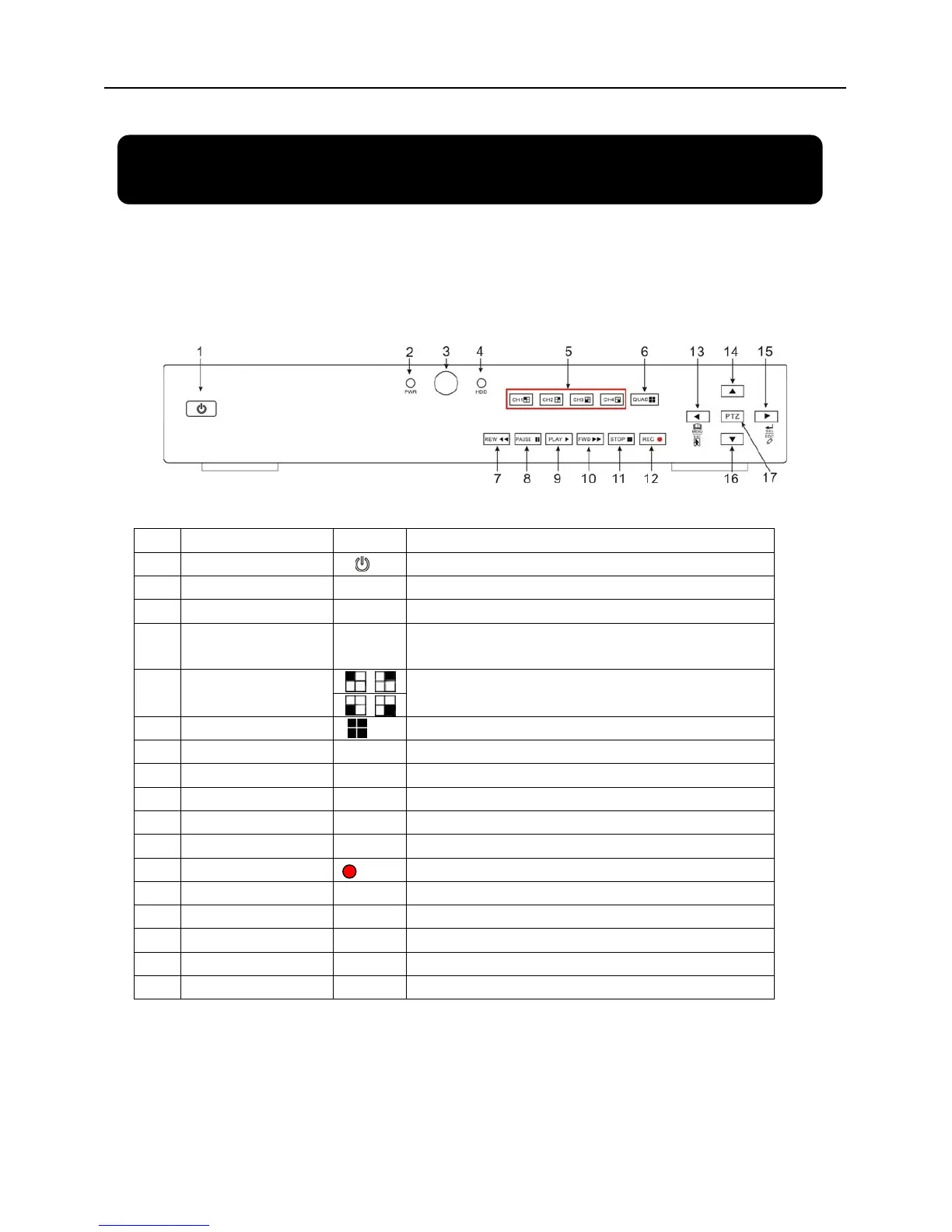
2.1 Front Panel
2.1.1 4-CH Front Panel (Details please refer to the real product)
Item Key title/Indicator Marks Functions
1
Power Switch
Turn Power on and off
2
Power indicator
PWR
If the “Green” indicator is on the system is getting power
3
IR Receiver
Receives signal from Remote Control
4
HDD indicator
HDD
When the “Red” indicator flashes it means the hard drive
is being read or written to.
5
Channel Select:
CH1 CH2 CH3 CH4
Select Single Channel Display
6
QUAD
Display all cameras in Live display or playback mode
7
REW
Move Left / Rewind
8
PAUSE
Pause / play frame by frame
9
PLAY
Enter into pop-up Menu/Play
10
FWD
Move Right / Play Forward
11
STOP
Stop Playback; stop manual recording
12
REC
Start Manual recording
13
MENU/ESC
Enter into main menu or exit menu
14
Up
Move Up
15
SEL/EDIT
Enter into pop up menu; Select key / Edit
16
Down
Move Down
17
PTZ:
Move to PTZ control mode
List 2-1


 To Next Page