User Manual
27
6.3 Main Interface of Net-viewer
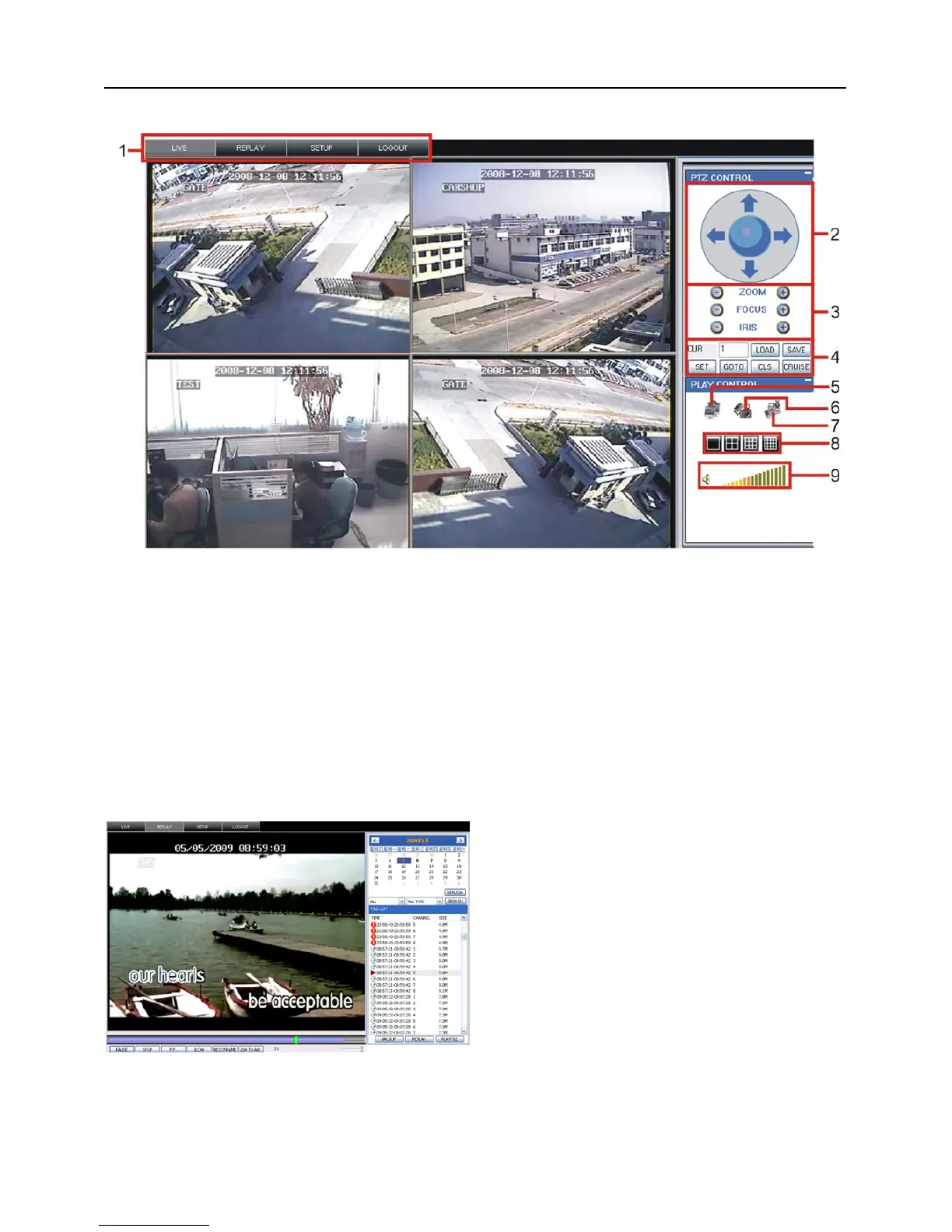
Picture 6.3
Log in Net-viewer and show the interface as follows
6.3.1 Menu column (Section 1 on Picture 6-3)
6.3.2 PTZ Control (Numbers 2, 3, 4 on Picture 6-3)
6.3.3 Live Play Control (Numbers 6 through 10 on Picture 6-3)
6.3.1 Menu column
Menu column include [Live] menu, [Replay] menu and [Setup] menu and [Logout] menu.
6.3.1.1 Live
After Logging-in to system, system will enter into Live display (shown as Picture 6-3).
6.3.1.2 Replay
Play button: [Play]/[Pause]
Stop button: stop playing recording.
F.F. button: fast forward playback recording
This option allows you to playback recordings
remotely.
First select the day, channel and type and
proceed searching and refreshing; second select
any event from search result list to playback.
Please note you can control playing speed by
sliding the playing-control bar on the bottom of
the interface (shown as Picture 6-4).
(Section 1 on Picture 6-3)
Picture 6-4


 To Next Page