ust
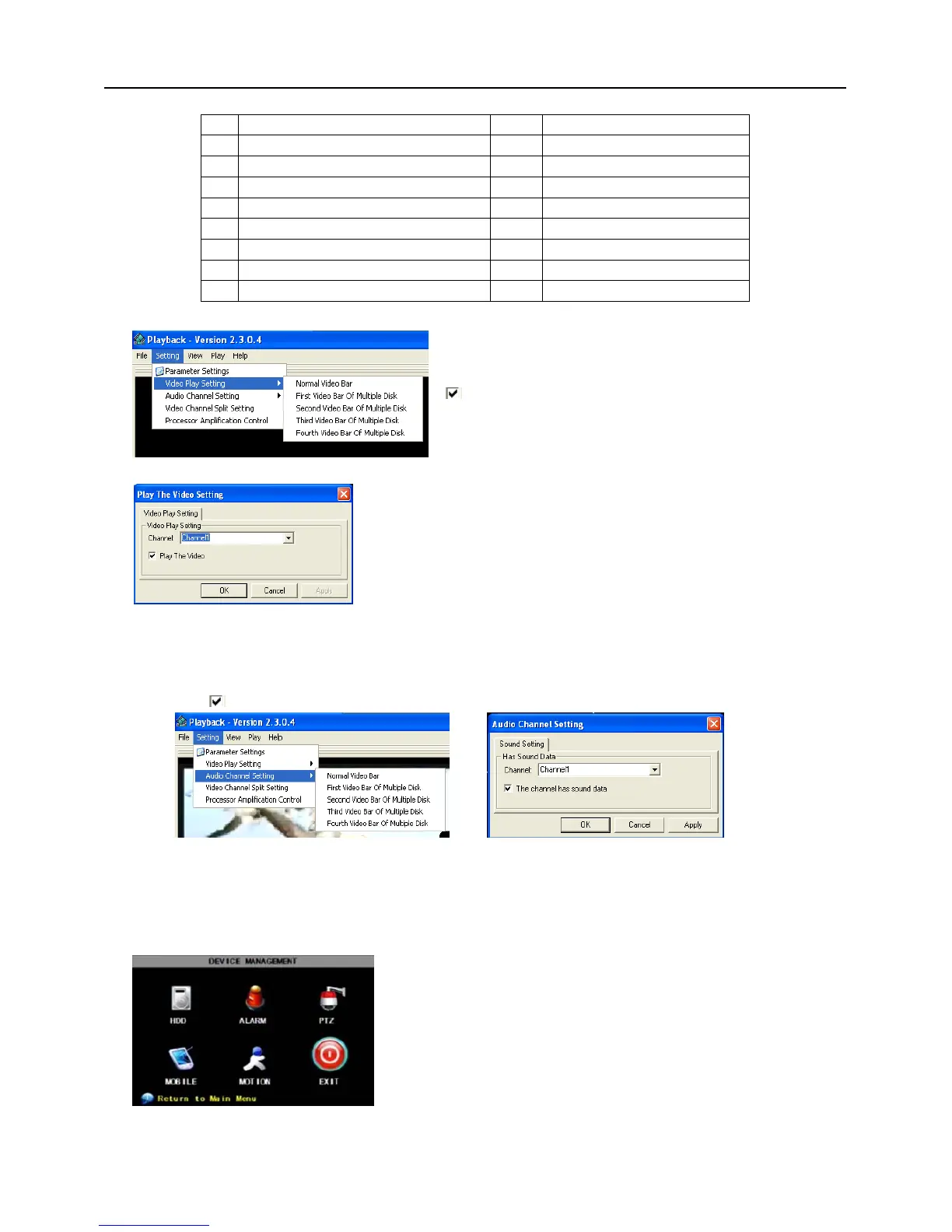
4、Please refer to the below [Video on] setting procedure (System default - video for every channel is on)
5、Refer to the below for [Audio on] setting procedure. (Setting parameter will be available after re-starting
multimedia player after [Audio on] set up.)
SettingAudio channel setting Normal video BarSelect the channel you want to playback the
audioSelect
the channel has audio filesApplyOK.
After successfully setting the above, when you playback the current channel, you can open the channel’s
audio function at the same time as the video
5.2.6 Device Management
SettingVideo play setting Normal video
BarSelect the channel you want to display Select
to play the videoApplyOK
Options in device management include Hard drive,
External Alarm, PTZ control, Mobile Phone Monitoring, and
Motion Detection.
Picture 5-27
Picture 5-27A
Picture 5-28A
Picture 5-28B
Picture 5-29


 To Next Page