5
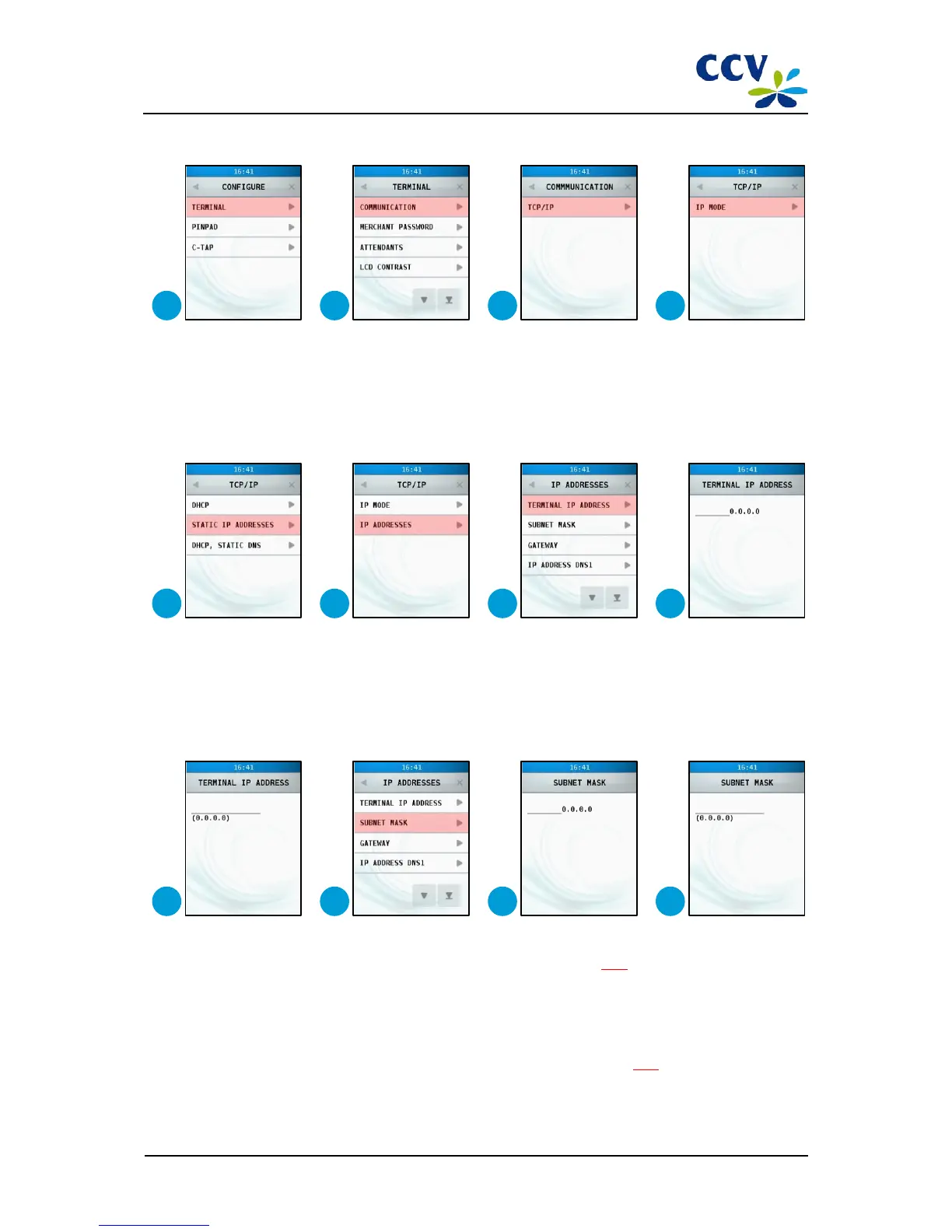
Choose the menu option <TERMINAL>.
6
Choose the menu option <COMMUNICATION>.
7
Choose the menu option <TCP/IP>.
8
Choose the menu option <IP MODE>.
9
Choose the menu option <STATIC IP ADDRESSES>.
10
Choose the menu option <IP ADDRESSES.
11
Choose the menu option <TERMINAL IP ADDRESS>.
12
Press <CORR>.
13
Enter the IP address and confirm with <OK>. To enter the IP address,, you must enter multiple full stops (.). Enter
this punctuation mark by entering <1> several times. Refer to sub-section 3.3.1
for more information about the
entering of alphanumerical characters.
14
Choose menu option <SUBNET MASK>.
15
Press <CORR>.
16
Enter the subnet mask and confirm with <OK>. To enter the subnet mask, you must enter multiple full stops
(.).Enter this punctuation mark by entering <1> several times. Refer to sub-section 3.3.1
for more information
about the entering of alphanumerical characters.



 To Next Page