3.2 Opening the menu of the PIN pad
You can open the menu of VX 820 ITS PIN pad using the program AdminLight. You can open the menu in two ways: in
local mode or in remote mode. When you open the menu in remote mode, you will be able to operate the menu
remotely using the program AdminLight. If you open the menu in local mode, you will be able to operate the menu on
location, using the keys and the touchscreen of the PIN pad (see section 3.3
).
For more information about the opening of the menu, please refer to the user manual of AdminLight.
3.3 Operating the PIN pad
You can operate the menu of the VX 820 ITS PIN pad using the keys and the touchscreen if you have opened the menu in
local mode (see section 3.2).
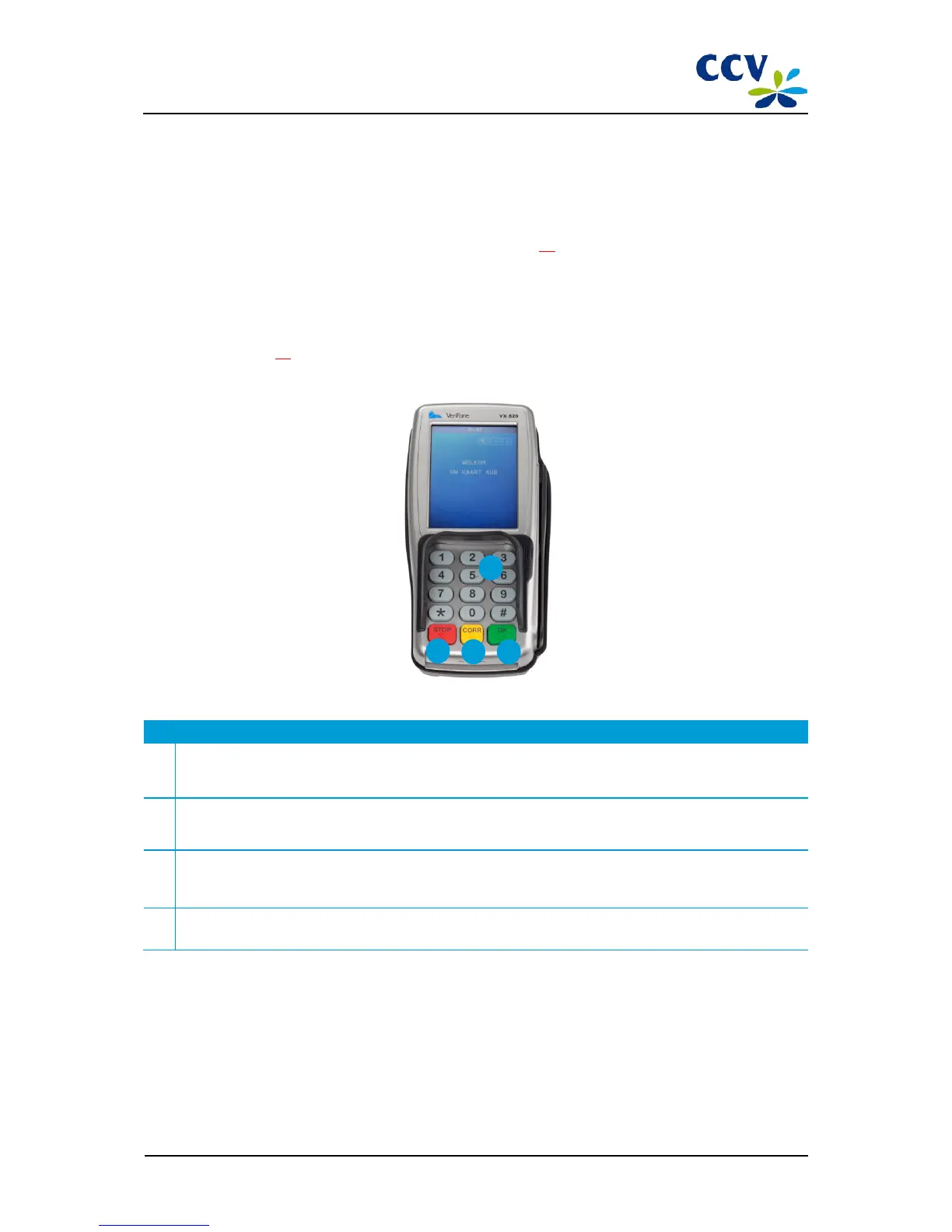
Description of the keys of the VX 820 ITS PIN pad
1 Numeric keys
Enter data, for example an IP address. During a transaction, card holders can enter a PIN code using these keys.
2 <STOP> key
Go back to a previous menu or cancel an action. Card holders can cancel a transaction by pressing this key.
3 <CORR> key
Correct any information entered or adjust the settings of the PIN pad. Card holders can correct the information
entered by pressing this key.
4 <OK> key
Confirm the information entered. Card holders use this key to accord with a transaction.



 To Next Page