23
Tip
In all circumstances, if your efforts are not sufficient, contact the After-Sales Service
Department without delay.
IIff yyoouu hhaavvee aa ddoouubbtt aabboouutt tthhee ffuunnccttiioonniinngg ooff yyoouurr oovveenn
, this does not necessarily mean
that there is a malfunction.
IInn aannyy eevveenntt,, cchheecckk tthhee ffoolllloowwiinngg iitteemmss::
Warning
- Repairs to your appliance must be made only by professionals. Repairs not carried out
according to guidelines can be a source of danger to the user.
7 / TROUBLESHOOTING
EN
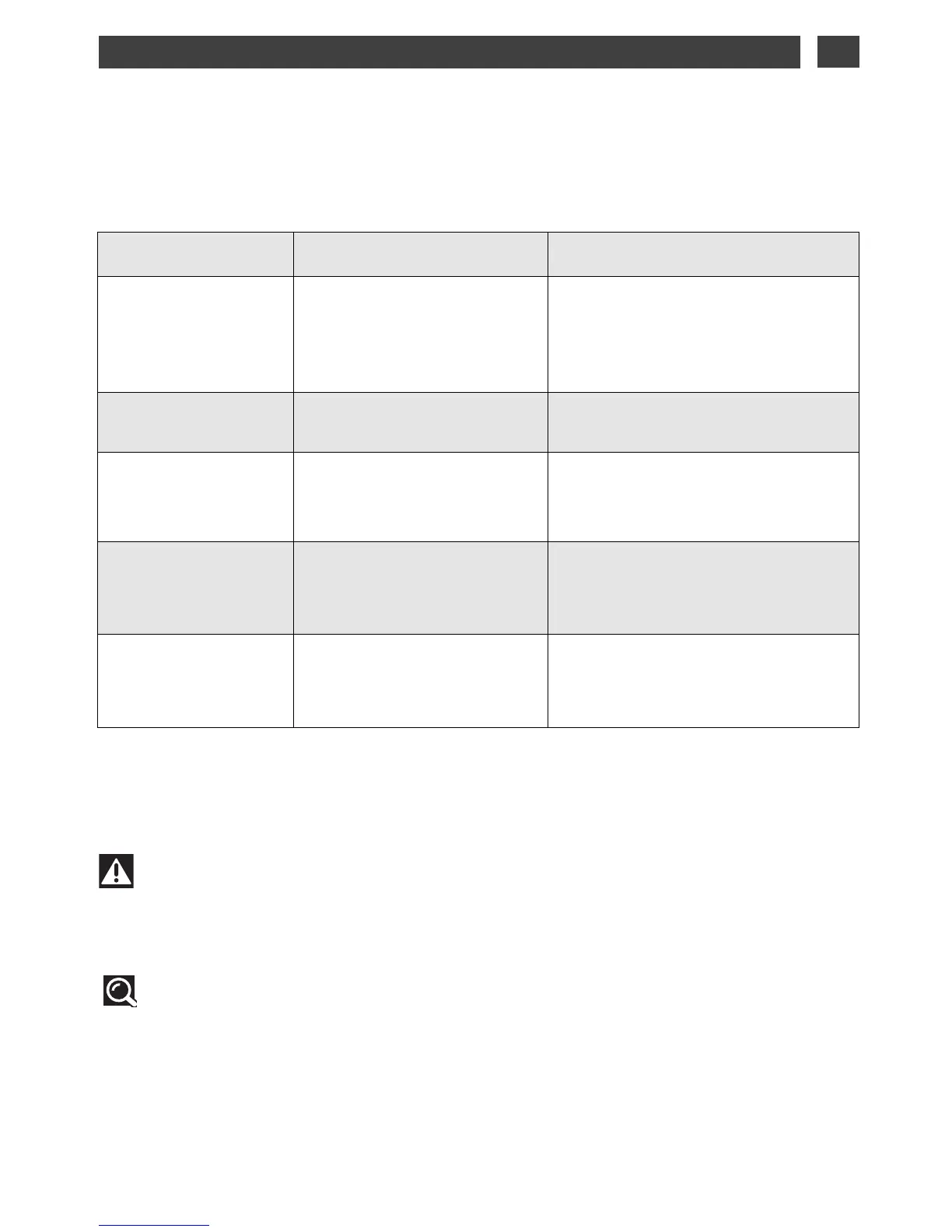
YYOOUU OOBBSSEERRVVEE
TTHHAATT……
PPOOSSSSIIBBLLEE CCAAUUSSEESS WWHHAATT SSHHOOUULLDD YYOOUU DDOO??
TThhee oovveenn iiss nnoott
hheeaattiinngg
- The oven is not connected.
- Your fuse is out of order.
- The selected temperature is
too low.
➡ Plug in your oven.
➡ Replace the fuse and check its value
(16A).
➡ Increase the selected temperature.
TThhee ppaaddlloocckk iiss
ffllaasshhiinngg
- Problem with the door’s lock-
ing mechanism.
➡ Call the After-Sales Service Depart-
ment.
TThhee lliigghhtt iinn yyoouurr oovveenn
iiss nnoo lloonnggeerr wwoorrkkiinngg..
- The light is out of order.
- The oven is not connected or
the fuse is not working.
➡ Replace the bulb.
➡ Plug in your oven or replace the
fuse.
TThhee ppyyrroollyyssiiss
cclleeaanniinngg ccyyccllee ddooeess
nnoott bbeeggiinn..
- The door is not properly
closed.
- The locking system is defec-
tive.
➡ Make sure the door is closed.
➡ Call the After-Sales Service Depart-
ment.
YYoouurr oovveenn ssttaarrttss
bbeeeeppiinngg..
- During cooking.
- At the end of cooking.
➡ The recommended temperature of
your choice has been reached.
➡ Your programmed cooking cycle is
finished.



 To Next Page