16
-- YYoouurr oovveenn’’ss pprrooggrraammmmeerr ccaann bbee uusseedd aass aann
iinnddeeppeennddeenntt ttiimmeerr tthhaatt aalllloowwss yyoouu ttoo ccoouunntt
ddoowwnn aa ttiimmee wwi
itthhoouutt ooppeerraattiinngg tthhee oovveenn..
In this case, the timer display has priority over
the clock display.
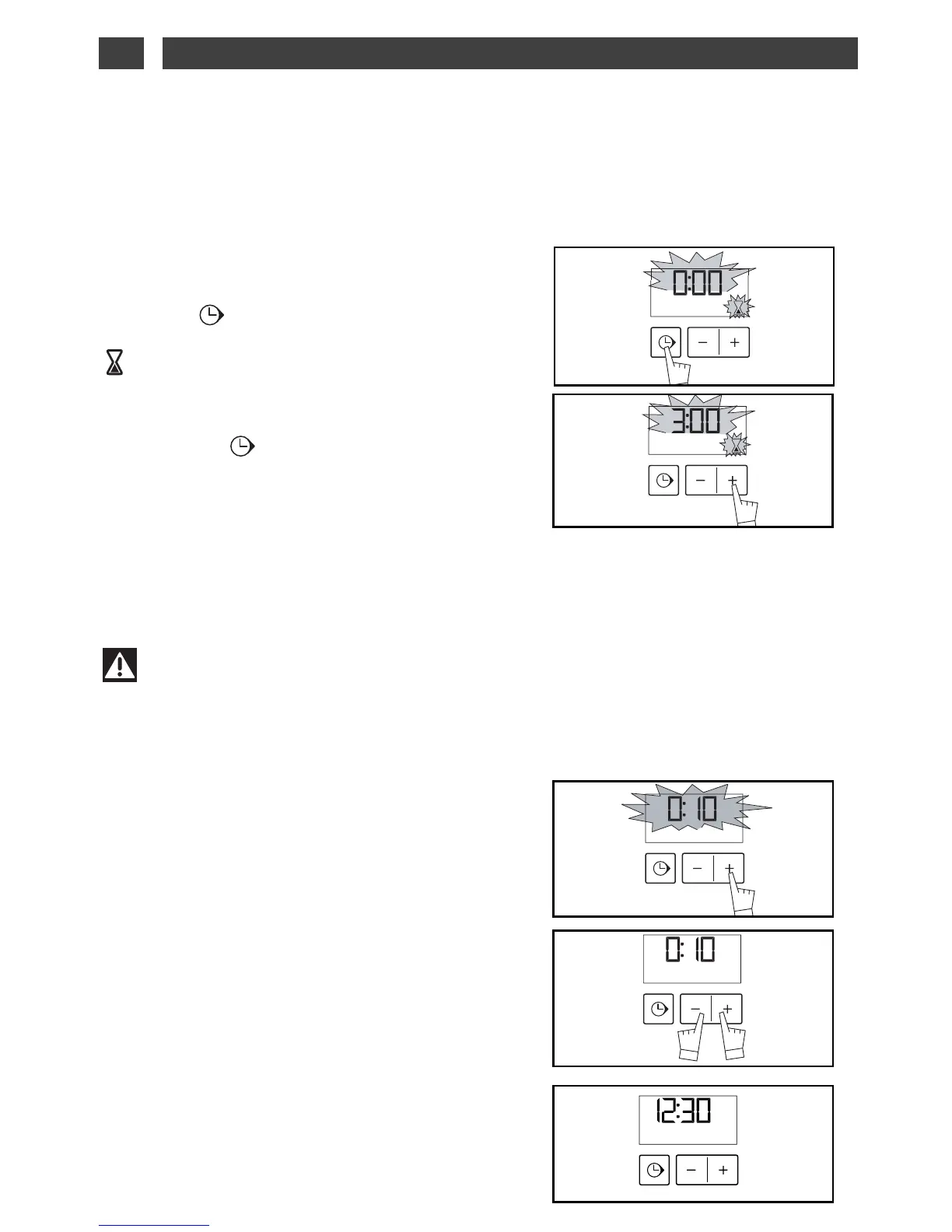
- Press the “ ”
TOUCH CONTROL
(fig.1) until the
timer symbol flashes
-> 0.00 and a small hourglass flashes.
- Adjust the selected time by pressing the
++
or
--
touch controls. (fig.2).
- Press on the “ ” touch control to confirm
or wait a few seconds.
Warning
It is possible to change or cancel the timer programme at any time.
fig.1
fig.2
USING THE TIMER FUNCTION
••
SETTING THE DISPLAY BRIGHT-
NESS
••
You can adjust the brightness of your display. To
do this:
- Set and confirm the time on your programmer
as 00:10 (fig.1).
- Press simultaneously on the
++
and
--
touch con-
trols for 10 seconds until “CO” is displayed; you
are not in configuration mode (fig.2).
- Press the
++
and
--
touch controls to obtain the
desired brightness.
After having adjusted the brightness to your lik-
ing, wait a few seconds and return your pro-
grammer to the current time of day.
fig.1
fig.2
The display stops flashing after a few seconds and the timer starts working, counting down the
time in seconds.
Once the time has expired, the timer emits a series of beeps to notify you.
The beeps are stopped by pushing on any touch control.
4 / USING YOUR APPLIANCEEN



 To Next Page