CT-V900 CONTROLLER 11
ACCESS CONTROL NETWORK
CONNECTING THE ACCESS CONTROL SERVER
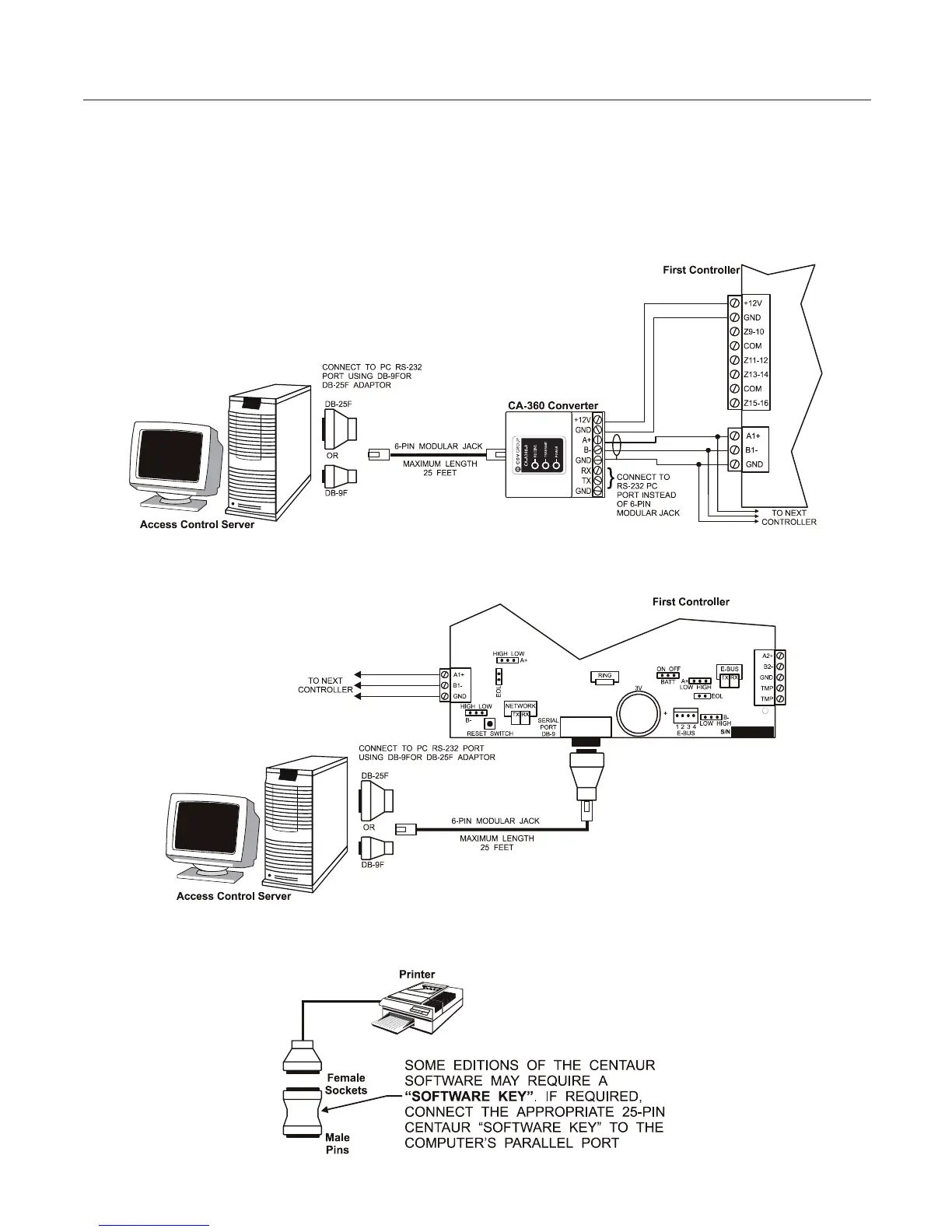
There are two ways of connecting the controller network to the access control server. If the access control server is
locatedmorethan25feetfromtherstcontroller,youwillberequiredtousetheCA-360converterasshownin
Figure5. If the access control server is located lessthan 25feet from the rst controller, you can connect the
access control server directly to the controller’s RS-232 port as shown in Figure 6. The controller then performs
the conversion of RS-232 to RS-485 internally.
Figure 5: Connecting to the Access Control Server via RS-485
Figure 6: Connecting to the Access Control Server via RS-282
Figure 7: Connecting a Centaur Software Key
www.cdvgroup.com



 To Next Page