ACCESS CONTROL SYSTEM OVERVIEW
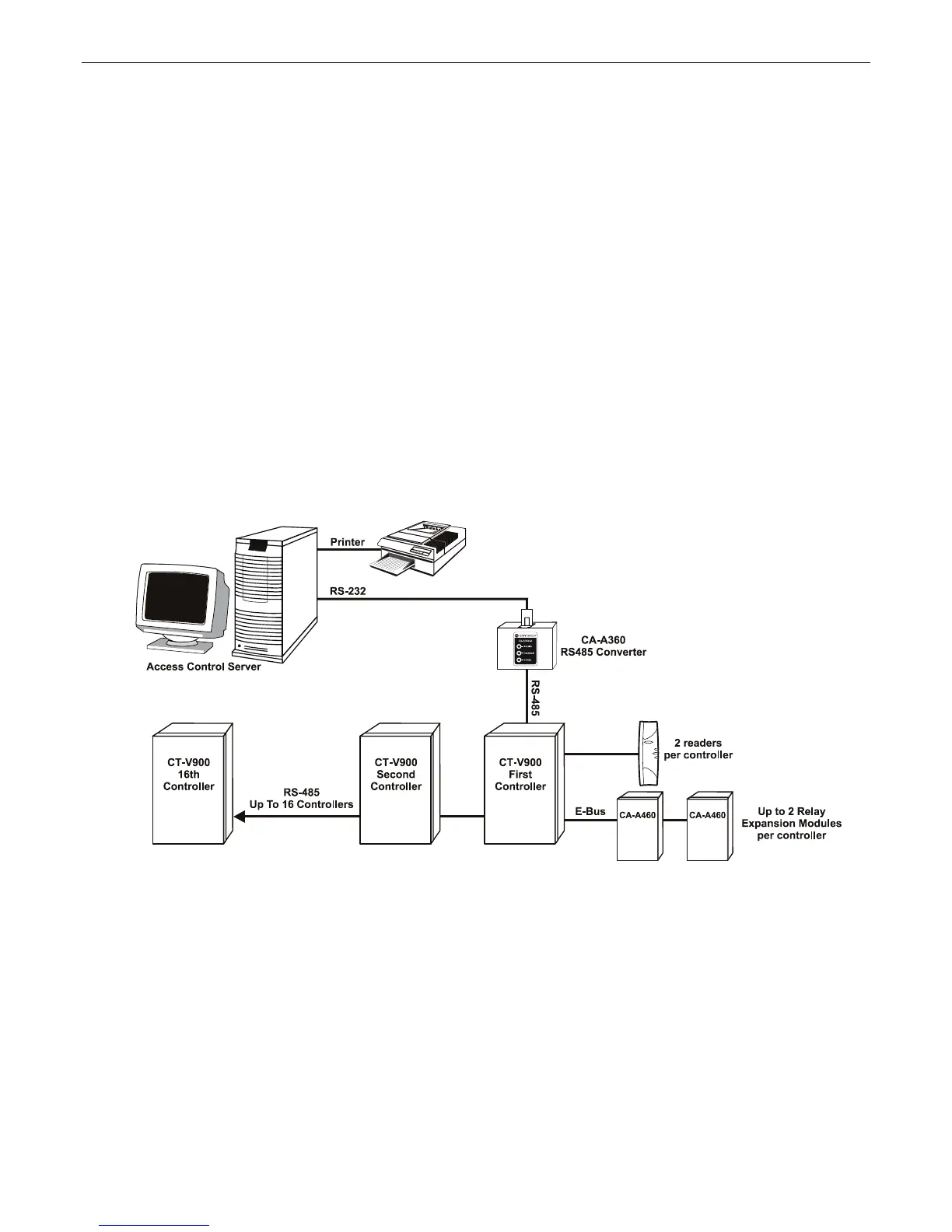
For an overview of the access control system using Centaur 2.0, refer to “Figure 8” on page 12. For an overview
of the access control system using Centaur 3.0, refer to “Figure 9” on page 13. Please take note of the following
items concerning the connection of the controller network to the access control server:
• Centaur 2.0: Up to 16 controllers can be connected to the access control server to control a total of 32 readers.
Centaur 3.0: Up to 256 controllers can be connected to the access control server to control a total of 512 readers
(expandable to 2048 readers).
• Controllers are connected in “daisy chain” format or can be connected in a “star network” when using the CA-A370
Network Hub. “Y” networks cannot be used when connecting the RS-485 communications bus between controllers.
• The controller addresses assigned by the dip switches on each controller (see page 9) do not have to correspond
to the actual order of controller placement along the RS-485 network. However, we recommend that this is done
to facilitate trouble shooting and installation service.
•ConnecttheA1+,B1-andGNDoftherstcontrollertotheA1+,B1-andGNDofthesecondcontrollerusingBelden
1227A type cable. Repeat from the second controller to the third and so forth to a maximum of 1220m (4000 ft.).
• Depending on the location of a controller it may be required to place the Controller Network EOL jumper on. For
more information refer to “EOL (Controller Network)” on page 8.
• To change the communication speed:
- stop communications in the CENTAUR software
- change the baud rate in the software
- change the dip switch settings on all controllers
- press the reset button on each board
- if using the CA-A360 Converter, change the baud rate jumper (J5) to on
- start communications
Figure 8: Overview of Access Control System Using Centaur 2.0
12 INSTALLATION MANUAL www.cdvgroup.com



 To Next Page