12
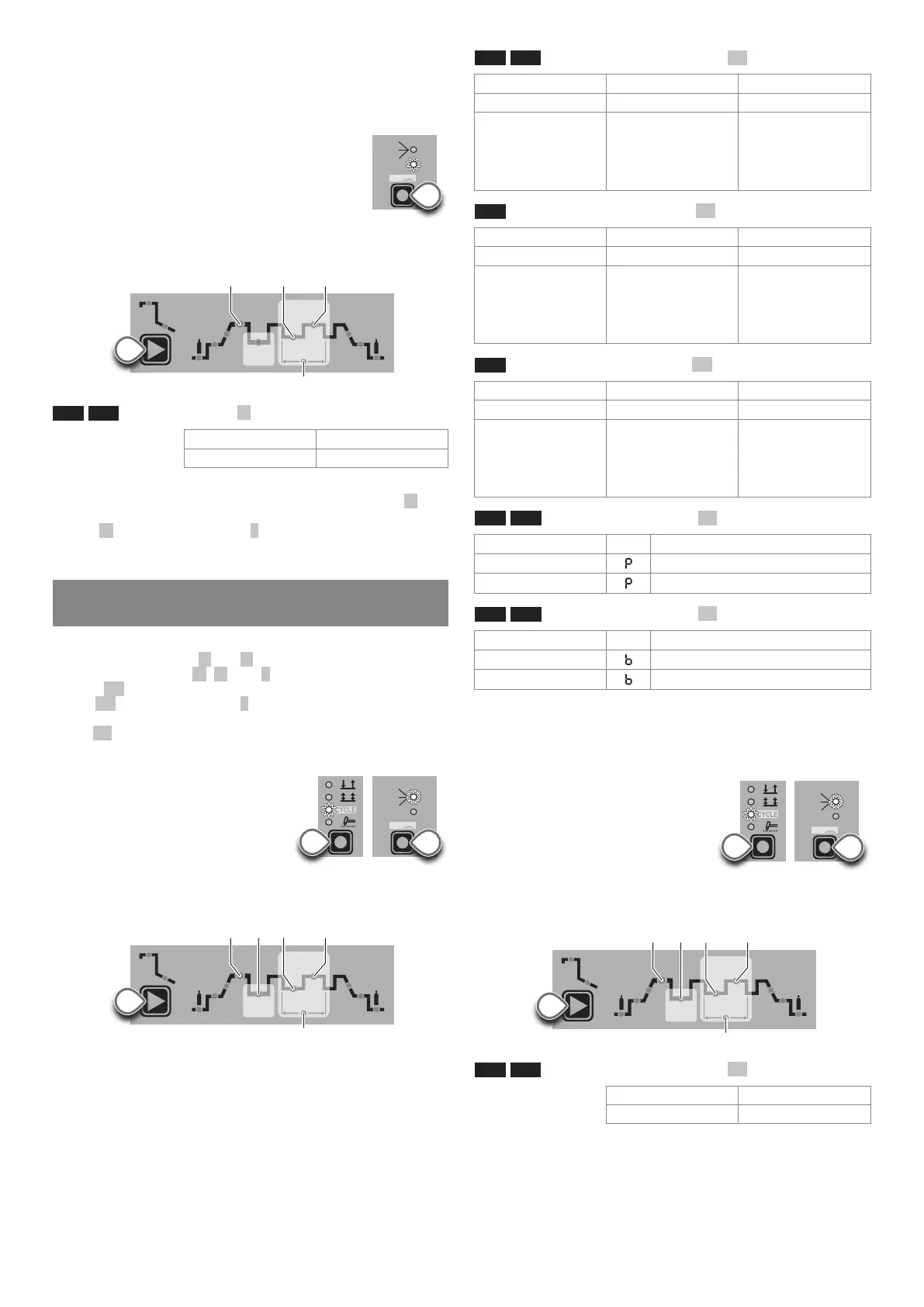
2D) SYN PULSE
TIG pulse welding with synergic setting of parameters.
WARNING: This can only be programmed when the TIG DC with
HF ignition or TIG DC with “Lift” type ignition welding process-
es are used.
Press the PULSE key (T5) until the requited pulsa-
tion is active.
SYN LED on.
Press the WELDING PARAMETERS SELECTION
Key (T10) a number of times to set the following
(in addition to the WELDING PARAMETERS defined as being
“BASIC”):
HOT
START
ARC
FORCE
I2
PULSE
CYCLE
f
I
1
Ip
Ib
T10
L19 - L11 BASE CURRENT Ib
4000 AC/DC 5000 AC/DC
30 ÷ 400 A 37 ÷ 500 A
This function, which is good for less skilled operators, makes it
possible to change the pulsation parameter (Peak current Ip ) and
the other values for the corresponding pulsation parameters (Base
current Ib - Pulsation frequency f ) vary automatically.
To exit the setting phase, hold the WELDING PARAMETERS SE-
LECTION key (T10) down for about 1 second.
3 - WELDING PARAMETERS with PULSE mode and
CYCLE welding mode active (CYCLE LED on)
When this welding mode is active it is possible to work at 2 differ-
ent pulse current levels ( I1 and I2 ). To do so you must also set (not
only pulse parameters Ib , Ip , and f ), but also the 2
nd
level PEAK
current ( I
2p ). The other 2
nd
level pulse parameters (BASIC CUR-
RENT I
2b
and FREQUENCY f ) are achieved synergically. The
FREQUENCY remains constant while the 2
nd
level BASIC CUR-
RENT I2b is proportional to the ratio between the 1
st
level currents.
3A - SLOW PULSE + CYCLE (TIG AC-TIG DC)
Press the PULSE key (T5) until the re-
quited pulsation is active (the LED ON
SLOW flashing slowly).
Press the WELDING MODE SELEC-
TION key (T9) until the CYCLE weld-
ing mode is active (CYCLE LED on).
Press the WELDING PARAMETERS SELECTION Key (T10) a
number of times to set the following (in addition to the WELDING
PARAMETERS defined as being “BASIC”):
HOT
START
ARC
FORCE
I2
PULSE
CYCLE
f
I
1
Ip
Ib
T10
ON
FAST
ULTRA
FAST
SYN
PULSE
T5
ON
FAST
ULTRA
FAST
SLOW
SYN
PULSE
T5
T9
L19 - L11 1
st
LEVEL PEAK CURRENT I1p
4000 AC/DC 5000 AC/DC
TIG DC 5 ÷ 400 A 5 ÷ 500 A
TIG AC
DYNAMIC TIG
SPEED TIG
COLD TIG
SOFT TIG
5 ÷ 400 A
5 ÷ 400 A
5 ÷ 231 A
5 ÷ 283 A
5 ÷ 500 A
5 ÷ 500 A
5 ÷ 289 A
5 ÷ 354 A
L17 2
nd
LEVEL PEAK CURRENT I2p
4000 AC/DC 5000 AC/DC
TIG DC 5 ÷ 400 A 5 ÷ 500 A
TIG AC
DYNAMIC TIG
SPEED TIG
COLD TIG
SOFT TIG
5 ÷ 400 A
5 ÷ 400 A
5 ÷ 231 A
5 ÷ 283 A
5 ÷ 500 A
5 ÷ 500 A
5 ÷ 289 A
5 ÷ 354 A
L18 1
st
LEVEL BASE CURRENT I1b
4000 AC/DC 5000 AC/DC
TIG DC 5 ÷ 400 A 5 ÷ 500 A
TIG AC
DYNAMIC TIG
SPEED TIG
COLD TIG
SOFT TIG
5 ÷ 400 A
5 ÷ 400 A
5 ÷ 231 A
5 ÷ 283 A
5 ÷ 500 A
5 ÷ 500 A
5 ÷ 289 A
5 ÷ 354 A
L19 - L21 PEAK current duration T
p
4000 AC/DC - 5000 AC/DC
TIG DC
0,01 ÷ 0,99 sec
TIG AC
0,10 ÷ 0,99 sec
L18 - L21 BASE current duration T
b
4000 AC/DC - 5000 AC/DC
TIG DC
0,01 ÷ 0,99 sec
TIG AC
0,10 ÷ 0,99 sec
To exit the setting phase, hold the WELDING PARAMETERS SE-
LECTION key (T10) down for about 1 second.
3B - FAST PULSE + CYCLE (TIG DC)
Press the PULSE key (T5) until the re-
quited pulsation is active (the LED ON
FAST flashing quickly).
Press the WELDING MODE SELEC-
TION key (T9) until the CYCLE weld-
ing mode is active (CYCLE LED on).
Press the WELDING PARAMETERS SELECTION Key (T10) a
number of times to set the following (in addition to the WELDING
PARAMETERS defined as being “BASIC”):
HOT
START
ARC
FORCE
I2
PULSE
CYCLE
f
I
1
Ip
Ib
T10
L19 - L11 1
st
LEVEL PEAK CURRENT I1p
4000 AC/DC 5000 AC/DC
5 ÷ 400 A 5 ÷ 500 A
ON
FAST
ULTRA
FAST
SLOW
SYN
PULSE
T5
T9



 To Next Page