15
Creating and memorising
automatic welding points
Once you have defined the parameters the operator requires to do
their work properly, you can save them in the memory and create
a WELDING PROGRAM by proceeding as follows.
WARNING: To access the setting saving phase, the PRINCIPAL
CURRENT LED I1 must be switched on without flashing.
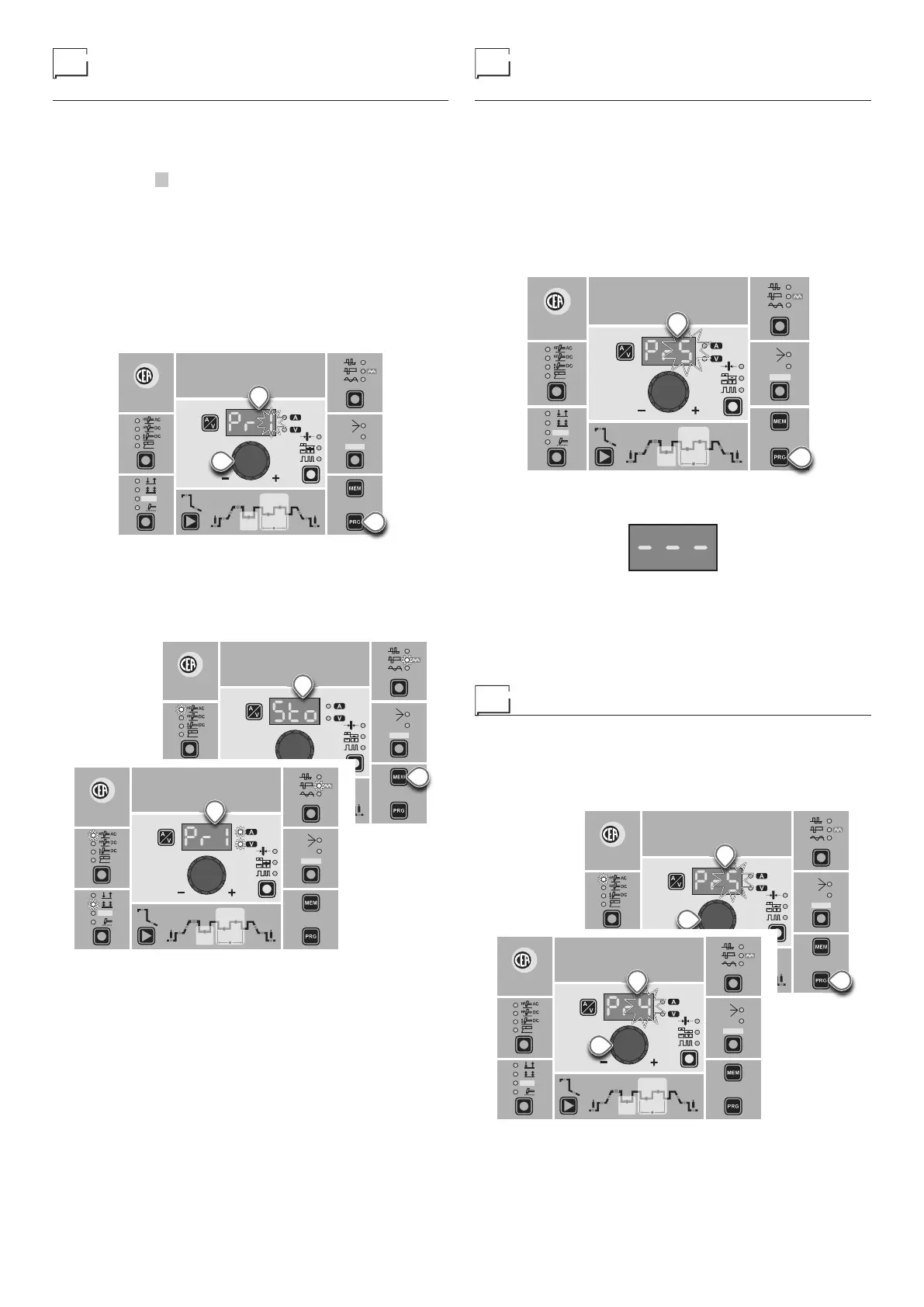
1) Hold the “PRG” PROGRAM Key (T2) down for at least 5 con-
secutive seconds until the DISPLAY (D) reads Pr, accompa-
nied by a flashing number (e.g. Pr 1).
In order to be able to choose WELDING PROGRAM that is
free, simply rotate the ENCODER knob (E) and look for a pro-
gram for which the control panel has all the LEDs for the vari-
ous settings switched off.
WARNING: The MTA control panel allows you to save a max-
imum of 5 WELDING PROGRAMS.
It is also possible to overwrite a program already saved.
WAVE
ON
FAST
ULTRA
FAST
SLOW
SYN
CYCLE
HOT
START
ARC
FORCE
I2
PULSE
CYCLE
f
I
1
Ip
Ib
Ø
PULSE
E
T2
D
2) To SAVE the PROGRAM hold the “MEM” SAVE Key (T1) down
until the DISPLAY reads “Sto”.
3) The WELDING PROGRAM has now been saved and its num-
ber appears in the DISPLAY (D) along with the other settings
saved (corresponding LEDs on without flashing).
WAVE
ON
FAST
ULTRA
FAST
SLOW
SYN
CYCLE
HOT
START
ARC
FORCE
I2
PULSE
CYCLE
f
I
1
Ip
Ib
Ø
PULSE
T1
D
WAVE
ON
FAST
ULTRA
FAST
SLOW
SYN
CYCLE
HOT
START
ARC
FORCE
I2
PULSE
CYCLE
f
I
1
Ip
Ib
Ø
PULSE
D
PROGRAMMED and/
or MANUAL welding
PROGRAMMED WELDING
When the WELDING PROGRAM has been saved, the operator
can weld using only pre-set values as they cannot edit any type
of parameter / function. To edit, switch to MANUAL welding mode.
MANUAL WELDING
To go back to set / edit the parameters selected or to create a new
program, proceed as follows:
1) Hold the “PRG” PROGRAM Key (T2) down (about 3 seconds)
until the DISPLAY (D) shows the number of the program se-
lected flashing (e.g. Pr5).
WAVE
ON
FAST
ULTRA
FAST
SLOW
SYN
CYCLE
HOT
START
ARC
FORCE
I2
PULSE
CYCLE
f
I
1
Ip
Ib
Ø
PULSE
T2
D
2) Turn the ENCODER Key (E) anticlockwise until the DISPLAY
(D) shows 3 dashes.
3) Press and release the “PRG” PROGRAM key (T2) and the
machine goes back to the initial operation condition.
4) You can now set or edit the individual parameters or create
new programs.
5) Rotate the ENCODER Knob (E) to scroll the programs until
you find an empty, unused program slot.
Calling up saved programs
1) Hold the “PRG” PROGRAM Key (T2) down (about 3 seconds)
until the DISPLAY (D) shows the number of the program se-
lected flashing (e.g. Pr 5).
2) Turn the ENCODER Knob (E) until the DISPLAY (D) shows
the program number (flashing) you wish to call up (e.g. Pr4).
WAVE
ON
FAST
ULTRA
FAST
SLOW
SYN
CYCLE
HOT
START
ARC
FORCE
I2
PULSE
CYCLE
f
I
1
Ip
Ib
Ø
PULSE
E
T2
D
WAVE
ON
FAST
ULTRA
FAST
SLOW
SYN
CYCLE
HOT
START
ARC
FORCE
I2
PULSE
CYCLE
f
I
1
Ip
Ib
Ø
PULSE
E
D
NOTE: If when you are rotating the ENCODER knob (E) to look for
a saved welding program to call up the MTA panel does not have
any LEDs switched on without flashing, this means that the weld-



 To Next Page