16
ing program you are trying to call up has not been saved and, as
a result, cannot be called up!
3) Press and release the “PRG” PROGRAM key (T2) to call up
the program number selected.
4) You can now carry out PROGRAMMED welding.
Viewing the parameters set
1) Call up the program required (see the “Calling up saved pro-
grams” paragraph).
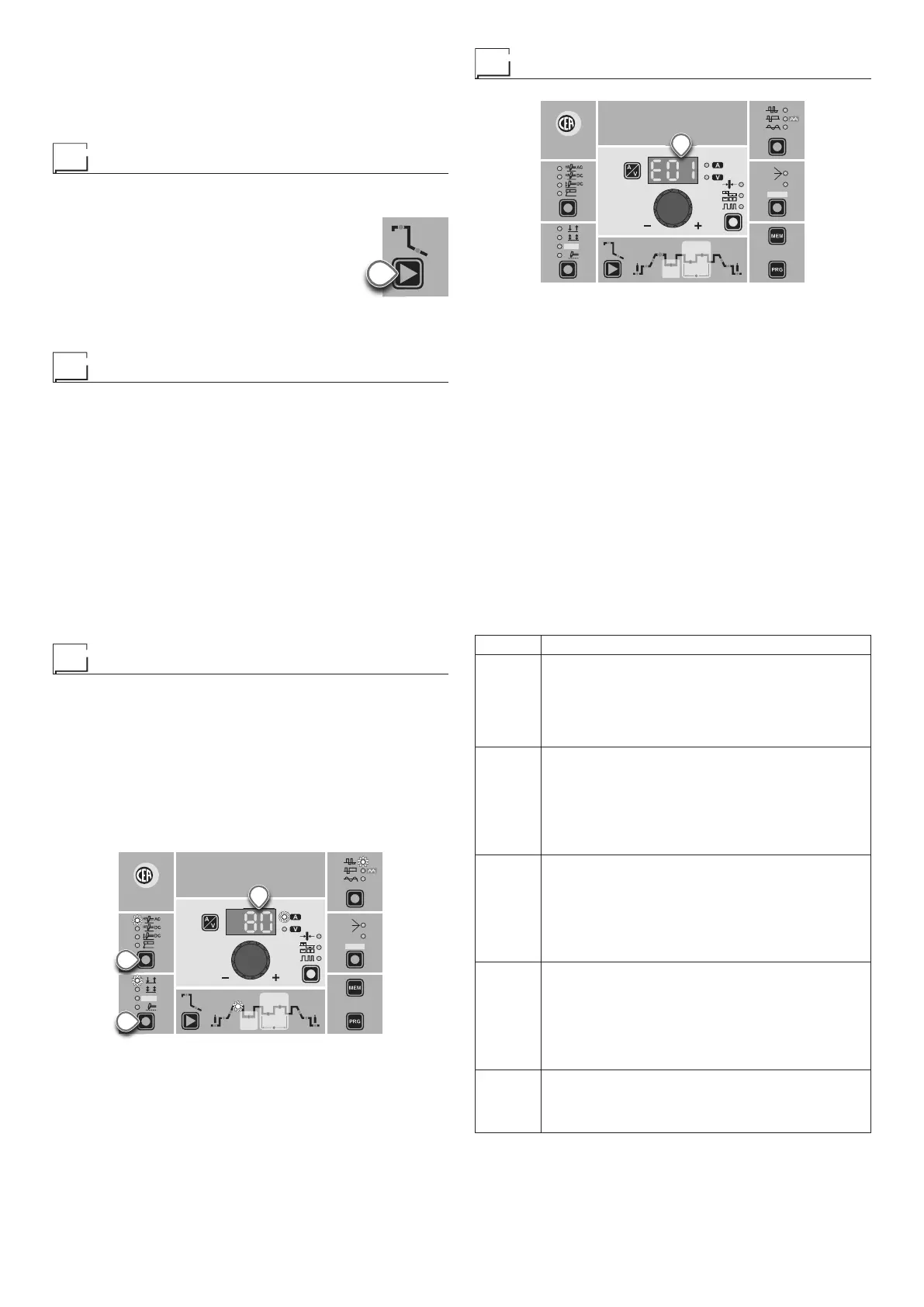
2) Press and release the WELDING PARAM-
ETERS SELECTION Key (T10) to view the
parameters set in sequence.
3) Hold the WELDING PARAMETERS SELEC-
TION Key (T10) down for more than 1 sec-
ond to go back to the program selected.
NOTE: If the parameters set are edited, you automatically exit
programming.
Auxiliary functions
“Energy saving”
This function manages correct functioning of the cooling fan and
cooling equipment that only run when strictly necessary, that is:
• FAN MOTOR - The fan is activated when:
-
During welding or for a certain period of time after this is fin-
ished.
-
When the thermostat intervenes or for a certain period of time
after it has just been reset.
• COOLING DEVICE - The cooling device is activated:
-
For a few seconds when the machine switches on. This oper-
ation is used to make the cooling liquid circulate through the
plant at the correct pressure. Call the technical service de-
partment if, when the cooling system is switched off, the error
does not disappear from the DISPLAY (D).
-
During welding or for a certain period of time after this is fin-
ished.
Factory default
WARNING: This operation results in complete resetting of all pa-
rameters to the factory settings.
To reset the settings, you must:
• When the welding machine is off, push and hold the WELDING
PROCESS SELECTION (T7) and WELDING MODE SELEC-
TION (T9) keys down together.
•
Switch on the welding machine and hold down the keys until the
DISPLAY (D) reads 80.
• Release the two keys.
• The reset procedure has now been completed successfully.
WAVE
ON
FAST
ULTRA
FAST
SLOW
SYN
CYCLE
HOT
START
ARC
FORCE
I2
PULSE
CYCLE
f
I
1
Ip
Ib
Ø
PULSE
T7
T9
D
HOT
START
ARC
FORCE
T10
Error and protection conditions
WAVE
ON
FAST
ULTRA
FAST
SLOW
SYN
CYCLE
HOT
START
ARC
FORCE
I2
PULSE
CYCLE
f
I
1
Ip
Ib
Ø
PULSE
D
The equipment is protected against problems and if any arise the
DISPLAY shows fixed or flashing (error code) messages (depend-
ing on the type of error) that serve to inform the operator that a fault
has occurred in the equipment (see table 1).
The table provides a summary of all the error conditions that may
arise on the equipment and, if possible, what the operator must
do to attempt to resolve the problem.
Automatic reset error: once the alarm condition has been re-
solved the equipment starts working again and the operator can
weld again!
PLEASE NOTE: If the fault persists look for the cause of the
fault and contact our technical assistance department if nec-
essary.
All of this is necessary to allow our technical assistance depart-
ment (which must be contacted each time error messages
appear on the equipment’s operator interface) to resolve prob-
lems more easily, as quickly as possible and thanks to the user’s
reports, also because, in the meantime the machine will not allow
the operator to do their work.
Table 1
Display Diagnosis
E01
PRESSURE SWITCH
This message appears when the cooling equipment
is connected to the machine and its pressure switch
does not close due to a lack of pressure in the
hydraulic circuit.
Automatic reset error.
E02
OVER VOLTAGE
This message appears when the power supply
voltage exceeds 500V.
If the fault persists look for the cause of the fault
and contact our technical assistance department if
necessary.
Automatic reset error.
E03
UNDER VOLTAGE
This message appears when the power supply
voltage drops below 280V.
If the fault persists look for the cause of the fault
and contact our technical assistance department if
necessary.
Automatic reset error.
E04
OVER CURRENT
This message appears when the primary current
exceeds values that are dangerous for the plant.
If the fault persists look for the cause of the fault
and contact our technical assistance department if
necessary.
Automatic reset error.
t°C
THERMAL PROTECTION
The welding stops due to an excessively high
temperature (thermostat activated).
Automatic reset error.



 To Next Page