7
3 Preparation of Measurement
It prepares and checks, before starting measurement.
3.1 Measurement Mode
About the measurement mode which can be measured from this model (measuring method).
3.1.1 Measurement Mode
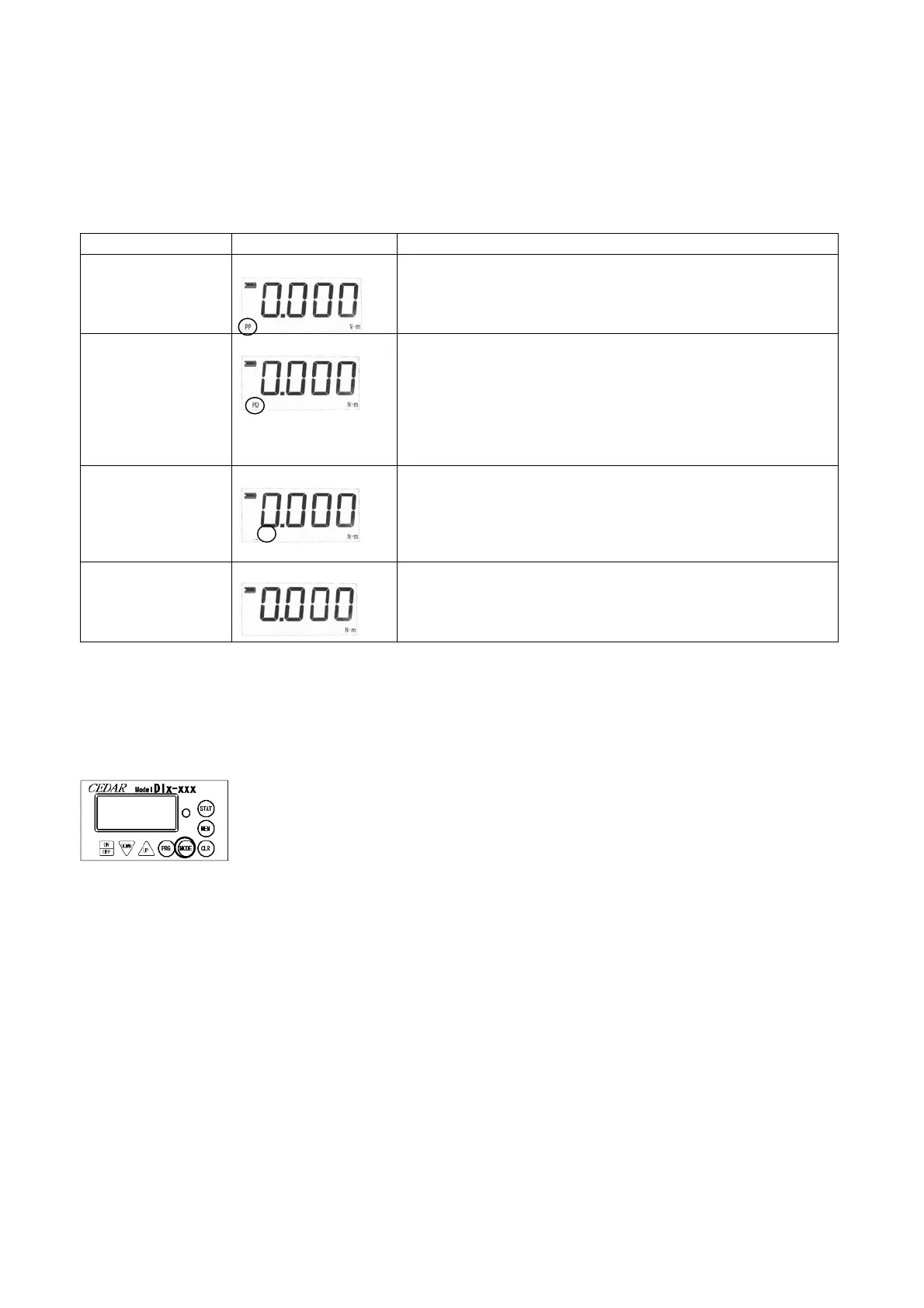
(peak to peak)
Display section「PP」
The maximum under measurement is always displayed.
Load holds more than from 20digits*.
Usually, this mode is used.
(peak-down)
Display section「PD」
A value when a load torque value changes from a ris
is displayed. Since the downward width to judge can be
changed, measurement appropriate for various conditions is
possible.It carries out once it pushes a clear button, when
applying re-load.
Load operates more than from 20digits*.
It is suitable for measurement of a torque wrench etc.
(Real-time Output)
Display section「C」
The data output of the load torque value is carried out
every about 1 / 160 seconds.
(A change whole 1 / 12 seconds is possible)
It is suitable for torque curve creation
or a screw bundle examination.
(track)
It is mainly used at the time of calibration etc.
The value of the load torque concerning
a detector is displayed as it is.
(There is no display.)
* digit -- DID-4 -- 20digit is 0.020N-m.(0.20kgf-cm/0.20lbf-in)
DIW-120-- 20digit is 2.0N-m.
3.1.2 A setup and Change in Measurement Mode
Button to be used -- "MODE"
Pushing the "MODE" button is continued for about 1 second.
( It is a setting mode pushed long
so that the measurement should not change while measuring it. )
The measurement mode display changes.
The measurement mode to be used is chosen.
The display changes sequentially if it keeps pushing.
Truck (with no display) -> Peak hold (PP) -> peak down( PD) -> Real-time output (C) -> Truck
3.1.3 Setup and Change of Measurement Unit
The unit to measure can be changed.
A change is mentioned later.
It can set up as one of the setting items of "convenient functional 5.2 Numerical value."
For details, please look at "5.2 Setup of (9) measurement unit."


 To Next Page