Calibrating the system
______________________________________________________________________________________
NewTom VGi evo – Service Manual rev 6 8-1
8 Calibrating the system
Chinrest calibration
In case some maintenance (replacement of motor or limit switches) has been performed on the chinrest, a new
calibration has to be carried out.
1) Enable the service level (CTRL + ALT + SHIFT + END).
2) Select Tools → Scanner test, then select Calibration
→ Chine rest setup. The “Chinrest Calibration”
window will appear.
3) Select the “Axes Calibration” button and wait for the
procedure to complete.
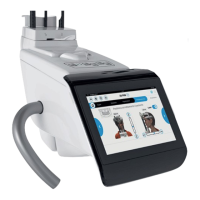
4) Manually move the plate all the way to the RIGHT by
pressing the corresponding button on the console
(see picture on the side).
5) Write down the current position with reference to
the horizontal ruler.
6) Move the plate all the way to the LEFT by pressing
the corresponding button on the console (see
picture on the side).
7) Write down the current position with reference to
the horizontal ruler.
8) Calculate the total excursion along the X axes and
enter it in the corresponding field.
9) Move the plate all the way to the FRONT by pressing
the corresponding button on the console (see
picture on the side).


 To Next Page